


GitHub Account
Overview
Use this account type to connect GitHub Snaps to your GitHub instance using a personal
access token. The token is sent in the Authorization: Bearer header on
every request, along with the configured API version header
(X-GitHub-Api-Version). Both fine-grained and classic personal access
tokens are supported.
This account works with GitHub Cloud (https://api.github.com) and GitHub
Enterprise Server (GHES). Expression-enabled fields support Secrets Management, a
SnapLogic add-on that allows you to store endpoint credentials in a third-party secrets
manager such as AWS Secrets Manager, Azure Key Vault, or HashiCorp Vault. During
validation and execution, pipelines obtain the credentials directly from the secrets
manager. Learn more: Configure Accounts to
use secrets.
Prerequisites
- A GitHub account with access to the resources you want to use in your pipelines.
- A fine-grained or classic personal access token with the required scopes. See Managing your personal access tokens for instructions.
- For GitHub Enterprise Server: the host name or URL of your GHES instance.
Known issues
None.
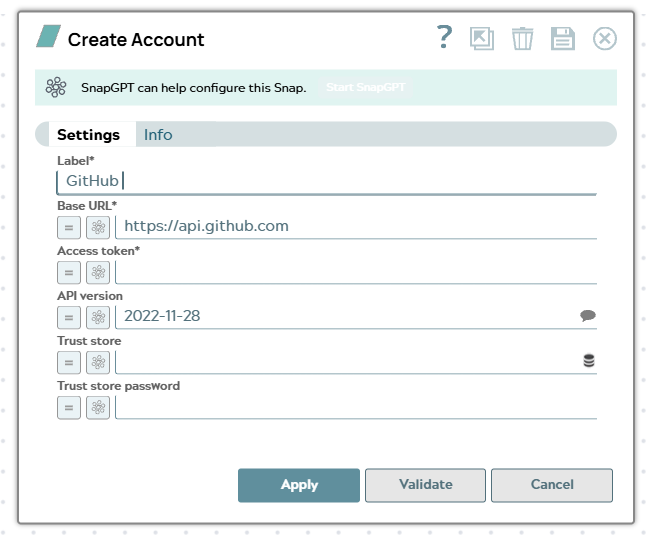
Account settings
| Field/Field set | Description |
|---|---|
Label*
String |
Unique name for the account.
Default value: None Example: |
Base URL*
String/Expression |
Base URL of the GitHub API. Use the default for GitHub Cloud. For GitHub
Enterprise Server, enter https://<HOST>/api/v3, where
<HOST> is the host name or IP address of your GHES
instance.
Default value: Example: |
Access token*
String/Expression |
A fine-grained or classic personal access token used to authenticate
requests. Sent as the Authorization: Bearer header on every
call. This field is obfuscated after saving.
Default value: None Example: |
API version
String/Expression |
Value sent as the X-GitHub-Api-Version header on every
request. Update this value if you are targeting a GHES release that supports a
different API version.
Default value: Example: |
Trust store
String/Expression |
Path to a trust store containing the SSL certificate for your GHES
instance. Required only when your GHES server uses a self-signed certificate.
Leave blank for GitHub Cloud.
Default value: None |
Trust store password
String/Expression |
Password for the trust store specified in Trust
store. Leave blank if no trust store is configured.
Default value: None |
Click Apply to save the account settings.
Troubleshooting
| Error | Reason | Resolution |
|---|---|---|
| Failed to validate account: 401 Unauthorized | The personal access token is invalid, expired, or revoked. | Verify that the token is correct and has not expired or been revoked. Generate a new token if needed and update the account. |
| Failed to validate account: 403 Forbidden | The token does not have the required scopes or permissions for the requested resource. | Generate a new token with the scopes required by the Snaps in your pipeline, or update the fine-grained token permissions. See Permissions required for fine-grained personal access tokens. |
| Failed to validate account: Could not connect to <URL> | The GitHub URL is not reachable from the Snaplex, or the URL is incorrect. | For GitHub Cloud, verify that the URL is
https://api.github.com. For GHES, confirm the host name and
that the Snaplex can reach https://<HOST>/api/v3. Review
proxy and firewall settings. |
| Failed to validate account: 404 Not Found | The GitHub URL does not point to a valid GitHub API endpoint. This often
occurs when using a GHES URL without the /api/v3 path. |
For GHES, ensure the URL includes the /api/v3 path, for
example https://github.mycompany.com/api/v3. |