


MCP Token Exchange rule
Exchanges an inbound user token for a tool-specific downstream token using RFC 8693 OAuth 2.0 Token Exchange, enabling each MCP Server tool to authenticate with its target backend service using a narrowly scoped credential.
X-SL-Exchanged-Token) that the downstream tool pipeline reads when
calling the target service.
Authorization header. The downstream tool
pipeline receives both the original broad-scoped token and the narrowly-scoped exchanged
token. The tool pipeline must be written to read the exchanged token header, not the
original Authorization header.Rule execution order
Place the MCP Token Exchange rule after the MCP
OAuth2 JWT Validator rule in the policy chain. The JWT Validator must validate
the inbound token before this rule acts on it. The rule only acts on
tools/call requests; it is a no-op for other MCP methods.
Exchange modes
The rule supports two RFC 8693 exchange modes, selected via the Exchange Mode field:
- Impersonation (default): The exchanged token represents the end user only. The downstream service sees the user as the caller; the gateway's identity is not recorded in the token. No actor token is required, and no additional IdP configuration is needed.
- Delegation: The exchanged token includes an
actclaim identifying the gateway as the party acting on behalf of the user. Use this mode when downstream systems or auditors need to know that a gateway invoked the tool on the user's behalf. Delegation requires additional IdP configuration (an impersonator role and the IdP's impersonation feature enabled) and either a static actor token or a client authorized to use theclient_credentialsgrant for automatic actor-token fetch.Tip: Set Requested Token Type toJWTin Delegation mode if the downstream service needs to inspect theactclaim. An opaque returned token does not carry theactclaim.
Per-tool token routing
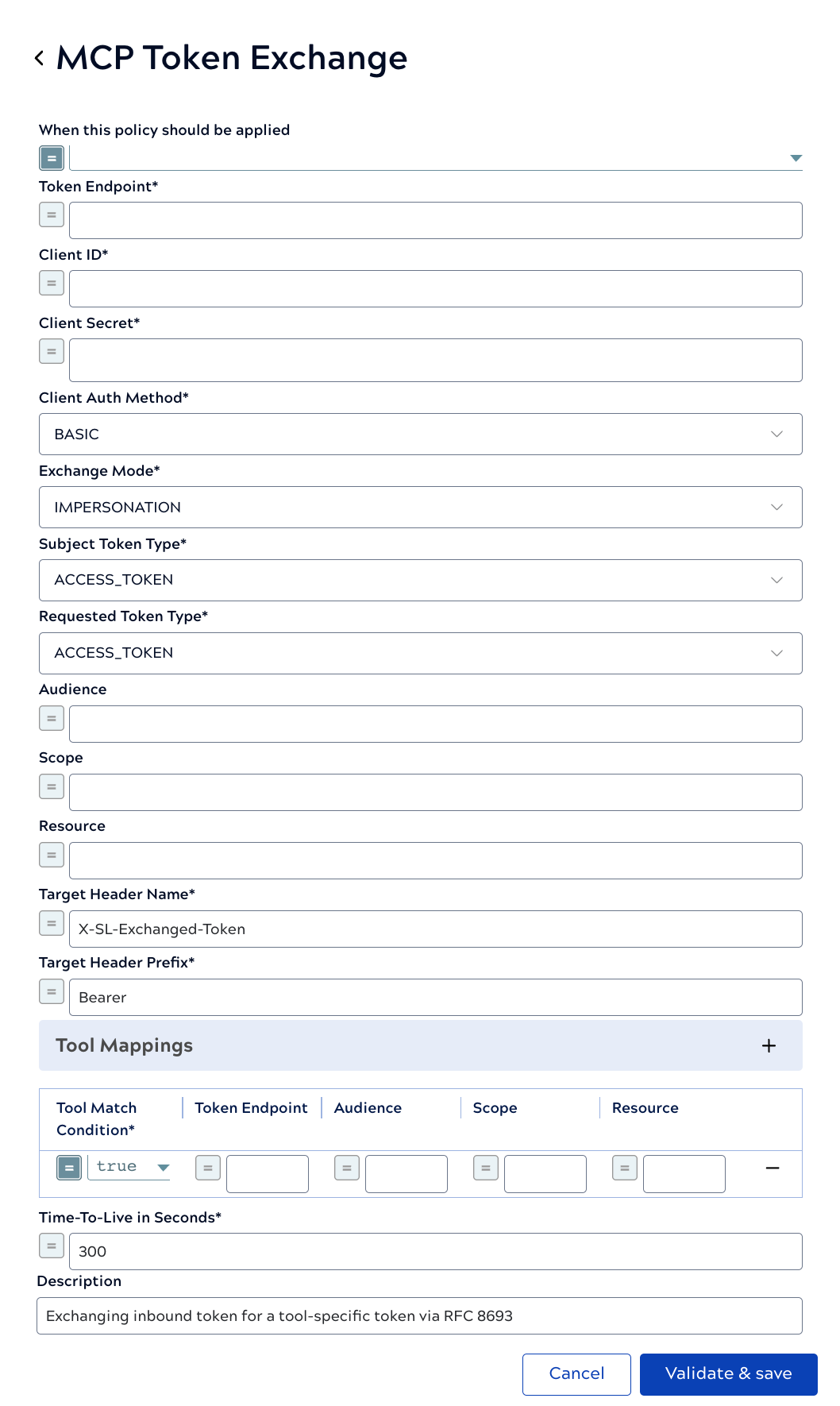
A single rule instance can serve multiple tools with different target tokens using
Tool Mappings. Each mapping row defines a boolean match condition
evaluated against the invoked tool name — bound as $toolName in the
expression — and optional per-tool overrides for Token Endpoint, Audience, Scope, and
Resource. Rows are evaluated in order; the first row whose condition evaluates to
true wins, and its override values replace the global STS settings for
that request.
$toolName is available only in the Tool Match Condition
expression. The Audience, Scope, and Resource override fields are evaluated statically and
do not have access to $toolName.Token caching
Exchanged tokens are cached to reduce repeated round-trips to the STS. The cache key incorporates the subject token, token endpoint, audience, scope, resource, exchange mode, and actor token, so distinct exchange configurations are cached separately. Configure the Time-To-Live in Seconds to balance freshness with performance.
| Field/Field set | Description |
|---|---|
| When this rule should be applied |
Boolean expression that determines when this rule applies to a request. Default value: true |
| STS Connection | Connection settings for the Security Token Service (STS) that performs the token exchange. |
| Token Endpoint |
Required. The STS token endpoint URL to which the exchange request is sent. Example: https://auth.example.com/oauth/token |
| Client ID |
Required. The OAuth 2.0 client identifier registered with the STS. |
| Client Secret |
Required. The client secret corresponding to the Client ID. Masked in the UI. |
| Client Auth Method |
How client credentials are sent to the STS:
|
| Exchange Parameters | RFC 8693 parameters that control the token exchange request. |
| Exchange Mode |
The token exchange mode. See Exchange modes above.
|
| Subject Token Type |
The RFC 8693 type URI of the inbound token passed as the
CAUTION: Select ACCESS_TOKEN even when the inbound token is
JWT-encoded. The token type describes the token's role, not its wire format. Some
STS implementations reject exchanges when the type is set to
Default value: ACCESS_TOKEN
JWT
for a standard access token. |
| Requested Token Type |
The RFC 8693 type URI of the token to be returned by the STS:
|
| Audience |
The intended audience(s) of the exchanged token. Accepts a single string or a
list of strings; each value is sent as a separate |
| Scope |
Space-delimited scopes to request for the exchanged token. Single string only. Example: read:contacts write:contacts |
| Resource |
The URI of the target resource server for the exchanged token
( |
| Tool Mappings |
A table of per-tool overrides. Each row defines:
Use Tool Mappings to route different tools to different target audiences or token endpoints from a single rule instance. Example: Tool Match Condition:$toolName.startsWith('salesforce_')
|
| Output Injection | Settings that control how the exchanged token is delivered to the tool pipeline. |
| Target Header Name |
Required. The HTTP request header into which the exchanged token is injected before the request is forwarded to the tool pipeline. Default value: X-SL-Exchanged-Token |
| Target Header Prefix |
The prefix prepended to the token value in the target header. Set to empty to inject the raw token without a prefix. The downstream tool pipeline and the header name and prefix must match what the target service expects. CAUTION: If the tool pipeline constructs the authorization header
itself from the raw token, set this field to empty to avoid a double prefix such
as
Default value: Bearer
Bearer Bearer <token>. |
| Delegation Settings | Additional settings for Delegation exchange mode. These fields are visible only when Exchange Mode is set to Delegation. |
| Actor Token |
A token identifying the gateway as the acting party in a delegation exchange. Masked. Can be supplied as a static value or via expression. If left blank, the rule automatically fetches an actor token using the
Default value: N/A |
| Actor Token Type |
The RFC 8693 type URI of the actor token. Default value: ACCESS_TOKEN |
| Actor Token Scope |
Optional scopes requested when the rule fetches its own actor token via
Default value: N/A |
| Time-To-Live in Seconds |
The duration in seconds for which exchanged tokens are cached. Caching reduces repeated STS round-trips for requests with the same subject token, endpoint, audience, scope, resource, exchange mode, and actor token. Default value: 300 |
| Description | The purpose of the rule. |
Limitations
- Only operates on
tools/callrequests. The rule is a no-op for other MCP methods (tools/list,initialize). - Supports same-IdP token exchange only. The rule authenticates with a single set of client credentials to a single IdP. Per-tool Token Endpoint overrides allow routing different tools to different authorization servers within the same IdP (for example, separate Okta Authorization Servers per tool), but do not bridge entirely different identity providers. Cross-IdP federation must be handled in the tool pipeline.
- Client authentication to the STS supports BASIC and
BODY methods only. Private Key JWT
(
client_assertion) is not yet supported. - Automatic actor-token fetch (when Actor Token is blank in
Delegation mode) requires the configured client to be authorized for the
client_credentialsgrant. If it is not, supply a static actor token. - Scope and Resource are single-valued. Only Audience accepts multiple values.
- The original inbound
Authorizationheader is not removed. Both the original broad-scoped token and the exchanged narrow-scoped token are forwarded to the tool pipeline.
IdP considerations
This rule is IdP-agnostic, but IdP-side configuration differs between providers. The following compares two validated implementations.
Audience model
| Okta | Zitadel | |
|---|---|---|
| Audience per Authorization Server | One audience per Authorization Server. Dynamic audience is not supported. | Dynamic audience on a single token endpoint via the
audience request parameter. |
| Multi-tool configuration | Requires one Authorization Server per tool. Use per-tool Token Endpoint overrides in Tool Mappings to point each tool at its own Authorization Server. | A single token endpoint with per-tool Audience overrides in Tool Mappings is sufficient. |
Delegation setup (Zitadel)
For Delegation mode with Zitadel, the following IdP-side configuration is required in addition to the standard token exchange setup:
- Enable the instance-level Token Exchange feature flag.
- Enable Security Settings > Allow Impersonation.
- Grant the actor identity an impersonator role
(
ORG_END_USER_IMPERSONATORfor same-org orIAM_END_USER_IMPERSONATORfor cross-org). - Supply the actor token explicitly in the Actor Token field
(for example, a machine-user personal access token), because the confidential web
application used for exchange cannot use the
client_credentialsgrant.