


Google Vertex AI Gemini API Agent
Overview
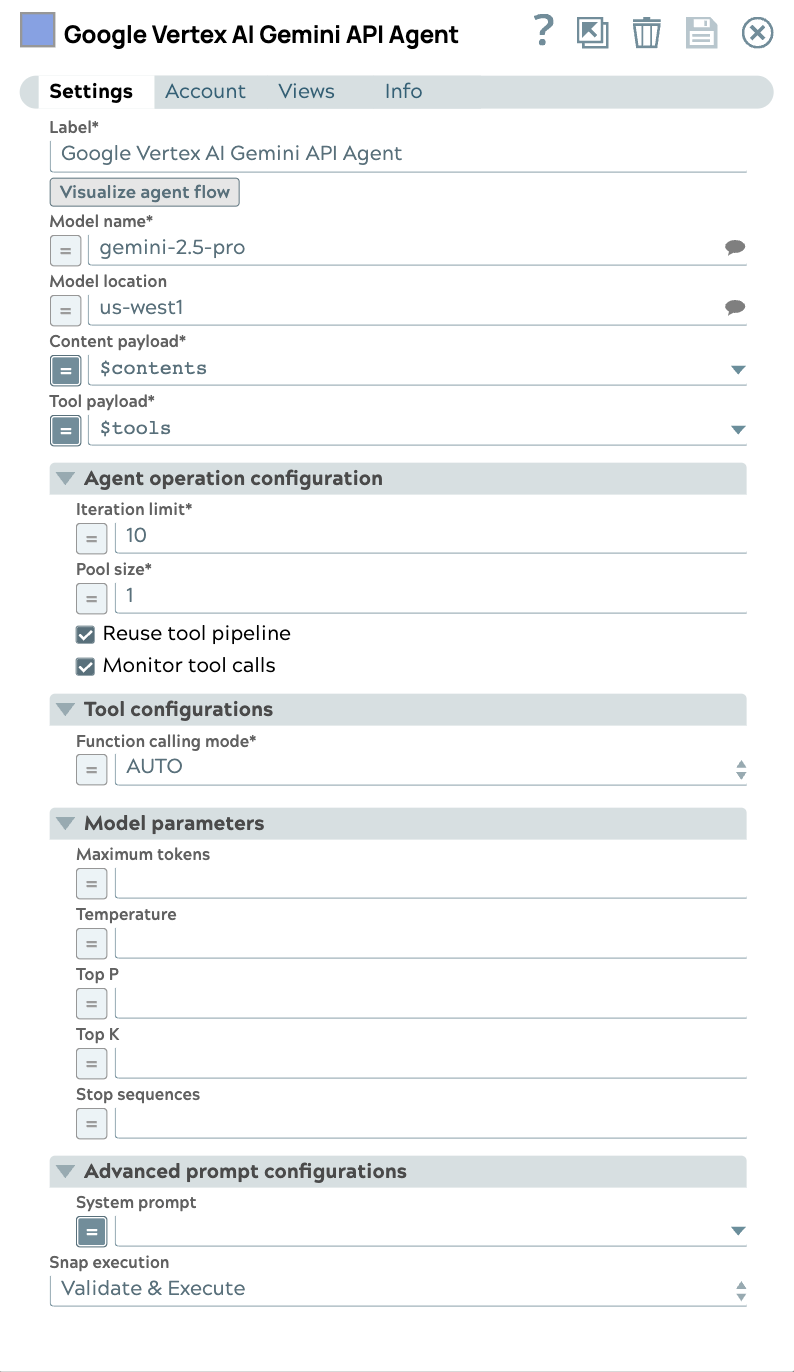
The Google Vertex AI Gemini API Agent Snap accepts input containing an initial request content, a list of tools, and parameters to invoke an Agent execution loop. The Snap handles the call to the Google Vertex AI Gemini API, consumes the result and calls tools, then collects them accordingly until the model has no more tools to call.
Learn more about the Agent Snap in this developer blog.
- This is a Transform-type Snap.
Prerequisites
- A valid Google GenAI Service Account, Google GenAI Access Token Account or Google Gemini API Key Account configured with the following OAuth scope https://www.googleapis.com/auth/generative-language.
Limitations
- gemini-1.0-pro and gemini-1.5-pro are not supported for the Top K field.
- Tool pipelines must return a single output document per invocation. If a tool pipeline returns more than one output document, the Agent Snap uses only the first document; the remaining documents are discarded, which may result in data loss. Refer to Create Tools for your Agents.
Snap views
| Type | Description | Examples of upstream and downstream Snaps |
|---|---|---|
| Input | This Snap supports a maximum of one binary or document input view. When the input type is a document, you must provide a field to specify the path to the input prompt. The Snap requires a prompt, which can be generated either by the Google GenAI Prompt Generator or any user-desired prompt intended for submission to the Gemini API. | |
| Output | This Snap has at most one document output view. The Snap provides the result generated by the Vertex AI Gemini API. | Mapper |
| Learn more about Error handling. | ||
Snap settings
- Expression icon (
 ): Allows using
JavaScript syntax to access SnapLogic Expressions to set field values dynamically (if
enabled). If disabled, you can provide a static value. Learn more.
): Allows using
JavaScript syntax to access SnapLogic Expressions to set field values dynamically (if
enabled). If disabled, you can provide a static value. Learn more. - SnapGPT (
 ): Generates SnapLogic Expressions
based on natural language using SnapGPT. Learn
more.
): Generates SnapLogic Expressions
based on natural language using SnapGPT. Learn
more. - Suggestion icon (
 ): Populates a
list of values dynamically based on your Snap configuration. You can select only one
attribute at a time using the icon. Type into the field if it supports a comma-separated
list of values.
): Populates a
list of values dynamically based on your Snap configuration. You can select only one
attribute at a time using the icon. Type into the field if it supports a comma-separated
list of values. - Upload
 : Uploads files. Learn more.
| Field/Field set | Type | Description |
|---|---|---|
| Label*
|
String |
Specify a unique name for the Snap. Modify this to be more appropriate, especially if more than one of the same Snaps is in the pipeline. Default value: Google Vertex AI Gemini API Agent Example: Agent tool caller |
| Visualize agent flow | String |
Launch the Agent Visualizer UI. Default value: N/A |
| Model name | String/Expression/ Suggestion |
Required. The model name to use for Gemini API. Default value: N/A Example: gemini-2.0-flash |
| Model location | String/Expression/ Suggestion |
The location of the model. Default value: N/A Example: us-central1 |
| Content payload | String/Expression |
Required. Specify the content payload to send to the Gemini text generation endpoint for all contents. Contents coming from the Prompt Generator Snap will be correctly formatted. Default value: N/A Example: |
| Tool payload | String/Expression |
Required. The list of tool definitions to send to the model. Default value: N/A Example: |
| Agent operation configuration |
Modify the limitation of the Agent execution. |
|
| Iteration limit | Integer/Expression |
Required. The maximum iterations an agent should run. Default value: 10 Example: 10 |
| Monitor tool calls | Checkbox |
Monitor tool call parameters in pipeline statistics. Default status: Selected |
| Pool size | Integer/Expression |
Required. The number of threads for parallel tool execution. Default value: 1 Example: 1 |
| Reuse tool pipeline | Checkbox |
Reuse the tool pipeline for tool execution. Default status: Selected |
| Tool pipeline timeout (minutes) | Integer/Expression |
The maximum time in minutes to wait for a tool pipeline to return its result
before the tool call fails. A tool pipeline that runs longer than this value fails
with Pipelines saved before this field was introduced default to 10 minutes. Default value: 10 Minimum value: 1 Example: 10 |
| Tool configurations |
Modify the tool call settings to guide the model responses and optimize output processing. |
|
| Function calling mode | Dropdown list/Expression |
Required. Specifies the mode in which function calling should execute.
Default value: AUTO Example: AUTO |
| Allowed function names | String/Expression |
Appears when Function calling mode is set to ANY. Required. Specify a set of function names that limit the functions the model can call. Default value: N/A Example: |
| Model parameters |
Parameters used to tune the model runtime. |
|
| Top K | Integer/Expression |
The number of high-probability tokens considered for each generation step, controlling the randomness of the output. If left blank, the endpoint uses its default value. Default value: N/A Example: 20 |
| Stop sequences | String/Expression |
Sequence of tokens to stop the completion at. Default value: N/A Example: .pay, ["amazing"], ["September", "paycheck"] |
| Temperature | Decimal/Expression |
The sampling temperature to use, a decimal value between 0 and 1. If left blank, the endpoint uses its default value. Default value: N/A Example: 0.2 |
| Maximum tokens | Integer/Expression |
Maximum number of tokens that can be generated in the Gemini text generation foundation model. If left blank, the endpoint uses its default value. Default value: N/A Example: 50 |
| Top P | Decimal/Expression |
The nucleus sampling value, which must be a decimal between 0 and 1. If left blank, the endpoint uses its default value. Default value: N/A Example: 0.2 |
| Advanced prompt configurations |
Configure the advanced prompt settings. |
|
| System prompt | String/Expression |
Specify the persona for the model to adopt in the responses. This initial instruction guides the LLM's responses and actions. Default value: N/A Example:
|
| Snap execution
|
Dropdown list |
Choose one of the three modes in
which the Snap executes. Available options are:
Default value: Validate & Execute Example: Execute only |
Troubleshooting
Warning: Tool pipeline pipeline-path produced N output documents, but only the first document is used by the Agent.
The remaining documents are discarded, which may result in data loss. The Agent Snap expects a 1:1 mapping between a tool call and its output document.
Add a Gate Snap or similar aggregation logic within the tool pipeline to consolidate multiple records into a single output document before the pipeline output view. Refer to Create Tools for your Agents.
Passing downstream accounts
The Agent Snap passes the account path through to the tool pipeline. In the following output example, the Agent Snap requires both the tool pipeline path and account path to automatically run the pipeline.
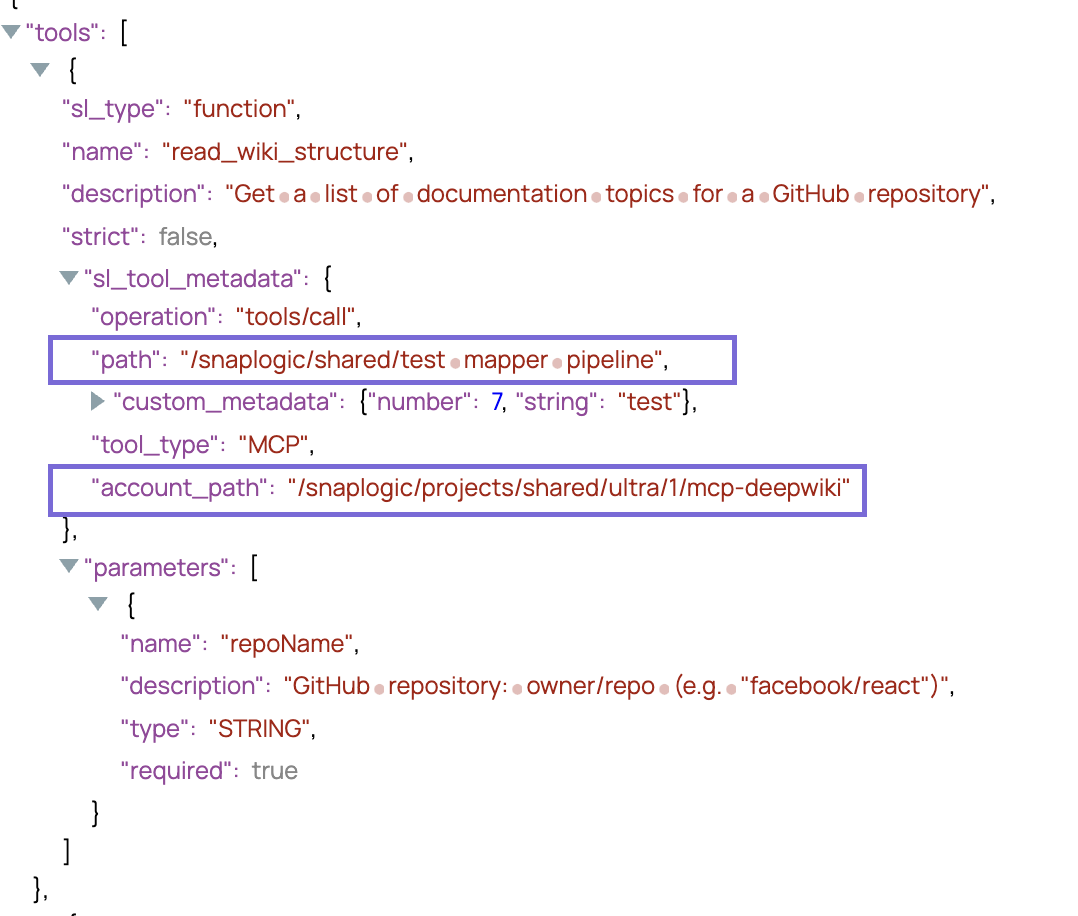
The account configuration is accessed via pipeline parameters. When you configure your pipeline, add the parameter account to the pipeline parameters of the agent and tool pipeline.
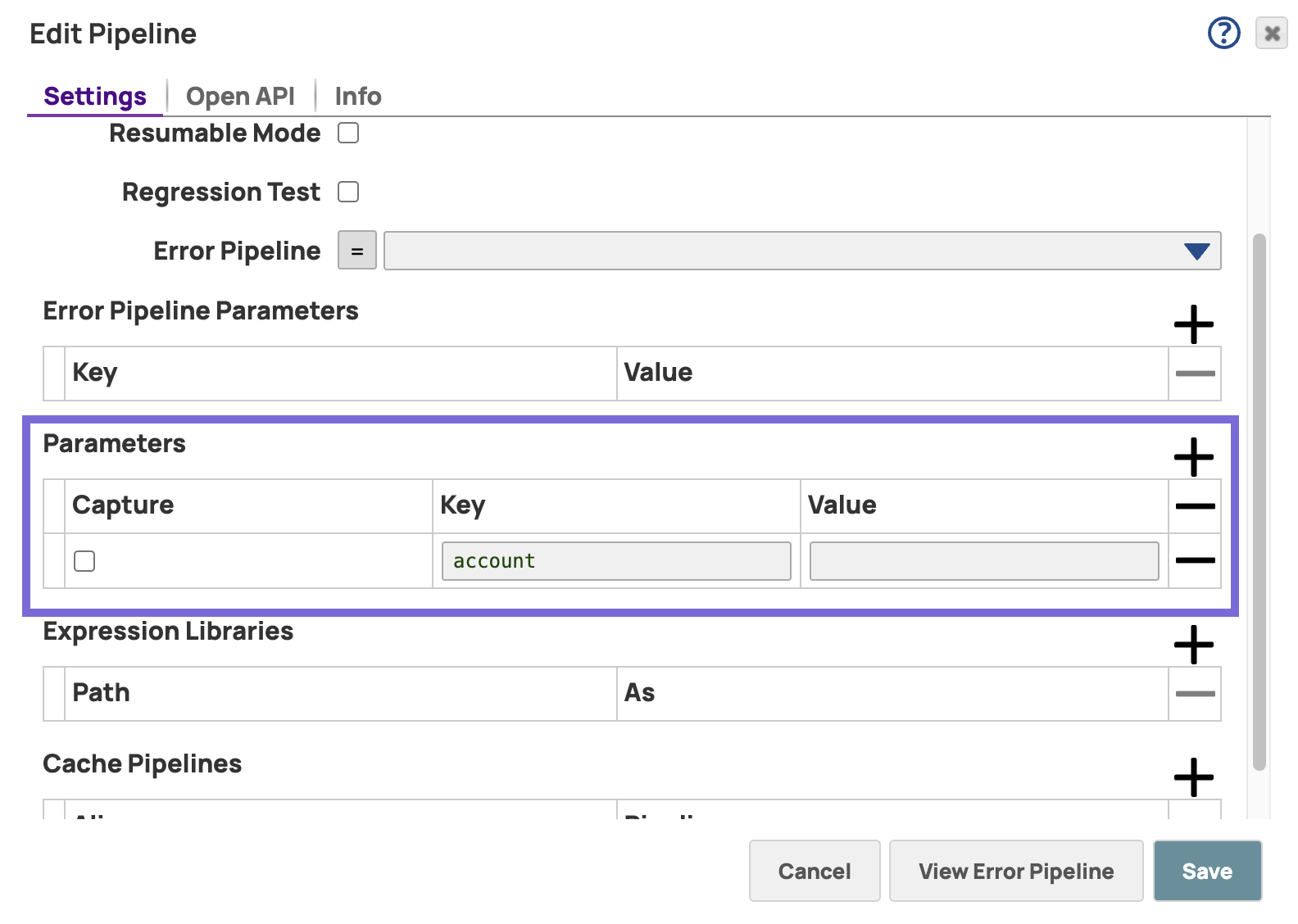
The tool pipeline executes successfully even if it references a different account than the Agent.