


Using the Workday Read Snap for Error Handling
This example demonstrates how you can use the Workday Read Snap for error handling. Here, we assume a bad mapping.
In the following mapping, we assume that the data types that we mapped together are incompatible. Usually while mapping an object, you may have to make several attempts to map the data you need to appropriate fields; so it is good to understand how you can manage problematic mappings.

Download this Pipeline
-
In the Mapper Snap, configure the mapping of
aaato the$Request_References[*].Worker_Reference[*].ID[*].typefield to simulate a bad mapping with an incompatible data type.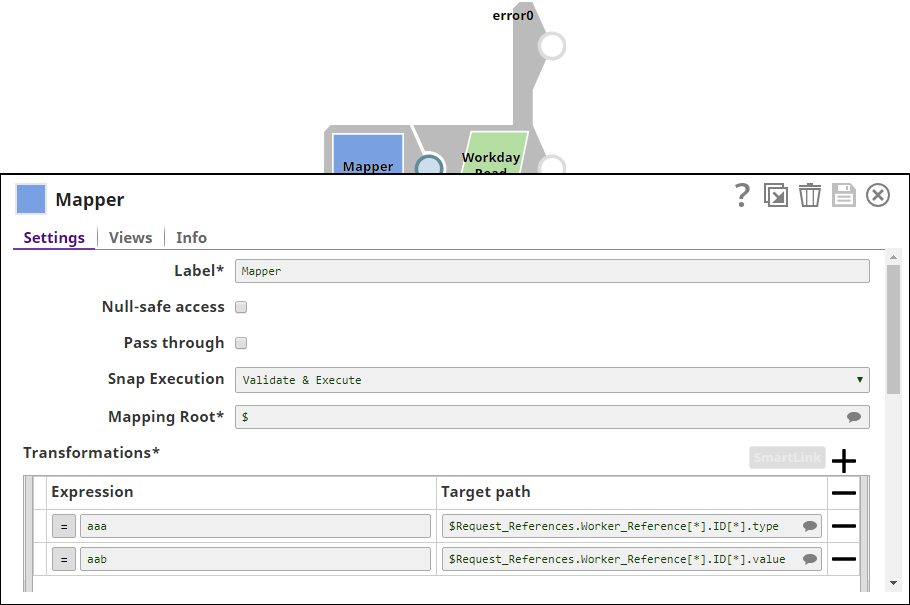
-
Run the pipeline. The invalid type mapping of
aaato$Request_References[*].Worker_Reference[*].ID[*].typetriggers the Workday Read Snap to write to the error view. (The error view on the Snap must be enabled explicitly.)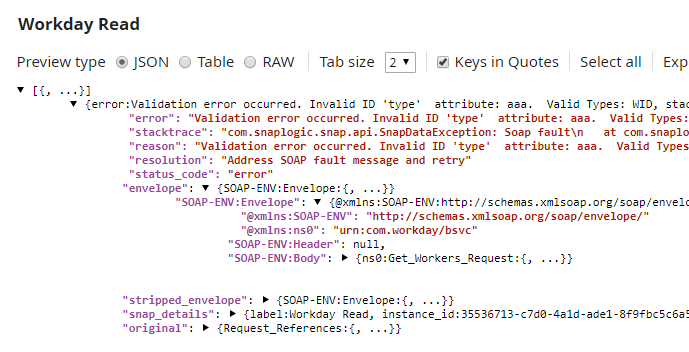
Understanding Workday Read Error Views
-
The error key provides the message returned from Workday. In this case, the error key indicates that mapping the value
aaato thetypefield is invalid. -
The envelope key contains information related to the SOAP envelope that was populated by applying the variables from the input view into the generated SOAP envelope.
-
The stripped envelope key carries the information of the SOAP envelope that will be sent to Workday.
-
The original key carries the document that came in on the input view.
- Download and import the SLP file into your Environment.
- Configure Snap accounts.
- Provide Pipeline parameters, if any.