


DynamoDB Query
Overview
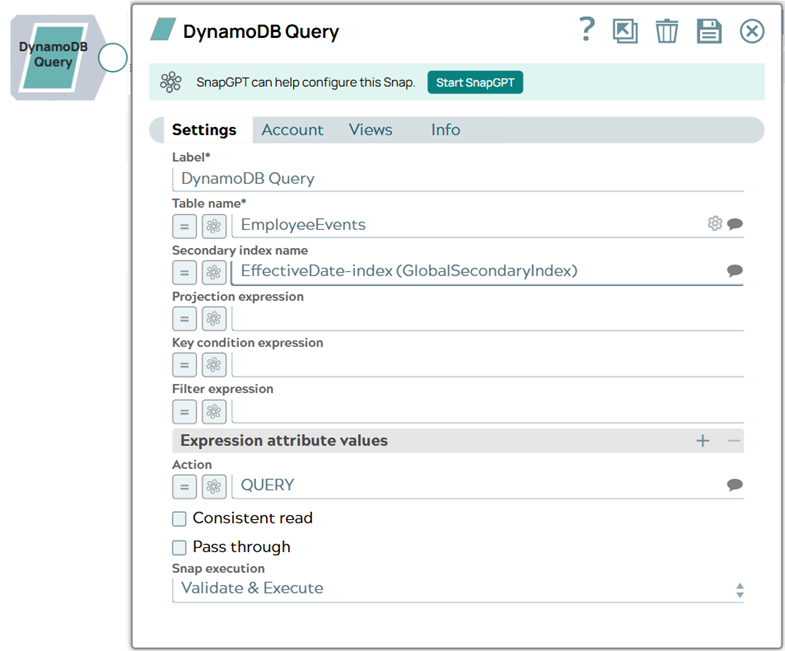
It processes Snap properties and formats the HTTP request entity body according to the syntax defined in the AWS DynamoDB Query API Reference. It can be used to retrieve data from DynamoDB table as well as Global Secondary Index or Local Secondary Index.
Supported Accounts
- This is a Read-type Snap.
 Works in Ultra Tasks
Prerequisites
None.
Snap views
| Type | Description | Examples of upstream and downstream Snaps |
|---|---|---|
| Input |
This Snap has at most one document input view. If the upstream Snap is connected, this Snap executes once per each input document and produces the query results as a stream of documents to the output view. Each input document is used to evaluate expression properties in the Snap. |
|
| Output |
This Snap has exactly one document output view and produces a stream of documents, one for each item matching the query criteria. |
|
| Learn more about Error handling. | ||
Snap settings
| Field/Field set | Description |
|---|---|
|
Label String
|
Specify a unique name for the Snap. Modify this to
be more appropriate, especially if there are more than one of the same Snap in the
pipeline.
Default value: DynamoDB Query |
|
Table name String/Expression/ Suggestion
|
Required. The name of the DynamoDB table. Table names can be
suggested if the expression property is disabled. The input document schema and
pipeline parameters can be suggested when the expression property is enabled. Default value: None Example:
|
|
Secondary index name String/Expression/ Suggestion
|
The name of Global Secondary Index or Local Secondary Index if used in the
query. Amazon DynamoDB provides fast access to items in a table by specifying
primary key values. However, many applications might benefit from having one or more
secondary (or alternate) keys available, to allow efficient access to data with
attributes other than the primary key. For more information, see Improving Data Access with Secondary
Indexes. Default value: None Example:
|
|
Projection expression String/Expression
|
A string that identifies one or more attributes to retrieve from the table.
The attributes in the expression must be separated by commas. If no attribute names
are specified, then all attributes will be returned. If any of the requested
attributes are not found, they will not appear in the result. Default value: None Example:
|
|
Key condition expression String/Expression
|
The condition that specifies the key value(s) for items to be retrieved by the
Query action. The condition must perform an equality test on a single partition key
value. The condition can also perform one of several comparison tests on a single
sort key value. Query can use KeyConditionExpression to retrieve one item with a
given partition key value and sort key value, or several items that have the same
partition key value but different sort key values. Refer to the
KeyConditionExpression section in the AWS DynamoDB Query API Reference for more
details. Default value: None Example:
|
|
Filter expression String/Expression
|
A string that contains conditions that DynamoDB applies after the Query operation, but before the data is returned to the Snap. Items that do not satisfy the filter expression criteria are not returned. A filter expression does not allow key attributes. You cannot define a filter expression based on a partition key or a sort key. Note: A filter expression is applied after the items have already been read; the
process of filtering does not consume any additional read capacity units. For more
information, see the Filter Expression for Query section in Working with Queries.
Default value: None Example:
|
|
Expression attribute values |
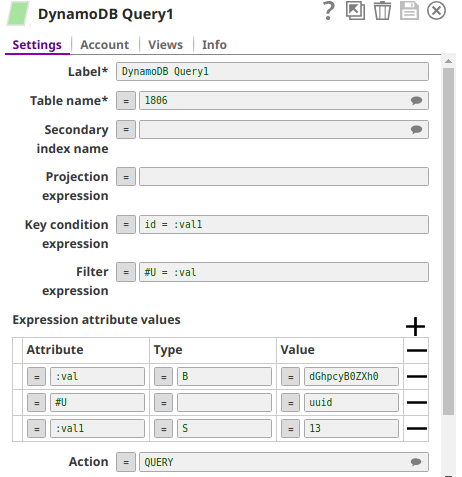
Specify the placeholders for the Expression Attribute Names and/or Expression Attribute Values. Example: If your table contains a column named UUID (a
reserved word) and you want to read a value from the UUID column, then you must
assign a placeholder for the column name because you cannot use a reserved word
directly in your expression. You can define the Attribute
#u, leave the Type blank, and enter
the value as UUID. In the Snap Filter
expression condition, enter Set #u=:val1.
Note: DynamoDB reserves certain words and they are called reserved words. You must
not use reserved words as attribute names in expressions. If you must write an
expression that contains a word that conflicts with a DynamoDB reserved word, then
you can define an expression attribute name to use in the place of the reserved
word. For more information, see Expression Attribute Names. Similarly, you
cannot use certain values as attribute values in expressions and instead must
define an expression attribute name. For more information, see Expression Attribute Values.
|
Attribute
String/Expression |
The expression attribute name. Begins with a # for names and : for values.
Default value: None Example:
|
Type
String/Expression |
The attribute type. Blank for Expression Attribute Names. S for string, N for
number, and so on, for Values. Default value: None Example:
|
Value
String/Expression |
The actual literal to be used in the query condition. Default value: None Example:
|
|
Action Dropdown list
|
Enter COUNT to get only the number of items after query execution or DESCRIBE
TABLE to get the table metadata at the output view, or QUERY for normal query
operations. Default value:
Example:
|
|
Consistent read Checkbox
|
Determines the read consistency model. If set to true, then the operation uses
strongly consistent reads. Otherwise, the operation uses eventually consistent
reads. Strongly consistent reads are not supported on global secondary indexes. If
you query a global secondary index with Consistent read set to true, you will
receive an Exception. Default value: Not selected |
|
Pass through Checkbox
|
If true, the input document is passed through to the output view under the
'original' key. Default value: Not selected |
|
Snap execution Dropdown list
|
Choose one of the three modes in
which the Snap executes. Available options are:
Default value: Execute only |
Troubleshooting
The Snap produces an error document if DynamoDB fails to execute the submitted query. The
request_entity field in the error document contains the HTTP entity body
of the submitted query and may be useful when troubleshooting the pipeline. The Snap
processes the Snap properties and prepares the HTTP entity body for the query. The
error_entity field in the error document is the error message from the
DynamoDB server describing which part of the query has caused the error.