


Amazon SNS - Confirm Subscription
Overview
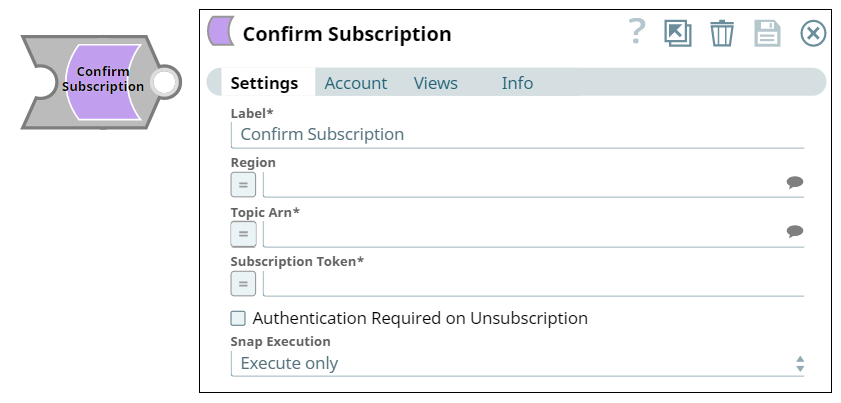
You can use this Snap to confirm an endpoint subscription to a topic in Amazon SNS. It verifies an endpoint owner's intent to receive messages by validating the subscription token sent to the endpoint while subscribing to a topic. After you subscribe your endpoint, Amazon SNS sends a subscription confirmation message to the endpoint. Amazon SNS does not send messages to the endpoint until the subscription has been confirmed.
Supported Accounts
- This is a Write-type Snap.
 Works in Ultra Tasks
Prerequisites
- An endpoint subscription to a topic. See Amazon SNS - Subscribe Topic.
- Subscription Token.
Snap views
| Type | Description | Examples of upstream and downstream Snaps |
|---|---|---|
| Input |
Document. This Snap has at most one document input view. The topic ARN, region, and subscription token of the topic. |
|
| Output |
Document. This Snap has at most one document output view. The ARN of the subscription and the Subscription ID. |
|
| Learn more about Error handling. | ||
Snap settings
| Field/Field set | Description |
|---|---|
|
Label
|
Specify a unique name for the Snap. Modify this to
be more appropriate, especially if there are more than one of the same Snap in the
pipeline.
Default value: Confirm Subscription Example: |
| Region
|
Specify the AWS region where the application is implemented. This is a suggestible field and suggestions are populated based on the Account settings. If you do not provide a value in this field, the Snap evaluates the region in the following sequence:
Default value: None Example: |
| Topic ARN
|
Required. Specify the Amazon Resource Name of the topic. This is a suggestible field and suggestions are populated based on the Account settings. Default value: N/A Example: |
| Subscription Token
|
Required. Enter the valid subscription token sent to the endpoint while subscribing to a topic. Default value: N/A Example: |
| Authentication Required on Unsubscription
|
Select this checkbox if you want the Snap to verify the authentication of the user before unsubscribing an endpoint subscription to a topic. If this field is set to true, only the topic owner and subscription owner can unsubscribe the endpoint. Default status: Deselected Example: |
|
Snap execution Dropdown list
|
Choose one of the three modes in
which the Snap executes. Available options are:
Default value: Execute only |
Troubleshooting
| Error | Cause | Resolution |
|---|---|---|
| An error occurred while updating a topic with the given topic name in AWS SNS. | Valid information might be missing. | Check the input data, formats and try again. |
| Missing Topic ARN | ARN must be provided. | The topic ARN must be provided. |