


Spreadsheet Dynamic OAuth2 Account
Overview
You can use this account type to connect Google Sheet Snaps with data sources that use Spreadsheet Dynamic OAuth2 account.
Prerequisites
- Access token to authorize Google API Client Libraries, or
- Google OAuth 2.0 endpoints to access Google APIs.
Account settings
Legend:
- Expression icon (
 ): Allows using
pipeline parameters to set field values dynamically (if enabled). SnapLogic Expressions
are not supported. If disabled, you can provide a static value.
): Allows using
pipeline parameters to set field values dynamically (if enabled). SnapLogic Expressions
are not supported. If disabled, you can provide a static value. - SnapGPT (
 ): Generates SnapLogic Expressions
based on natural language using SnapGPT. Learn
more.
): Generates SnapLogic Expressions
based on natural language using SnapGPT. Learn
more. - Suggestion icon (
 ): Populates a
list of values dynamically based on your Snap configuration. You can select only one
attribute at a time using the icon. Type into the field if it supports a comma-separated
list of values.
): Populates a
list of values dynamically based on your Snap configuration. You can select only one
attribute at a time using the icon. Type into the field if it supports a comma-separated
list of values. - Upload
 : Uploads files. Learn more.
| Field/Field set | Description |
|---|---|
Label*
String |
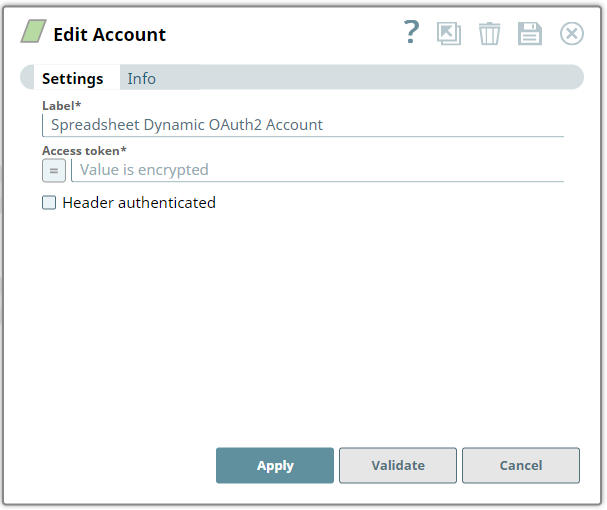
Required. Specify a unique label for the account instance.
Default value: N/A Example: Account_Test |
Access token*
String |
Required. Enter the access token to authorize Google API
Client Libraries or Google OAuth 2.0 endpoints to access Google APIs. The access
token is retrieved when setting up the account in the endpoint. Learn more at
Using OAuth 2.0 to Access Google APIs.
Note: The Access token expires in one hour.
Default value: N/A Example: SN3fH-25j53-hh3y77-sss12 |
Header authenticated
Checkbox |
Select this checkbox if endpoint uses bearer header authentication.
Default value: Deselected |