


COBOL Copybook Formatter
Overview
You can use the COBOL Copybook Formatter Snap to format a JSON file into a flat file based on the specified COBOL structures. COBOL programs can then format the input data to process the output.
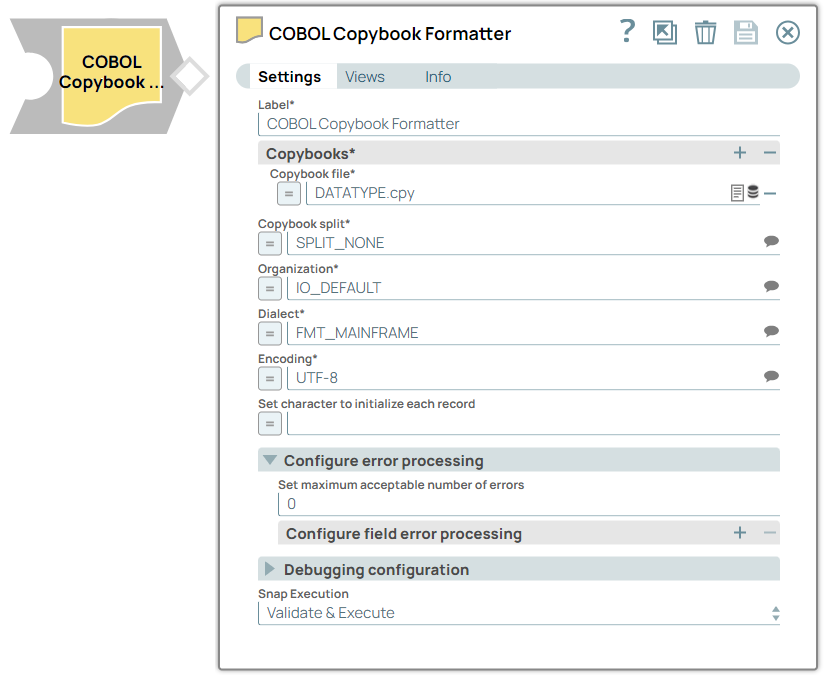
- This is a Format-type Snap.
-
Provide one or more COBOL Copybooks to the Snap to process the data.
-
Configure the Snap to indicate how the COBOL structures should be interpreted. A single or multiple Copybooks can contain one or more structures that are used to create the output data. The Snap must understand the level at which these structures should start in the COBOL Copybook. If there is a single structure, no splitting of the Copybook is required. If there are multiple structures in the Copybooks, normally this will be at the 01 level; however, there are also options to split based on other levels.
-
Configure the format of the records to be written to the output file.
-
Configure the code page in which the output character fields are encoded.
-
Configure the endianness of the output binary fields.
-
Configure the default value to which each flat file record should be set initially if required.
-
Provide input documents that comply with the structures below.
When the pipeline is run, Snap produces a binary output representing the input documents formatted according to the specified COBOL structure.
Input Document Structure
The input document structure must exactly map to the COBOL structure or structures as follows:
- If the COBOL Copybook is a list of fields without any structures, the input document will consist of a list of fields with the same name as the COBOL field, with a value to be set into the correct location in the flat file record. A sample COBOL Copybook and input data are provided below:
- If the COBOL Copybook has a high level 01 Structure and individual fields below this, the input document must have fields in the format <StructureName> as the first level and then each <fieldname> in an object below that. A sample COBOL Copybook and input data are provided below:
- If the COBOL Copybook contains multiple different COBOL structures, the input must be an input document with each document element starting with the name of one of the COBOL structures provided. The rest of the structure should follow the same rules as above. A sample COBOL Copybook and input data are provided below:
Note that often, there is a requirement to supply data as a hexadecimal value. This can be achieved by providing the value of a field in the format of x’012345’, but please note:
- The value must be an even number of digits to be a valid hexadecimal value.
- The value is set exactly as is in the location of the field in the output flat file. Therefore the exact length of that field must be provided.
Limitations
The input document structure is very rigid and must map to the format of the provided COBOL structures.
Snap Views
| Type | Description | Examples of Upstream and Downstream Snaps |
|---|---|---|
| Input | Structured JSON documents that match the structure of the COBOL structures. | JSON Splitter |
| Output | A flat binary file containing the data mapped from the input document to the COBOL structures provided as part of the configuration. |
|
| Learn more about Error handling. | ||
Snap Settings
| Field/Field set | Description |
|---|---|
Label* String |
Specify the name for the Snap. You can modify the default name to be more specific and meaningful, especially if you have more than one of the same Snaps in your pipeline. Default value: Cobol Copybook Formatter Example: Process The 038 Copybook |
Copybooks*
Fieldset |
Use this field set to define the Copybooks to use. |
Copybook File* String/Expression |
Specify the Copybook file that describes the data. Alternatively, click the upload icon to browse and upload the required copybook file. Default value: N/A Example: PipeRecFileOfPS.json |
Copybook Split* String/Expression/ Suggestion |
Select the option to split the Copybook for processing. The available options are:SPLIT_NONE: No split.SPLIT_01_LEVEL: Splits on all 01 levels.SPLIT_TOP_LEVEL: Splits on the top-level structures defined by a level that is greater than level 01.SPLIT_REDEFINE: Splits on the highest level of COBOL REDEFINE structures.noteIf the Copybook contains multiple ‘01 entries’, it must be split for processing.If the Copybook contains multiple structures below the 01 level, that must be used.If the Copybook contains multiple ‘01 entries’, it must be split for processing.If the Copybook contains multiple structures below the 01 level, that must be used. Default value: SPLIT_NONE Example: SPLIT_01_LEVEL |
Organization* String/Expression/ Suggestion |
Specify the type of file organization for the data payload. Alternatively click the Suggestion icon to fetch a list of file organisation types and select the desired organization.IO_DEFAULT: Attempt to automatically detect the file organization.IO_STANDARD_TEXT_FILE: Standard file using CRLF or LF as the newline delimiter.IO_UNICODE_TEXT: Unicode/double byte file using CRLF or LF as the newline delimiter.IO_FIXED_LENGTH: Every record (or line) is a standard fixed length based on the maximum record length (determined from copybook).IO_CONTINOUS_NO_LINE_MARKER: Files where there are no End-of-Line markers. Records are based on Record-Lengths.IO_VB: Mainframe VB (Variable Record length file): Records consist of a Record-Length including the length of the following data followed by the Record-Data.IO_VLI: Mainframe like VB (Variable Record length file): Records consist of a byte swapper Record-Length excluding the length of the following data followed by the Record-Data.Learn more aboutOrganization types. Default value: IO_DEFAULT Example: IO_UNICODE_TEXT |
Dialect* String/Expression/ Suggestion |
Specify the COBOL dialect. The available options are:FMT_MAINFRAME: Mainframe COBOL (Big Endian).FMT_INTEL: Intel COBOL (Little Endian).FMT_FUJITSU: Fujitsu Cobol 3 compiler.FMT_OPEN_COBOL: GnuCobol (formerly Open Cobol) on a Little-Endian machine.FMT_OC_MICRO_FOCUS_B: GnuCOBOL running in Microfocus compatibility mode on a Big-Endian machine.FMT_BIG_ENDIAN: Generic Big Endian.The selected dialect determines how the parser deals with binary information in the input file. Default value: FMT_MAINFRAME Example: FMT_INTEL |
Encoding* String/Expression/ Suggestion |
Specify the format for encoding the input data. Any supported Java encoding is available for use. Some common code pages to be used:CP1141: Standard mainframe EBCDIC code page.ASCII: Standard ASCII files.Windows-1252: Standard code page used on Windows platforms. Default value: UTF8 Example: CP1252 |
Configure error processing
Fieldset |
Configure the action the Snap must take if an error occurs. |
Set maximum acceptable number of errors Integer |
Set the maximum number of acceptable errors that can occur before the Snap terminates. Zero (0) indicates no limit on errors that can be issued. |
Configure field error processing
Fieldset |
Use this field set to configure the Snap's action when an error occurs for each field. |
Field Name String/Expression/ Suggestion |
Specify or select the full name (this must include structure for uniqueness) of the COBOL field being configured. |
Error processing configuration* Dropdown list |
Select or set the action the Snap must take when an error occurs when processing:Fail:The pipeline processing fails immediately after an error is encountered on this field. This is the default behavior of the Snap.IgnoreField:The field is ignored and is not included in the output record.IgnoreRecord:The entire record is ignored and not included in the output.DefaultValue:The default value provided will be output for the field in the output record. |
Default value for field String/Expression |
Specify the default value that will be output for a field. |
Debugging configuration
Fieldset |
Configure the debugging properties. |
Name of only structure to output String/Expression/ Suggestion |
Specify or select the name of the only structure for which data is to be sent to the output. Data for any other structure is ignored and is not sent to the output. |
Ranges of records to be output
Fieldset |
Specify one or more ranges of records to be output. |
Low record for range String |
Specify the first record in the range to be passed to the output.noteThe numbers here are relative to 1, so 1 is the first record, 2 is the second record.If the ranges include records that don’t exist in the input data, these are ignored.If ranges overlap, this will cause a configuration error.The numbers here are relative to 1, so 1 is the first record, 2 is the second record.If the ranges include records that don’t exist in the input data, these are ignored.If ranges overlap, this will cause a configuration error. |
High record for range String |
Specify the last record in the range to be output. |
Set character to initialize each record Integer |
Specify the number (optional) to set each record to the output. The field is specified as a numeric value from 0 to 255 inclusive and represents the decimal value of the character to be used. For example:0 – x’00’ (low values)32 – ASCII blank64 – EBCDIC Blank255 – x’FF’(high values)noteUsing this field has performance implications so we recommend you to use only if required.Using this field has performance implications so we recommend you to use only if required. |
Snap execution Dropdown list |
Choose one of the three modes in
which the Snap executes. Available options are:
|
Additional configuration requirements
The output from this Snap will be a flat binary file containing the data that reflects the COBOL structure(s) provided as part of the configuration. This file will consist of data that has records with the following formats. For the records to be written correctly, you must configure the correct record type processing for the records to be processed accurately. For more information about the Organization types, refer to the Organization field in thetable:
- Fixed Length records (IO_FIXED_LENGTH): Records that have a consistent fixed length that is the total length of the COBOL structure or structures configured for the Snap.
- Records delimited by a carriage return/line feed (CR/LF) or just a LF (IO_STANDARD_TEXT_FILE): Records separated by CR/LF characters within the data. The length of the data between these CR/LFs may be fixed or variable and must correctly be represented by the length of the COBOL structure or structures configured for the Snap.
- Variable blocked records (IO_VB): Variable length records that are created on IBM z/OS environments with an RDW prior to each record. This RDW includes the record length, including the length of the following data followed by the Record-data.
- Alternate variable blocked records (IO_VLI): Records consist of a byte swapper Record-Length excluding the length of the following data followed by the Record-Data.
To ensure accurate processing of the data, you must configure the following types of data correctly:
- Character data:This data must have a code page you must correctly specify in your configuration.
- Binary data:These are binary numeric values that have a specific endianness (the order in which the bits are transmitted over a communication channel) depending on the platform from which they have originated.Big Endian generally comes from older mainframe platforms (z Series, i Series, Solaris, and so on) and is where the high-order byte of the binary value is the most significant byte.Little Endian generally comes from newer platforms (x86, x86-64, and so on) and is where the low-order byte of the binary value is the most significant byte.
Troubleshooting
| Error | Reason | Resolution |
|---|---|---|
| Account validation failed. | The pipeline ended before the batch could complete execution because of a connection error. | Verify that theRefresh tokenfield is configured to handle the inputs properly. If you are not sure when the input data is available, configure this field as zero to keep the connection always open. |