


Bulk Import
Overview
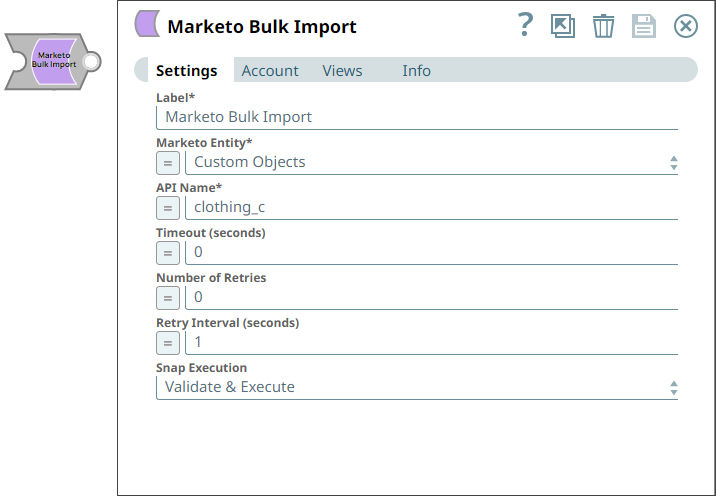
You can use the Marketo Bulk Import Snap to perform bulk imports for the selected entity.
- This is a Write-type Snap.
 Does not support Ultra Tasks
Prerequisites
- A valid Marketo OAuth2 Account.
- Valid permissions for bulk import operations. Refer to the Marketo Bulk Import API documentation.
Limitations
- Marketo Snaps do not support some special characters (for example, (𝖖𝖗𝖘𝖬𝖭𝖮𝗕𝗖𝘧𝘨𝘩𝛀𝛁𝛂𝛃𝛄𝛅𝛆𝛇,𝖗𝖘𝖬𝛌𝛗𝛘𝛙𝛴).
Snap views
| Type | Description | Examples of upstream and downstream Snaps |
|---|---|---|
| Input | This Snap has at most one document input view. Marketo Entity and API Name. | |
| Output | This Snap has at most one document output view. Document details of the specified Marketo Entity and API. | |
| Learn more about Error handling. | ||
Snap settings
| Field/Field set | Description |
|---|---|
Label*
String |
Specify a unique name for the Snap. Supports expressions.
Default value: Marketo Bulk Import |
Marketo Entity*
Dropdown list |
Select the Marketo entity for the bulk import:
Default value: Leads |
API Name*
String/Expression |
Appears when you select Custom Objects for Marketo Entity. Specify the API name of the custom object to import. Default value: N/A |
List ID
Integer/Expression |
Appears when you select Leads for Marketo Entity. Specify the ID of the static list to add the imported leads to. Leave blank to import without adding to a list. Default value: N/A |
Lookup Field
String/Expression |
Specify the field to use for deduplication, such as string, email, integer. The supported field types are: ID, cookies, email, twitterID. Default value: N/A Warning: You can use ID for update only operations.
|
Partition Name
String/Expression |
Specify the name of the lead partition to import records into. Required for workspaces and partitions-enabled instances. Default value: N/A |
Program ID*
String/Expression |
Appears when you select Program Members for Marketo Entity. Specify the ID of the program for which to import members. Default value: N/A |
Program Member Status*
String/Expression |
Appears when you select Program Members for Marketo Entity. Specify the program membership status to assign to the imported members. Default value: N/A |
Timeout (seconds)
Integer/Expression |
Specify the time in seconds to wait for the bulk import to complete before it times out. A value of zero disables the timeout. Default value: 0 |
Number of Retries
Integer/Expression |
Specify the number of attempts the Snap must make in case of connection failure or timeout. Default value: 0 |
Retry Interval (seconds)
Integer/Expression |
Specify the minimum number of seconds the Snap must wait before each retry attempt. Default value: 1 |
Snap execution
Dropdown list |
Choose one of the three modes in
which the Snap executes. Available options are:
Default value: Validate and Execute |