


Advanced Use Case: File Reader to Redshift Bulk Load
Overview
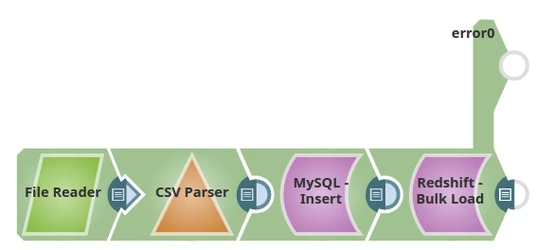
This advanced example demonstrates how to use the Redshift Bulk Load Snap in a typical enterprise ETL scenario. The pipeline reads data from a CSV file, parses it, and loads it into a Redshift table. If the table does not exist, the Snap creates it with the appropriate schema based on the input data structure.
Prerequisites
- CSV file accessible to the File Reader Snap (local, SLDB, or remote location)
- Amazon Redshift cluster with appropriate access
- S3 bucket configured in Redshift account for staging files
- Valid Redshift account configured in SnapLogic
Pipeline Flow
The pipeline performs the following ETL operations:
- Extract: File Reader Snap reads the data from the CSV file and passes it to the CSV Parser
- Transform: CSV Parser performs parsing of the data, converting CSV rows into structured documents
- Load: Redshift Bulk Load Snap loads the entire dataset into the Redshift table, creating a new table with the provided schema if it doesn't exist
Pipeline
Snap Configuration
File Reader Snap:
- File: Path to the CSV file (for example,
/path/to/data.csv) - Read mode: Binary or Text (depending on file encoding)
- Reads the entire file content and passes it downstream
CSV Parser Snap:
- First row as header: Selected (if CSV has headers)
- Delimiter: Comma (or custom delimiter)
- Quote character: Double quote (default)
- Parses CSV data into structured JSON documents with field names and values
Redshift Bulk Load Snap:
- Schema name: Specify target schema (for example,
public) - Table name: Specify target table name
- Create table if not present: Selected
- Data Source: Input view
- Validate input data: Selected (recommended for initial loads)
- The Snap stages data to S3 and uses the COPY command for efficient bulk loading
Table Creation Behavior
When Create table if not present is selected:
- The Snap analyzes the first input document to determine column names and data types
- A CREATE TABLE statement is automatically generated
- The table is created in Redshift with appropriate column definitions
- Data types are inferred from the CSV Parser output:
- Numeric values → INTEGER or DECIMAL
- Date/time strings → TIMESTAMP or DATE
- Text values → VARCHAR with appropriate length
Note:
If you need precise control over data types, consider:
- Pre-creating the table in Redshift with exact column definitions
- Using a Mapper Snap to explicitly cast data types before the Bulk Load Snap
- Providing schema metadata through the second input view of the Bulk Load Snap
Output
The Snap outputs a document showing:
- Status: Success or failure of the bulk load operation
- Records loaded: Total count of successfully loaded records
- Failed records: Count of records that failed to load (if any)
- Table created: Confirmation if a new table was created
Example output:
{
  "status": "Success",
  "recordsLoaded": 10000,
  "failedRecords": 0,
  "tableCreated": true,
  "tableName": "public.sales_data"
}
Performance Considerations
- File size: For large CSV files (GB+), consider splitting the file or using parallelism settings
- S3 staging: Data is temporarily staged in S3 before loading, ensure sufficient S3 storage
- Compression: Enable compression (default) for faster S3 uploads unless CPU is constrained
- Batch processing: For multiple files, use a Directory Browser Snap to iterate and load each file
Error Handling
Configure error handling to manage data quality issues:
- Maximum error count: Set threshold for acceptable failures (default: 100)
- Validate input data: Enable to catch data type mismatches early
- Accept invalid characters: Enable to handle UTF-8 encoding issues
- Connect the error view to capture and log failed records
Use Cases
This pipeline pattern is useful for:
- Daily batch loading of CSV exports from other systems
- Migrating historical data from flat files to Redshift
- Loading periodic reports or data feeds
- Initial data warehouse population from legacy systems
- ETL processes that receive data as file drops