


MongoDB Delete
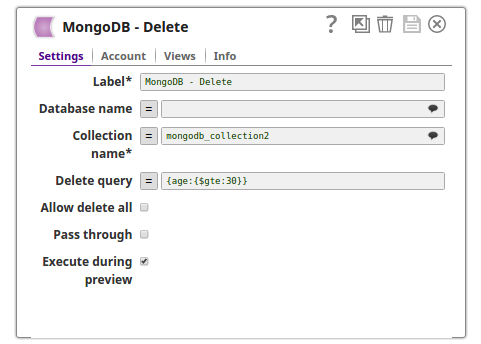
This Snap deletes some or all documents in a MongoDB collection.
Overview
This Snap deletes some or all documents in a MongoDB collection.
Supported Accounts
- This is a Write-type Snap.
Prerequisites
None.
Limitations and known issues
None.
Snap views
| Type | Description | Examples of upstream and downstream Snaps |
|---|---|---|
| Input | Optional. This Snap has at most one document input view. | |
| Output | Optional. This Snap has at most one document output view. The output document contains the number of documents deleted: {"deleted_documents": n} |
|
| Learn more about Error handling. | ||
Snap settings
| Field/Field set | Description |
|---|---|
Label* String |
Specify a unique name for the Snap. Modify this to
be more appropriate, especially if there are more than one of the same Snap in the
pipeline.
Default value: MongoDB - Delete |
Database name String/Suggestion |
The database that the collection is defined in. If not specified, then the MongoDB account database will be used. Default value: N/A Example: assets |
Collection name String/Expression/ Suggestion |
Required. Select or enter a MongoDB collection name. Default value: N/A Example: leads |
Delete query String/Expression |
The delete query represents the remove query parameter. It is an expression that evaluates to an object or JSON string. If no delete query is defined, then all records will be removed from the collection. When the expression evaluates to an object, only strict mode is supported. When the expression evaluates to a JSON string, both strict mode and mongo shell mode are supported. More information about MongoDB Extended JSON can be found here. Example: (with '=' button pressed/expression enabled) $id represents an integer in this example.
or
Default value: N/A |
Allow delete all Checkbox |
If this property is selected and the Delete query is empty, all documents are deleted from the selected collection. If not selected and the Delete query property is empty, the Snap execute successfully with an output document:
Default status: Deselected |
Pass through Checkbox |
If selected, the input document will be passed through to the output views under the key 'original'. The document will be passed to the Parameter output view, and it will also be passed to the Result Set output view if there is output sent from this view. Default status: Selected |
Number of retries Integer/Expression |
Specify the maximum number of attempts to be made to receive a response. The request is terminated if the attempts do not result in a response. Note:
Default value: 0 Example: 4 |
Retry interval (seconds) Integer/Expression |
Specify the time interval between two retry requests. Default value: 1 Example: 5 |
|
Snap execution Dropdown list
|
Choose one of the three modes in
which the Snap executes. Available options are:
Default value: Validate & Execute Example: Execute only |