


Databricks - Execute
Overview
-
Data Definition Language (DDL) queries
-
Data Manipulation Language (DML) queries
-
Data Control Language (DCL) queries
The Snap runs each statement as a single atomic unit to allow rolling back changes when a statement fails during execution.
- This is a Write-type Snap.
 Does not support Ultra Tasks
Prerequisites
- Valid access credentials to a DLP instance with adequate access permissions to perform the action in context.
- Valid access to the external source data in one of the following: Azure Blob Storage, ADLS Gen2, DBFS, GCP, AWS S3, or another database (JDBC-compatible).
Limitations
- Because the Databricks JDBC driver does not return a result set for Data Definition
Language (DDL) statements such as DROP, CREATE, and ALTER, the Snap displays a standard
message:
SQL statement executed successfully but did not produce any result set.
Snap views
| Type | Description | Examples of upstream and downstream Snaps |
|---|---|---|
| Input | Input document is not mandatory. The Snap can fetch and apply values for parameterized queries from an upstream Snap output. | |
| Output | A JSON document containing each SQL statement along with its execution status (or result). | |
| Learn more about Error handling. | ||
Snap settings
- Expression icon (
 ): Allows using
pipeline parameters to set field values dynamically (if enabled). SnapLogic Expressions
are not supported. If disabled, you can provide a static value.
): Allows using
pipeline parameters to set field values dynamically (if enabled). SnapLogic Expressions
are not supported. If disabled, you can provide a static value. - SnapGPT (
 ): Generates SnapLogic Expressions
based on natural language using SnapGPT. Learn
more.
): Generates SnapLogic Expressions
based on natural language using SnapGPT. Learn
more. - Suggestion icon (
 ): Populates a
list of values dynamically based on your Snap configuration. You can select only one
attribute at a time using the icon. Type into the field if it supports a comma-separated
list of values.
): Populates a
list of values dynamically based on your Snap configuration. You can select only one
attribute at a time using the icon. Type into the field if it supports a comma-separated
list of values. - Upload
 : Uploads files. Learn more.
| Field/Field set | Type | Description |
|---|---|---|
Label
|
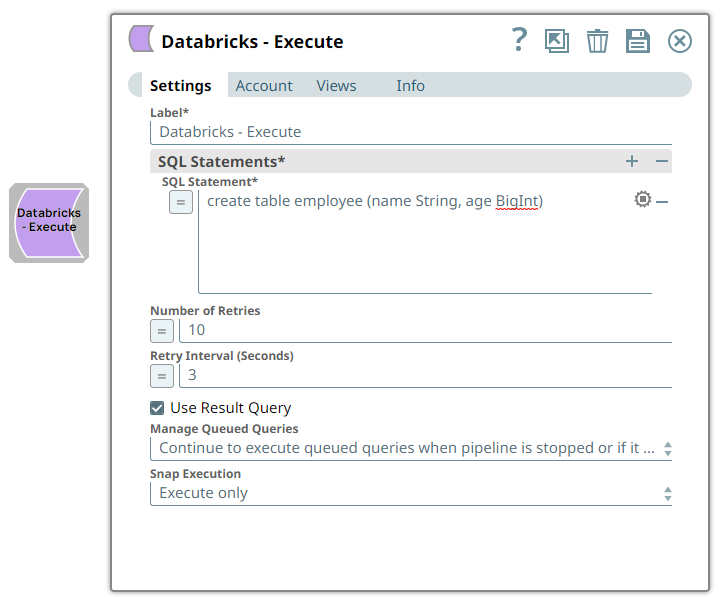
String | Required. Specify a unique name for the Snap. Modify this to be more appropriate, especially if more than one of the same Snaps is in the pipeline. Default value: Databricks - Execute Example: Db_MultiQuery |
| SQL statement | String/Expression | Required. Specify the Databricks SQL statement you want
the Snap to execute. We recommend you to add a single query in the SQL Statement
field. The SQL statement must follow the SQL syntax as stipulated in DLP. Default value: None. Example: create table employee (name String, age BigInt) |
| Query type | Dropdown list/Expression | Select the type of the SQL query (statement) provided above. It can be
Read, Write, or
Auto.
Default value: Auto Example: Write |
| Ignore empty result | Checkbox | Select this checkbox to ignore empty results from the Snap's output. Default status: Deselected |
| Number of Retries | Integer/Expression | Specify the maximum number of retry attempts the Snap must make in case of
network failure. When you set the Number of retries to more than 0,
the Snap generates duplicate records when the connection is not established. To
prevent duplicate records, we recommend that you follow one of the following:
Default value: 0 Example: 3 Minimum value: 0 |
| Retry Interval (Seconds) | Integer/Expression | Specify the minimum number of seconds the Snap must wait before each retry
attempt. Default value: 1 Example: 3 Minimum value: 1 |
| Use Result Query | Checkbox | Select this checkbox to write the SQL statement execution result to the Snap's
output view for each successful execution. The output of the Snap is enclosed in the
key ResultQuery, and the value will be the actual output produced
by the SQL statement. The example Pipeline below depicts the difference between the
output previews when this checkbox is selected and when it is not.This option allows you to effectively track the SQL statement's execution by clearly indicating the successful execution and the number of records affected, if any, after the execution. Default status: Deselected |
| Manage Queued Queries | Dropdown list | Select either of the following options from the dropdown list to handle queued
SQL queries:
Note: If you select Cancel queued queries when pipeline is stopped or if it
fails, then the read queries under execution are cancelled, whereas the
write type of queries under execution are not cancelled. Databricks internally
determines which queries are safe to be cancelled and cancels those
queries. Warning: Due to an issue with DLP, aborting an ELT
Pipeline validation (with preview data enabled) causes only those SQL statements
that retrieve data using bind parameters to get aborted while all other static
statements (that use values instead of bind parameters) persist.
To avoid this issue, ensure that you always configure your Snap settings to use bind parameters inside its SQL queries. Default value: Continue to execute queued queries when pipeline is stopped or if it fails. Example: Cancel queued queries when pipeline is stopped or if it fails |
| Snap execution
|
Dropdown list |
Choose one of the three modes in
which the Snap executes. Available options are:
Default value: Execute only Example: Validate & Execute |