


MCP Streamable HTTP OAuth2 Account
Overview
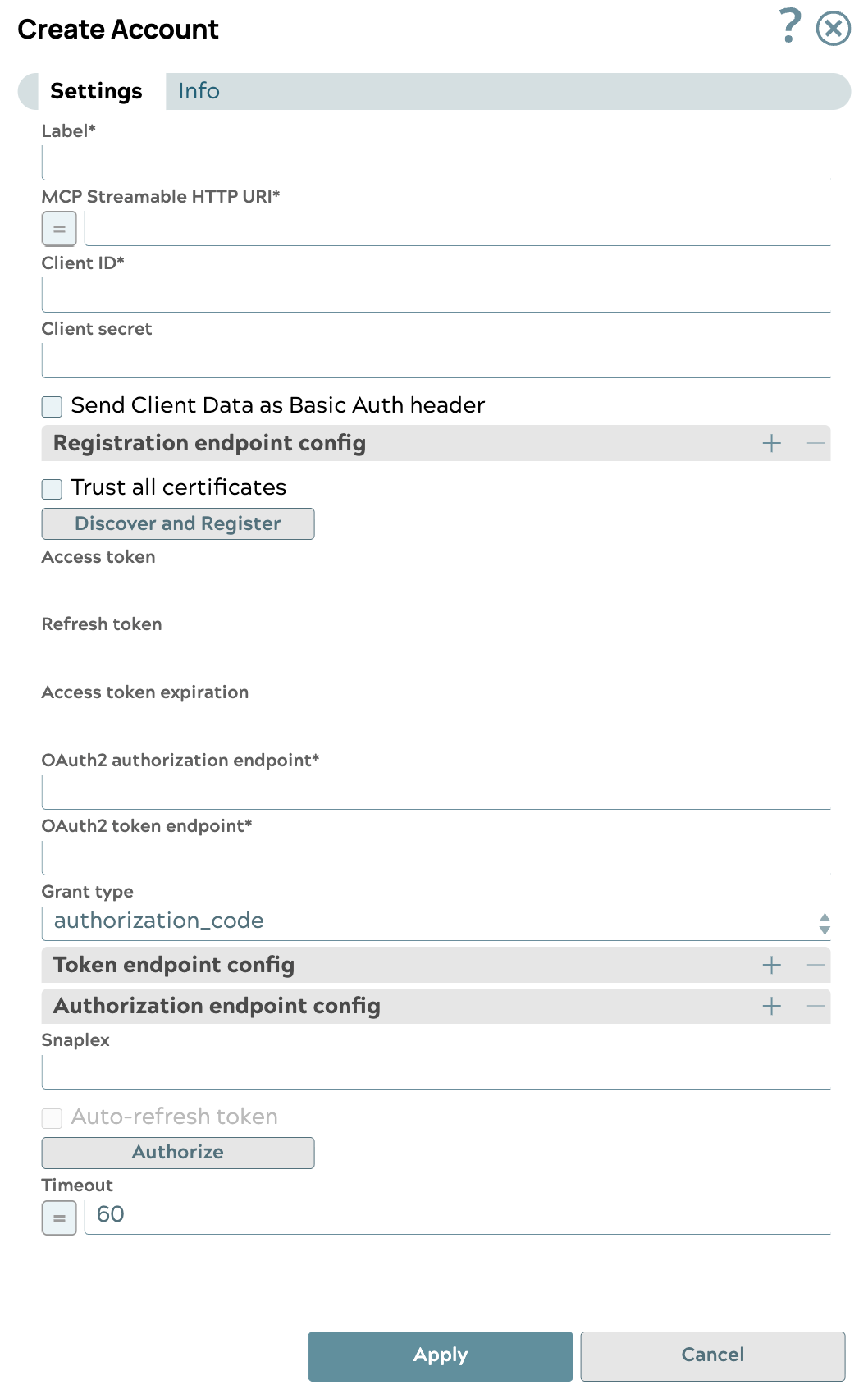
You can use this account type to connect MCP Client Snaps to Streamable HTTP Servers using OAuth2 authentication.
Prerequisites
- A valid MCP Streamable HTTP URI and required header fields if necessary for an MCP Server.
- A valid Client ID, Client secret, OAuth2 endpoint, and OAuth2 token.
Account settings
- Expression icon (
 ): Allows using
JavaScript syntax to access SnapLogic Expressions to set field values dynamically (if
enabled). If disabled, you can provide a static value. Learn more.
): Allows using
JavaScript syntax to access SnapLogic Expressions to set field values dynamically (if
enabled). If disabled, you can provide a static value. Learn more. - SnapGPT (
 ): Generates SnapLogic Expressions
based on natural language using SnapGPT. Learn
more.
): Generates SnapLogic Expressions
based on natural language using SnapGPT. Learn
more. - Suggestion icon (
 ): Populates a
list of values dynamically based on your Snap configuration. You can select only one
attribute at a time using the icon. Type into the field if it supports a comma-separated
list of values.
): Populates a
list of values dynamically based on your Snap configuration. You can select only one
attribute at a time using the icon. Type into the field if it supports a comma-separated
list of values. - Upload
 : Uploads files. Learn more.
| Field/Field set | Type | Description |
|---|---|---|
| Label | String |
Required. Specify the name for the account. We
recommend updating the account name if there is more than one account of
the same type in your project. Default value: N/A Example: Ping OAuth2 Account |
| MCP Streamable HTTP URI | String/Expression |
Required. The URI of the MCP Streamable HTTP server to connect to. Default value: N/A Example: HTTP MCP |
| Client ID | String |
Required. Specify the client ID associated with
your account. You can create the client ID as advised by your
application provider. Default value: N/A Example: p364e45x-953x-460p-9pb0-934xep16p693 |
| Client secret | String |
Required. Specify the client secret associated
with your account. You can create the client secret as advised by your
application provider. Default value: N/A Example: <Encrypted> |
| Send Client Data as Basic Auth Header | Checkbox | Select this checkbox to send the client information as a header to
the OAuth endpoint. Default status: Deselected |
| Registration endpoint config | Use this field set to
provide custom properties for the Registration endpoint. Click the + or
- icons to add or remove configuration rows. This field set comprises
the following fields:
|
|
| Trust all certificates | Checkbox | Select this checkbox to bypass TLS certificate checks for HTTPS requests. |
| Discover and Register | Checkbox | Select this checkbox to dynamically register the client with the authorization server using the provided MCP endpoint and parameters. |
| Access token | String | Auto-generated after authorization. Specify the token that SnapLogic
uses to make API requests on behalf of the user associated with the
client ID. Default value: N/A Example: <Encrypted> |
| Refresh token | String | Auto-generated after authorization. Specify the refresh token
associated with your account. If the refresh token is stored, then
the access token can be refreshed automatically before it
expires. You should retrieve the Refresh token when setting up the account for the endpoint, where the OAuth2 flow is executed and the resulting refresh token is stored in this field. If the refresh token is stored, then the access token can be refreshed automatically before it expires. Default value: N/A Example: <Encrypted> |
| Access token expiration | Integer | Auto-generated after authorization. The access token
expiration value, in seconds.
Default value: Current Time + 3600 seconds Example: 10000s |
| Header authenticated | Checkbox | Select this checkbox to indicate that the endpoint uses bearer header
authentication.
Default status: Deselected |
| OAuth2 Endpoint | String | Specify the URL of the endpoint that authorizes the application. Default value: N/A Example: https://login.microsoftonline.com/common/oauth2/v2.0/authorize |
| OAuth2 Token endpoint | String | Specify the URL of the endpoint that retrieves the token for an
authenticated account. Default value: N/A Example: https://login.microsoftonline.com/common/oauth2/token |
| Grant Type | Dropdown list |
Select one of the following methods for authorization:
Default value: Authorization Code Example: client_credentials |
| Username | String |
Appears when Password is selected. The username required by the password grant type Default value: N/A Example: admin101 |
| Password | String |
Appears when Password is selected. The password required by the password grant type Default value: N/A Example:xyzyx-zyzxz-yxzx
|
| Send client ID in request body | Checkbox |
Still send the Client ID in the request body when using the authorization_code grant type Default status: Deselected |
| Token endpoint config | Use this field set to
provide custom properties for the OAuth2 token endpoint. Click the + or
- icons to add or remove configuration rows. This field set comprises
the following fields:
|
|
| Token endpoint parameter | String | Define an optional token endpoint parameter. Default value: N/A Example: N/A |
| Token endpoint parameter value | String | Enter the value associated with the optional endpoint parameter
defined above. Default value: N/A Example: N/A |
| Authorization endpoint config | Use this field set to
provide custom properties for the OAuth2 auth endpoint. Click the + or -
icons to add or remove configuration rows. This field set comprises
the following fields:
|
|
| Auth endpoint parameter | String | Define an optional token endpoint parameter. Default value: N/A Example: N/A |
| Auth endpoint value | String | Enter the value associated with the authorization endpoint parameter
defined above. Default value: N/A Example: N/A |
| Snaplex | String | Specify the Snaplex path to be used for OAuth2 operations. Note:
Default value: N/A Example: /snaplogic/shared/cloud |
| Auto-refresh token | Checkbox | Disabled. Auto-refresh is not supported in this account. Default status: Deselected |
| Authorize | Button | Click this button to authorize the OAuth2 account using the credentials provided in the Client ID, Client Secret, OAuth2 Endpoint, and OAuth2 Token fields. |
| Timeout | Integer/Expression |
The timeout for the MCP SSE connection. Default value: 60 Example: 60 |