


Athena Bulk Upsert
Overview
- This is a Write-type Snap.
 Does not support Ultra Tasks
Snap views
| Type | Description | Examples of upstream and downstream Snaps |
|---|---|---|
| Input | This Snap has one document input views. All input documents are written into S3 files in ORC or Parquet format. | |
| Output | This Snap has one document output view. | |
| Learn more about Error handling. | ||
Snap settings
- Expression icon (
 ): Allows using
pipeline parameters to set field values dynamically (if enabled). SnapLogic Expressions
are not supported. If disabled, you can provide a static value.
): Allows using
pipeline parameters to set field values dynamically (if enabled). SnapLogic Expressions
are not supported. If disabled, you can provide a static value. - SnapGPT (
 ): Generates SnapLogic Expressions
based on natural language using SnapGPT. Learn
more.
): Generates SnapLogic Expressions
based on natural language using SnapGPT. Learn
more. - Suggestion icon (
 ): Populates a
list of values dynamically based on your Snap configuration. You can select only one
attribute at a time using the icon. Type into the field if it supports a comma-separated
list of values.
): Populates a
list of values dynamically based on your Snap configuration. You can select only one
attribute at a time using the icon. Type into the field if it supports a comma-separated
list of values. - Upload
 : Uploads files. Learn more.
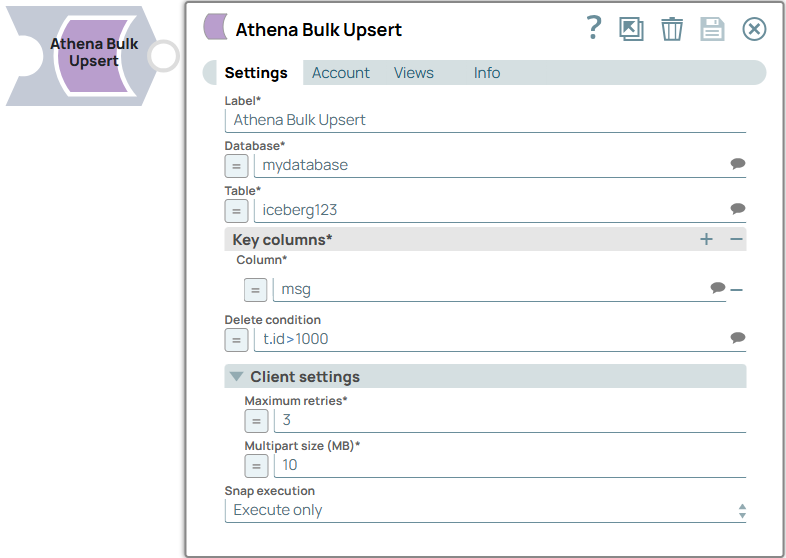
| Field/Field set | Type | Description |
|---|---|---|
| Label*
|
String | Specify a unique name for the Snap. Modify this to be more appropriate, especially if more than one of the same Snaps is in the pipeline. Default value: Athena Bulk Upsert Example: Athena Bulk Upsert - Client list |
| Database | String/Expression/ Suggestion | Required. Specify the name of the Athena database, that is a logical grouping of Athena tables. Default value: N/A Example: mydatabase |
| Table | String/Expression/ Suggestion | Required. Specify the target Athena table to perform bulk update or insert operation. Default value: N/A Example: Sales_db |
| Key columns | Required. Use
this field set to specify key column names that match values between the input data
and the target table. Important:
|
|
| Column | String/Expression/ Suggestion | Required. Specify the list of column names to match values from input data and target table. Default value: N/A Example: partnername |
| Delete condition | String/Expression/ Suggestion | Specify a condition to delete rows from the target table when key column values
match this condition. Important:
Default value: N/A Example: t.id=s.userid |
| Client settings | Use this field set to define the client settings. | |
| Maximum retries | Integer/Expression | Required. Specify the maximum number of retry attempts.
Default value: 3 Example: 10 |
| Multipart size (MB) | Integer/Expression | Required. Specify the size of each part in megabytes
(MB) used during S3 multipart upload.
Important: The maximum number of
parts in the S3 multipart upload is 10,000. Therefore, if the expected S3 object
is larger than 100 GB, you must enter a value larger than 10. The maximum size of
S3 object is 5 TB.
Minimum value: 5 Maximum value 5000Default value: 10 Example: 100 |
| Snap execution
|
Dropdown list |
Choose one of the three modes in
which the Snap executes. Available options are:
Default value: Execute only Example: Validate & Execute |
Troubleshooting
It is not an Iceberg table: %s
Athena Bulk Upsert Snap supports only Iceberg table type.
Use an Iceberg table in the Table field.