


PolyBase Bulk Load
Overview
The PolyBase Bulk Load Snap performs a bulk load operation from the input view document stream to the target table.
The Snap supports SQL Server database with PolyBase feature, which includes SQL Server 2016 (on-premise) and Data Warehouse. It first formats the input view document stream to a temporary CSV file in Azure Blob storage and then sends a bulk load request to the database to load the temporary Blob file to the target table.
This Snap enables the following ETL operations/flows:
- Loads data into a temporarily created Azure blob. Executes the SQL server command to load the above blob into the target table.
- The Snap reads all the incoming documents and writes them to a temporarily created blob on the Azure storage.
- The Snap executes the following DB commands in sequence:
- Create a master key, only if it does not exist
- Create the Database scoped credentials, only if it does not exist
- Create an external data source
- Create an external file format
- Create an external table (blob will be copied this external table)
- Copy the data from external table to the destination table
- This is a Write-type Snap.
 Works in Ultra Tasks
Supported Accounts
Prerequisites
- Bulk load requires a minimum of SQL Server 2016 to work properly.
- The database should have PolyBase feature enabled in it.
Limitations
- If the Snap fails while loading blob into the DB, the temporary blob created remains un-deleted so the data is not lost.
- Microsoft PolyBase does not support varchar entries which contain more than 1000 characters. As a workaround, if any row contains a varchar entry with more than 1000 characters, use the Azure SQL - Bulk Load Snap instead.
Snap views
| Type | Description | Examples of upstream and downstream Snaps |
|---|---|---|
| Input |
This Snap has exactly one document input view. |
|
| Output |
This Snap has at most one document output view. If an output view is available, it conveys that the bulk load operations were carried out successfully. |
|
| Learn more about Error handling. | ||
Examples
- Basic Use Case (PolyBase Bulk Load): This example demonstrates a simple ETL pipeline using JSON Generator, Mapper, and PolyBase Bulk Load Snaps to load records into a SQL Server table with PolyBase enabled.
- Advanced Use Case (PolyBase Bulk Load): This example demonstrates an enterprise ETL pipeline combining data extraction, transformation, and PolyBase bulk loading into a SQL Server table.
Snap settings
| Field/Field set | Description |
|---|---|
Label
String |
Required. Specify a unique name for the Snap. Modify this to be more appropriate, especially if more than one of the same Snaps is in the pipeline. Default value: PolyBase Bulk Load Example: PolyBase Bulk Load |
Schema Name
String/Expression/ Suggestion |
The database schema name. In case it is not defined, then the suggestion for
the table name will retrieve all tables names of all schemas. The property is
suggest-able and will retrieve available database schemas during suggest values.
Note: The values can be passed using the pipeline parameters but not the upstream
parameter.
Default value: None Example: SYS |
Table Name
String/Expression/ Suggestion |
Required. The target table to load the incoming data
into. Note: The values can be passed using the pipeline parameters but not the
upstream parameter. Default value: None Example: users |
Create table if not present
Checkbox |
Select this property to create target table in case it does not exist;
otherwise the system will throw a table not found error. Default value: Deselected Example: Selected |
Schema source
Dropdown list |
Specifies if the schema must be fetched from the input document or from the existing table while loading data into the temporary blob at the time of bulk upload. The options available are:
Default value: Schema from provided input |
Use type default
Dropdown list |
Specifies how to handle any missing values in input documents. The options available are TRUE and FALSE. If you select TRUE, the Snap replaces every missing value in the input document with its default value in the external table. Supported data types and their default values are:
If you select FALSE, the Snap replaces every missing value in the input document with a null value in the external table. Default value: TRUE |
Bulk insert mode
Dropdown list |
Specifies if the incoming data should be appended to the target table or
overwrite the existing data in that table. The options available are:
Note: If you select Overwrite, the Snap overwrites the existing table and
schema with the input data. Default value: Append Example: Overwrite |
Database scoped credential
String/Expression |
The Scoped credential is used to execute the queries in the bulk load
operation. To do bulk load via storage blob, external database resources are
required to be created. This, in turn, requires a "Database Scoped Credential".
Refer to Microsoft documentation for additional
information. Note: Provide the scoped credentials if one exists on the DB or the
Snap will create the temporary scoped credentials and deletes them once the
operation is completed.
Default value: None |
Encoding
Dropdown list |
The encoding standard for the input data to be loaded on to the database. The
available options are:
Default value: None |
Snap execution
Dropdown list |
Choose one of the three modes in
which the Snap executes. Available options are:
|
Troubleshooting
| Error | Cause | Resolution |
|---|---|---|
| Snap fails when writing to a data warehouse | Invalid row data caused the bulk load operation to fail. | The Snap writes a new blob in the Azure container. This new blob highlights the first invalid row that caused the bulk load operation to fail.
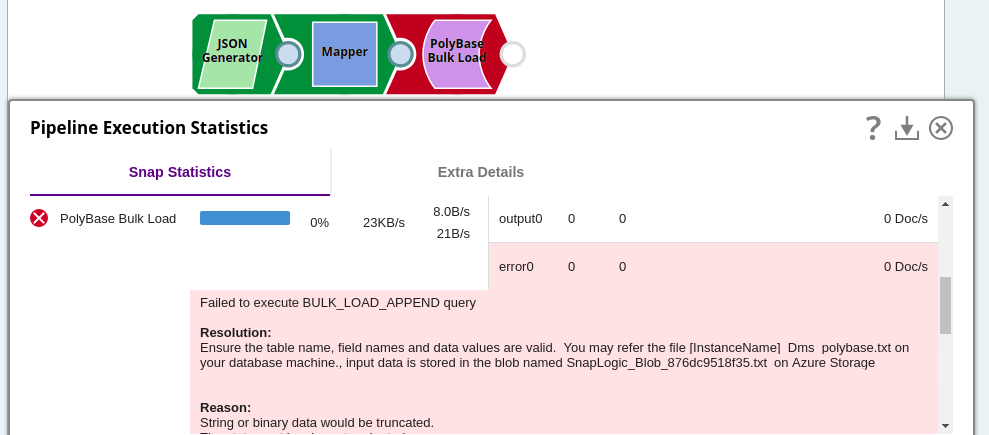 |
| Connection or authentication errors | Invalid credentials or configuration. |
|