


ServiceNow Account
Overview
You can use this account type to connect ServiceNow Snaps with data sources that use ServiceNow account.
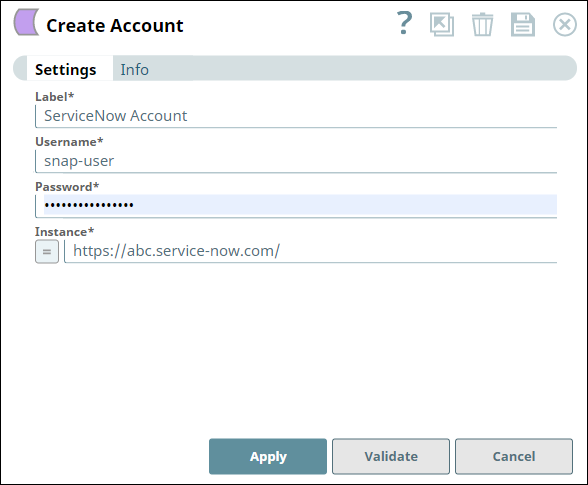
Account settings
Legend:
- Expression icon (
 ): Allows using
JavaScript syntax to access SnapLogic Expressions to set field values dynamically (if
enabled). If disabled, you can provide a static value. Learn more.
): Allows using
JavaScript syntax to access SnapLogic Expressions to set field values dynamically (if
enabled). If disabled, you can provide a static value. Learn more. - SnapGPT (
 ): Generates SnapLogic Expressions
based on natural language using SnapGPT. Learn
more.
): Generates SnapLogic Expressions
based on natural language using SnapGPT. Learn
more. - Suggestion icon (
 ): Populates a
list of values dynamically based on your Snap configuration. You can select only one
attribute at a time using the icon. Type into the field if it supports a comma-separated
list of values.
): Populates a
list of values dynamically based on your Snap configuration. You can select only one
attribute at a time using the icon. Type into the field if it supports a comma-separated
list of values. - Upload
 : Uploads files. Learn more.
| Field/Field set | Description |
|---|---|
| Label
|
Required. Specify a unique label for the account
instance. Default value: N/A Example: ServiceNow Account |
| Username
|
Required. Specify the name for this account. Default value: N/A Example: snap-user |
| Password
|
Required. Specify the password for the account. Default value: N/A Example: o8jkll0# |
| Instance
|
Required. Specify the name of the ServiceNow instance
(subdomain). For example, if https://abc.service-now.com is the URL
of your ServiceNow instance then abc is the instance name. Default value: N/A Example: abc |
Note: Click Validate
after entering the required details to ensure that all fields have been filled accurately.
Click Apply to save the settings.