


Amazon Bedrock MKB Ingest Documents
Overview
You can use this Snap to ingest documents into a CUSTOM data source of an
Amazon Bedrock Managed Knowledge Base (MKB) so that they become searchable through retrieval.
The Snap supports three ways of supplying document content—inline text, inline Base64-encoded
bytes, or a reference to a file already stored in Amazon S3—plus optional custom metadata per
document.
To reduce API calls, the Snap buffers incoming documents and submits them in batches (up to 10 documents per request, the Amazon Bedrock API maximum). Indexing on the Amazon Bedrock side is asynchronous, so the Snap output reflects each document's submission status, not final indexing completion.
CUSTOM data sources support direct document ingestion. When the
input view is Binary, the incoming bytes are used directly as the
document content, and the Content type field is hidden. You must still
provide a MIME type for the binary content.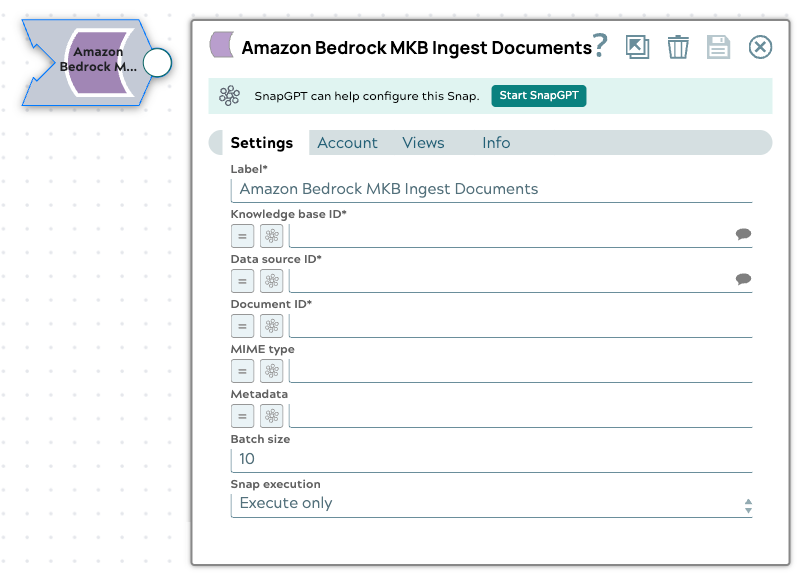
- This is a Write-type Snap.
 Works in Ultra Tasks
Prerequisites
- Amazon Bedrock Account
- An Amazon Bedrock Managed Knowledge Base with at least one
CUSTOMdata source. See Create a knowledge base in the Amazon Bedrock documentation.
Snap views
| Type | Description | Examples of upstream and downstream Snaps |
|---|---|---|
| Input | This Snap requires exactly one document or binary input view. When the input view is Binary, the incoming bytes are used as the document's byte content. | |
| Output | This Snap has exactly one document output view. The Snap writes one output
document per flushed batch (or per input document when Batch
size is 1), containing the IngestKnowledgeBaseDocuments
API response with the per-document submission status. |
Mapper |
| Error | Batch-level ingestion failures are routed to the error view, unless Batch size is 1, in which case the error is raised as a normal per-record error tied to that input document. | N/A |
Snap settings
- Expression icon (
 ): Allows using
JavaScript syntax to access SnapLogic Expressions to set field values dynamically (if
enabled). If disabled, you can provide a static value. Learn more.
): Allows using
JavaScript syntax to access SnapLogic Expressions to set field values dynamically (if
enabled). If disabled, you can provide a static value. Learn more. - SnapGPT (
 ): Generates SnapLogic Expressions
based on natural language using SnapGPT. Learn
more.
): Generates SnapLogic Expressions
based on natural language using SnapGPT. Learn
more. - Suggestion icon (
 ): Populates a
list of values dynamically based on your Snap configuration. You can select only one
attribute at a time using the icon. Type into the field if it supports a comma-separated
list of values.
): Populates a
list of values dynamically based on your Snap configuration. You can select only one
attribute at a time using the icon. Type into the field if it supports a comma-separated
list of values. - Upload
 : Uploads files. Learn more.
| Field/Field set | Type | Description |
|---|---|---|
| Label*
|
String |
Specify a unique name for the Snap. Modify this to be more appropriate, especially if more than one of the same Snaps is in the pipeline. Default value: Amazon Bedrock MKB Ingest Documents Example: Ingest product docs |
| Knowledge base ID | String/Expression/ Suggestion |
Required. Specify the unique identifier of the Managed Knowledge Base to ingest into. The Snap suggests available knowledge bases from the configured account. The suggested value uses the following format: KNOWLEDGE_BASE_ID:KNOWLEDGE_BASE_NAME Only the portion before the colon is used as the knowledge base ID. Default value: N/A Example: MOCKKBID:mock-knowledge-base |
| Data source ID | String/Expression/ Suggestion |
Required. Specify the unique identifier of the data source
to ingest into. Only Default value: N/A Example: MOCKDSID:mock-data-source |
| Document ID | String/Expression |
Required. Specify a stable, custom identifier for the document. Reusing the same identifier updates (upserts) the existing document rather than creating a duplicate. Default value: N/A Example: doc-1 |
| Content type | Dropdown list |
Select how the document content is supplied. This field is hidden when the input view is Binary (the content type is implicitly bytes in that case). The available options are:
Default value: TEXT Example: S3 |
| Text content | String/Expression |
Specify the inline text content of the document. This field is used only when
Content type is Default value: N/A Example: hello world |
| Byte content | String/Expression |
Specify the Base64-encoded file content of the document. This field is used only
when Content type is Default value: N/A Example: JVBERi0xLjQKJ... |
| MIME type | String/Expression |
Specify the MIME type of the byte content. Required whenever byte content is
used—that is, when Content type is Default value: N/A Example: application/pdf |
| S3 URI | String/Expression |
Specify the S3 URI of the document. This field is used only when
Content type is Default value: N/A Example: s3://my-bucket/manuals/manual-v2.pdf |
| Metadata | String/Expression |
Specify optional key-value metadata attributes to attach to the document. Values may be a string, number, boolean, or list of strings. The expression must evaluate to an object; a non-map value raises a configuration error. Default value: N/A Example: { "category": "faq" } |
| Batch size | Integer |
Specify the number of documents to buffer before sending an ingestion request. In
an Ultra Task, only Minimum value: 1 Maximum value 10 Default value: 10 Example: 10 |
| Snap execution
|
Dropdown list |
Choose one of the three modes in
which the Snap executes. Available options are:
Default value: Validate & Execute Example: Execute only |
Limitations
- Documents are buffered per knowledge base and data source pair. If either value changes between input documents, the pending buffer is flushed before buffering under the new pair. The buffer is also flushed automatically when it reaches Batch size, and any remaining partial batch is flushed when the pipeline completes successfully.
- If the pipeline fails or is stopped, a pending partial batch is dropped, not submitted.
- Amazon Bedrock indexes ingested documents asynchronously. The Snap output reflects the
submission status (for example,
STARTING), not final indexing completion.
Troubleshooting
A required field is missing.
The Knowledge base ID, Data source ID, Document ID, required content field, or MIME type (when byte content is used) is missing.
Provide the missing value indicated in the error message.
The Batch size is out of range or invalid for an Ultra Task.
Batch size is set outside the range of 1 to 10, or is greater than 1 in an Ultra Task.
Set Batch size to a value from 1 to 10. In an Ultra Task, set it to 1.