


Power BI OAuth2 Account
Overview
Use this account type to connect Microsoft Power BI Snaps with the Power BI REST APIs using OAuth2 authorization.
Prerequisites
- A valid Azure application with all the required API permissions.
- A valid client ID and client secret.
Required scopes
The following table lists the scope that each operation requires:
| Operation | Scope |
|---|---|
| Add Dashboard | Content.Create |
| Clone Tile | Dashboard.ReadWrite.All |
| Get Dashboard | Dashboard.ReadWrite.All or
Dashboard.Read.All |
| Get Tiles | Dashboard.ReadWrite.All or
Dashboard.Read.All |
| Get Dataset | Dataset.ReadWrite.All or
Dataset.Read.All |
| Get Datasources | Dataset.ReadWrite.All or
Dataset.Read.All |
| Get Direct Query Refresh Schedule | Dataset.ReadWrite.All or
Dataset.Read.All |
| Get Gateway Datasources | Dataset.ReadWrite.All or
Dataset.Read.All |
| Get Parameters | Dataset.ReadWrite.All |
| Get Refresh History | Dataset.ReadWrite.All or
Dataset.Read.All |
| Get Refresh Schedule | Dataset.ReadWrite.All or
Dataset.Read.All |
| Update Datasources | Dataset.ReadWrite.All |
| Update Direct Query Refresh Schedule | Dataset.ReadWrite.All |
| Update Parameters | Dataset.ReadWrite.All |
| Update Refresh Schedule | Dataset.ReadWrite.All |
| Bind To Gateway | Dataset.ReadWrite.All |
| Delete Dataset | Dataset.ReadWrite.All |
| Get Datasource | Dataset.ReadWrite.All or
Dataset.Read.All |
| Get Datasource Status | Dataset.ReadWrite.All |
| Get Datasource Users | Dataset.ReadWrite.All or
Dataset.Read.All |
| Get Gateway | Dataset.ReadWrite.All or
Dataset.Read.All |
| Update Datasource | Dataset.ReadWrite.All |
| Add Datasource User | Dataset.ReadWrite.All |
| Get Groups | Workspace.Read.All or
Workspace.ReadWrite.All |
| Get Import | Dataset.ReadWrite.All or
Dataset.Read.All |
| Post Import | Dataset.ReadWrite.All |
| PostDataset | Dataset.ReadWrite.All |
| Datasets PostRows | Dataset.ReadWrite.All |
| Datasets PutTable | Dataset.ReadWrite.All |
| Reports - Get Datasources | Report.ReadWrite.All or
Report.Read.All |
| Get Report | Report.ReadWrite.All or
Report.Read.All |
| Reports - Update Datasources | Reports.ReadWrite.All |
| Update Report Content | Report.ReadWrite.All |
| Clone Report | Content.Create |
| Delete Report | Report.ReadWrite.All |
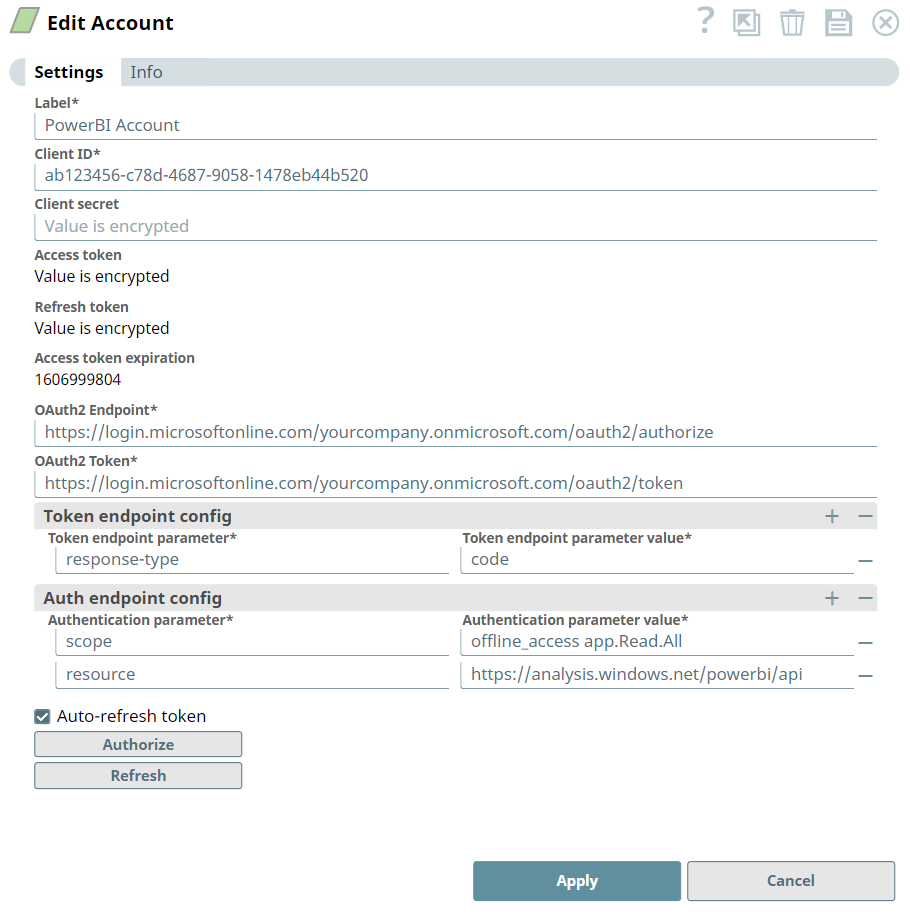
Account settings
| Field/Field set | Description |
|---|---|
|
Label* String
|
Required. Specify a unique name for the account. Default value: N/A Example: Power BI OAuth2 Production |
|
Client ID* String
|
Required. Enter the client ID associated with your application in the Azure portal. You can create the client ID as advised by your application provider. Default value: N/A Example:
|
|
Client secret* String
|
Required. Enter the client secret associated with your application in the Azure portal. You can create the client secret as advised by your application provider. Default value: N/A Example: |
|
Access token String
|
Auto-generated after authorization. The token that SnapLogic uses to make API requests on behalf of the user associated with the client ID. Default value: N/A |
|
Refresh token String
|
Auto-generated after authorization. The refresh token associated with your account. If the refresh token is stored, the access token can be refreshed automatically before it expires. Default value: N/A |
|
Access token expiration Integer
|
Auto-generated after authorization. The access token expiration value, in seconds. Default value: N/A Example: |
|
Header authenticated Checkbox
|
Select this checkbox to indicate that the endpoint uses bearer header authentication. Default value: Deselected |
|
OAuth2 Endpoint* String
|
Required. Enter the URL of the endpoint that authorizes the application. Default value: N/A Example:
|
|
OAuth2 Token* String
|
Required. Enter the URL of the endpoint that retrieves the token for an authenticated account. Default value: N/A Example:
|
| Token endpoint config |
Use this fieldset to provide custom properties for the OAuth2 token endpoint. Click the + or - icons to respectively add or remove configuration rows. This field set contains the following fields:
|
|
Token endpoint parameter String
|
Required. Enter the token endpoint parameter. Default value: N/A Example: |
|
Token endpoint value String
|
Required. Enter the value associated with the token endpoint parameter. Default value: N/A Example: |
| Auth endpoint config |
Use this fieldset to provide custom properties for the OAuth2 authorization endpoint. Click the + or - icons to respectively add or remove configuration rows. This field set contains the following fields:
|
|
Auth endpoint parameter String
|
Required. Enter the authorization endpoint parameter. Default value: N/A Example: |
|
Auth endpoint value String
|
Required. Enter the value associated with the authorization endpoint parameter. Default value: N/A Example: |
|
Auto-refresh token Checkbox
|
Select this checkbox to refresh the access token automatically using the refresh token. If you deselect this checkbox, the access token expires and is not refreshed automatically. Default value: Deselected |
|
Authorize Button |
Click this button to authorize the account using the credentials that you provided in the Client ID, Client secret, OAuth2 Endpoint, and OAuth2 Token fields. We recommend that you click this button when you create the account for the first time. |
|
Refresh Button |
Click this button to refresh the account manually. |
Click Apply to save the account settings.
Troubleshooting
| Error | Cause | Resolution |
|---|---|---|
| General communication error | The pipeline aborted because of connection issues. | Check the network and account settings. |
| One or more required field is blank |
You clicked Authorize in the account dialog, but one or more of the following fields is blank:
|
Enter valid details in the following fields and click Authorize:
|
| Authorization failed |
You clicked Apply after an authorization attempt failed, so the following fields are empty:
|
Enter valid details in the following fields and click Authorize:
|