


Oracle HCM Delete
Supported Accounts
- This is a Write-type Snap.
 Works in Ultra Tasks
Snap views
| Type | Description | Examples of upstream and downstream Snaps |
|---|---|---|
| Input | Each input document provides the data required to identify the record to delete from the target Oracle HCM instance. | |
| Output | Each output document contains details associated with the outcome of the Oracle HCM instance. | |
| Learn more about Error handling. | ||
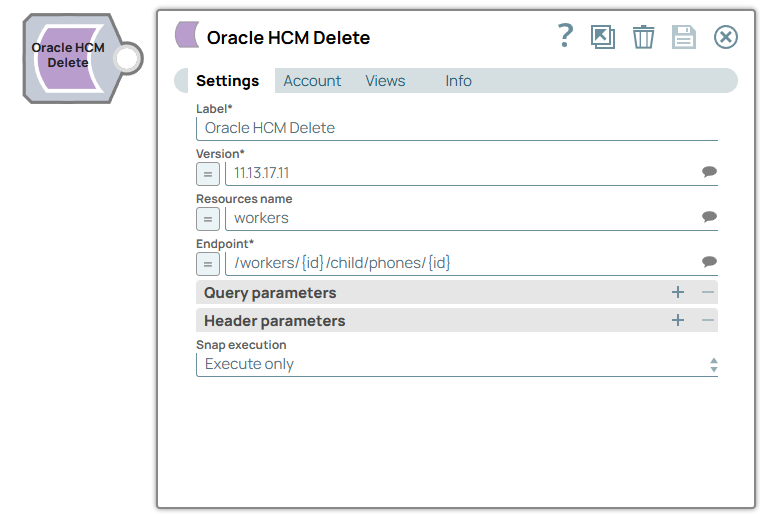
Snap settings
| Field/Field set | Description |
|---|---|
Label*
String
|
Specify a unique name for the Snap. Default value: Oracle HCM Delete Example: Delete worker |
Version*
String/Expression/ Suggestion
|
Specify the Oracle HCM instance version. Default value: N/A Example: 11.13.18.05 |
Resources name
String/Expression
|
Specify the Oracle HCM resources (Tasks). The suggestion list (available resources) is populated based on the selected version. For example: absences, elementEntries, and workers. Default value: N/A Example: workers |
Endpoint*
String/Expression/ Suggestion
|
Specify the Oracle HCM endpoint. The suggestions are populated (available endpoints) based on the selected resource. For example if "worker" resource is selected, the suggestions that populate are: /workers, /workers/{id}, /workers/{id}/child/addresses/{id} For expressions, the strings must be enclosed in double quotes, {id} should be replaced with valid variable names. For variable names passed from pipeline parameter: "/workers/" + _id, "/workers/" + _worker_id + "/child/addresses/" + _address_id Default value: N/A Example: /workers |
Query parameter
String
|
Specify the name of the query parameter. Default value: N/A Example: id |
Query parameter value
String/Expression
|
Specify the value that you want to assign to the parameter. Default value: N/A Example: $widget.id |
Header parameter
String
|
Specify the name of the HTTP header. Default value: N/A Example: content-type |
Header parameter value
String/Expression
|
Specify the value that you want to assign to the HTTP header. Default value: N/A Example: application/json |
Snap execution
Dropdown list
|
Choose one of the three modes in
which the Snap executes. Available options are:
|