


IBM MQ Producer
Overview
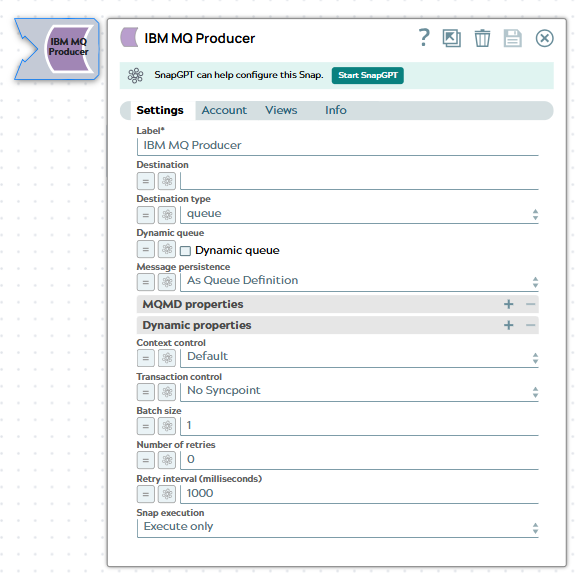
The IBM MQ Producer Snap sends messages to IBM MQ queues or topics. This Snap enables integration with IBM MQ messaging systems, supporting both point-to-point (queue) and publish-subscribe (topic) messaging patterns. Use this Snap to produce messages with configurable message options, MQMD properties, custom properties, and transaction control capabilities.
Supported Accounts
- This is a Write-type Snap.
 Works in Ultra Tasks
Prerequisites
- An IBM MQ Account with valid credentials and access permissions
- Access to the target IBM MQ queue manager
- Network connectivity between the Snaplex and IBM MQ server
- Appropriate permissions to create dynamic queues (if using the Dynamic Queue feature)
Snap views
| Type | Description | Examples of upstream and downstream Snaps |
|---|---|---|
| Input |
Accepts documents from upstream Snaps. Each input document is processed and sent as a message to the specified IBM MQ destination. |
|
| Output |
Outputs a document for each successfully sent message containing message metadata including message ID and correlation ID. |
|
| Learn more about Error handling. | ||
Snap settings
| Field/Field set | Type | Description |
|---|---|---|
| Label*
|
String |
Specify a unique name for the Snap. Modify this to be more appropriate, especially if more than one of the same Snaps is in the pipeline. Default value: IBM MQ Producer |
| Destination | String/Expression |
Required. The name of the IBM MQ queue or topic to which messages will be sent. Example: |
| Destination type | Dropdown list |
Specify the type of destination to which messages are sent:
Default value: Queue |
| Dynamic queue | Checkbox |
When enabled, it creates a dynamic queue if it does not already exist. Dynamic queues based on a model queue (the model queue can be permanent or temporary). Default value: Deselected |
| Model queue name | String/Expression |
Specify the name of the model queue to use as a template for creating the dynamic queue. The model queue defines the attributes (such as maximum depth, message persistence, and access permissions). The model queue must be created or present in MQ. This field appears only when the Dynamic queue is enabled. Example: |
| Message persistence | Dropdown list |
Specify the persistence mode for messages:
Default value: As Queue Definition |
| MQMD Properties | ||
| Property name | Integer/Expression |
Specify the MQMD property name. Example: |
| Property value | Integer/String/Expression |
Specify report options for the message. Accepts integer values or IBM MQ constant names. Example: |
| MsgType | Integer/Expression |
Specify the message type indicator. Example: |
| Expiry | Integer/Expression |
Specify the message expiration time in tenths of a second. A value of -1 indicates no expiration. Example: |
| Feedback | Integer/Expression |
Specify the feedback code for report messages. |
| Encoding | Integer/Expression |
Specify the numeric encoding used for numeric data in the message. Example: |
| Custom Properties | ||
| Custom Properties | Table |
Specify custom properties as key-value pairs that are stored in the RFH2 (Rules and Formatting Header version 2) usr folder. These values are present in XML format in the |
| Put Message Options (PMO) | ||
| Context control | Dropdown list |
Controls the message context (identity and origin information) that is set when the message is put on the queue:
Note: Setting PutDate or PutTime in MQMD Properties requires Context Control to be set to Set All Context.
Default value: Set All Context |
| Syncpoint control | Dropdown list |
Enables transaction coordination for put operations:
Note: When Syncpoint is selected, you must use the IBM MQ Acknowledge Snap downstream to commit or rollback the transaction.
Default value: No Syncpoint |
| Batch size | Integer/Expression |
Specify the number of messages to send per batch. It determines how many messages are included in a single transactional unit of work. This field is dynamic and appears only when you select Syncpoint in the Syncpoint control field. Note: When Syncpoint Control is enabled and an error record occurs within a batch,
all messages in that batch from the failed record is rolled back. The next record
then begins a new batch.
Default value: 1 Example: |
| Number of retries | Integer |
Specify the number of retry attempts for connection or network errors. When set to 0, the Snap does not retry on failure. Default value: 0 |
| Retry Interval (milliseconds) | Integer |
Specify the wait time in milliseconds between retry attempts. Default value: 1000 Example: |
| Snap execution | Dropdown list | Choose one of the three modes in which the Snap executes. Available options
are:
|
Troubleshooting
| Error | Resolution |
|---|---|
| MQRC_NOT_AUTHORIZED (2035) | Verify that the IBM MQ Account has appropriate permissions to put messages on the queue or topic. Check the queue manager's authority records. |
| MQRC_UNKNOWN_OBJECT_NAME (2085) | Confirm that the queue or topic name is correct and exists on the queue manager. If using Dynamic Queue, verify the model queue name is correct. |
| MQRC_Q_FULL (2053) | The queue has reached its maximum depth and cannot accept more messages. Remove messages from the queue or increase the queue's maximum depth setting. |
| MQRC_CONNECTION_BROKEN (2009) | Check network connectivity between the Snaplex and IBM MQ server. Verify firewall rules allow traffic on the specified port. |
| MQRC_PUT_INHIBITED (2051) | The queue is configured to inhibit put operations. Change the queue's put setting to enabled or use a different queue. |
| MQRC_OPTION_NOT_VALID_FOR_TYPE (2046) | The specified put options are not valid for the destination type. For example, setting PutDate/PutTime requires Context Control to be set to Set All Context. |
| Invalid MQMD property value | Verify that MQMD property values are within valid ranges. For example, Priority must be between 0 and 9, and Expiry must be a non-negative integer. |