


Open Table Iceberg - Select
Overview
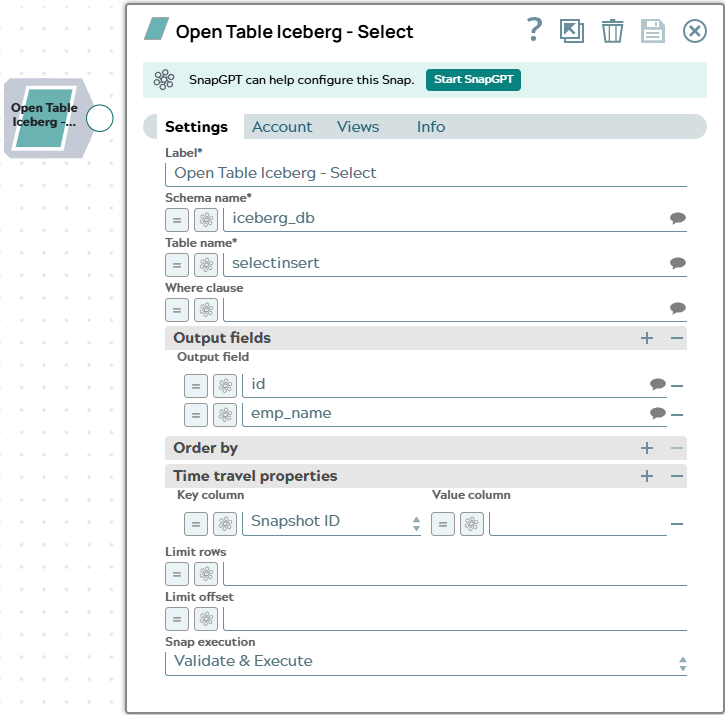
The Open Table Iceberg - Select Snap executes a SQL SELECT statement on an Iceberg catalog and outputs each result row as a document. You can filter rows using a WHERE clause, limit and offset the result set, specify which columns to return, and query historical data using time travel.
An optional second output view emits schema metadata — one document per column — which can be connected to the second input view of the Open Table Iceberg - Insert Snap to replicate the source table schema in the target.
- This is a Read-type Snap.
 Works in Ultra Tasks
Known issues
- Open Table Iceberg Snaps may abort with zero output and no actionable error when executed on a JRE 21 Snaplex; the same pipelines execute successfully on a JRE 11 Snaplex.
Prerequisites
- A configured Open Table Iceberg Account with access to the target catalog and schema.
- The target schema (namespace) and table must exist in the Iceberg catalog.
Supported Accounts
Snap views
| Type | Description | Examples of upstream and downstream Snaps |
|---|---|---|
| Input |
This Snap has at most one document input view. When connected, the input document can supply expression values for Snap settings fields. |
|
| Output |
The primary output view emits one document per result row. Each document contains the column names and values returned by the SELECT statement. An optional second output view emits one document per column with the following
fields: |
|
| Learn more about Error handling. | ||
Snap settings
| Field/Field set | Description |
|---|---|
Label* String |
Specify a unique name for the Snap. Modify this to be more appropriate, especially if more than one of the same Snaps is in the pipeline. Default value: Open Table Iceberg - Select Example: Iceberg Read Orders |
Schema Name*
String/Expression/ Suggestion |
Specify the schema (namespace) that contains the table to query. Click the
Suggest icon Default value: None Example: |
Table Name*
String/Expression/ Suggestion |
Specify the name of the Iceberg table to query. Click the Suggest icon
Default value: None Example: |
Where Clause
String/Expression/ Suggestion |
Specify a SQL WHERE predicate to filter the rows returned. Do not include the
Default value: None Example: |
Output Fields — Use this field set to specify
which columns to include in the output. Click  to
add a row and specify one column name per row. If empty, all columns are
returned. to
add a row and specify one column name per row. If empty, all columns are
returned. |
|
Output Field
String/Expression/ Suggestion |
Specify the name of a column to include in the output. Click the Suggest icon
Default value: None Example: |
| Order By — Use this field set to define the sort
order of the result set. Click to add a row and
specify one entry per sort column. |
|
Column Names
String/Expression/ Suggestion |
Specify a comma-separated list of column names to sort by. Click the Suggest
icon Default value: None Example: |
Time Travel Properties — Use this single-row
field set to query a historical version of the Iceberg table. When populated, the
Snap adds an AS OF clause to the query. |
|
Key Column
Dropdown list |
Select the type of time travel reference to use:
Default value: Snapshot ID Example: Timestamp |
Value Column
String/Expression |
Specify the snapshot ID (integer) or timestamp for time travel. Timestamps must
be in Default value: None Example: |
Limit Rows
Integer/Expression |
Specify the maximum number of rows to return. Set to Default value: None Example: |
Limit Offset
Integer/Expression |
Specify the number of rows to skip before returning results. Requires Limit Rows to be set. Default value: None Example: |
|
Snap execution Dropdown list
|
Choose one of the three modes in
which the Snap executes. Available options are:
Default value: Validate & Execute Example: Execute only |
 to select
from available namespaces in the catalog.
to select
from available namespaces in the catalog.Troubleshooting
| Error | Reason | Resolution |
|---|---|---|
| Invalid identifier | The schema name or table name contains characters not allowed in SQL identifiers. | Use only letters, digits, and underscores, and ensure the name begins with a letter or underscore. |
| Invalid snapshot ID | The value provided in the Value Column for Snapshot ID time travel is not a valid integer. | Provide a valid long integer as the Snapshot ID. |
| Invalid time travel timestamp | The timestamp provided does not match the expected format. | Use YYYY-MM-DD HH:MM:SS.mmm or ISO-8601 format for the
timestamp value. |
| Offset specified without a limit | Limit Offset is set but Limit Rows is not. | Set a value for Limit Rows when using Limit Offset. |