


Neo4j Account
Overview
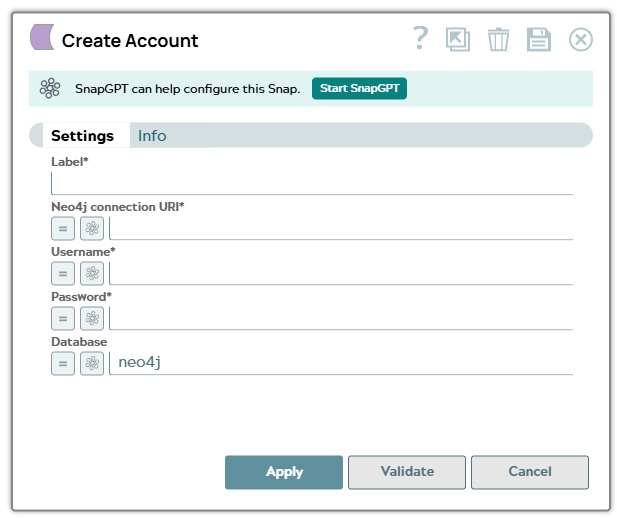
Use this account type to connect Neo4j Snaps to your Neo4j graph database using a connection URI and basic authentication. Expression-enabled fields allow you to supply the connection details dynamically at pipeline runtime, making this account suitable for multi-tenant pipelines or integrations that manage credentials externally.
Expression-enabled fields support Secrets Management, a SnapLogic add-on that allows you to store endpoint credentials in a third-party secrets manager such as AWS Secrets Manager, Azure Key Vault, or HashiCorp Vault. During validation and execution, pipelines obtain the credentials directly from the secrets manager. Learn more: Configure Accounts to use secrets.
Prerequisites
- A running Neo4j instance that is reachable from your Snaplex, with the Bolt connector enabled.
- A Neo4j user name and password with the privileges required for the operations you intend to run.
- Network access from the Snaplex node to the Neo4j Bolt port.
Account settings
| Field/Field set | Description |
|---|---|
| Label*
|
Specify a unique label for the account. Default value: N/A Example: |
Neo4j connection URI*
String/Expression |
Enter the Bolt connection URI of your Neo4j instance, including the scheme, host, and port. Use one of the following schemes:
Default value: None Example:
|
Username*
String/Expression |
Enter the user name of the Neo4j user that the Snaps authenticate as. Default value: None Example: |
Password*
String/Expression |
Enter the password for the Neo4j user. This field is obfuscated after saving. Default value: None Example: |
Database
String/Expression |
Enter the name of the database within the Neo4j instance that the Snaps run against. Leave the default value to use the instance's default database. Default value: neo4j Example: |
Click Apply to save the account settings.
Troubleshooting
| Error | Reason | Resolution |
|---|---|---|
| Failed to validate account: The client is unauthorized due to authentication failure | The user name or password is incorrect, or the user is not permitted to access the specified database. | Verify the Username and Password values against the credentials configured in Neo4j, and confirm that the user has access to the database named in the Database field. |
| Failed to validate account: Unable to connect to database | The connection URI is unreachable from the Snaplex, or the scheme, host, or port is incorrect. | Confirm that the Bolt connector is enabled on the Neo4j instance and that the
Snaplex node can reach the host and port in Neo4j connection
URI. For an encrypted endpoint, use the neo4j+s:// or
bolt+s:// scheme. |
| Database does not exist | The value in the Database field does not match a database on the Neo4j instance. | Enter an existing database name, or clear the field to use the instance's
default database. Run SHOW DATABASES in Neo4j to list the available
databases. |