


Azure AI Foundry API Key Account
Overview
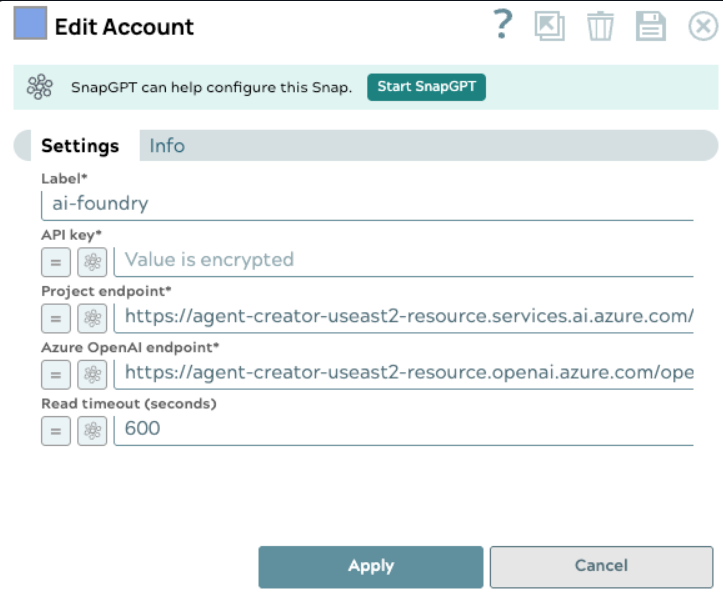
Use this account type to connect the Azure AI Foundry Chat Completions and Azure AI Foundry Chat Completions Agent Snaps to an Azure AI Foundry project endpoint. Azure AI Foundry exposes a multi-model chat completions endpoint that supports both OpenAI and non-OpenAI models (such as DeepSeek and xAI) through a single project-scoped API.
Prerequisites
- An Azure AI Foundry project. Learn more about creating an Azure AI Foundry project.
- An API key from your Azure AI Foundry project. The project endpoint and Azure OpenAI endpoint are available on the project overview page in the Azure AI Foundry portal.
Limitations and known issues
None.
Account settings
- Expression icon (
 ): Allows using
JavaScript syntax to access SnapLogic Expressions to set field values dynamically (if
enabled). If disabled, you can provide a static value. Learn more.
): Allows using
JavaScript syntax to access SnapLogic Expressions to set field values dynamically (if
enabled). If disabled, you can provide a static value. Learn more. - SnapGPT (
 ): Generates SnapLogic Expressions
based on natural language using SnapGPT. Learn
more.
): Generates SnapLogic Expressions
based on natural language using SnapGPT. Learn
more. - Suggestion icon (
 ): Populates a
list of values dynamically based on your Snap configuration. You can select only one
attribute at a time using the icon. Type into the field if it supports a comma-separated
list of values.
): Populates a
list of values dynamically based on your Snap configuration. You can select only one
attribute at a time using the icon. Type into the field if it supports a comma-separated
list of values. - Upload
 : Uploads files. Learn more.
| Field/Field set | Type | Description |
|---|---|---|
| Label*
|
String |
Specify a unique label for the account. Default value: N/A Example: Azure AI Foundry API Key Account |
| API key | String/Expression |
Required. Specify the API key for your Azure AI Foundry project. The API key is available in the project overview page in the Azure AI Foundry portal. Note: When you enable the expression for this
masked field, the value becomes visible in plain text format.
Default value: N/A |
| Project endpoint | String/Expression |
Required. Specify the Azure AI Foundry project endpoint shown on the project overview page. This endpoint is used to list available deployments. Default value: N/A Example: https://<resource>.services.ai.azure.com/api/projects/<project-name> |
| Azure OpenAI endpoint | String/Expression |
Required. Specify the Azure OpenAI endpoint shown on the project overview page. This endpoint is used for chat completions requests. Default value: N/A Example: https://<resource>.openai.azure.com/openai/v1 |
| Read timeout (seconds) | Integer/Expression | Specify the time in seconds to wait for a response from Azure. Default value: 600 Example: 800 |