Checkin or cancel reservation of a reserved object

This example pipeline demonstrates how to check in or cancel the checkout of a reserved object, and how to read its reservation history.
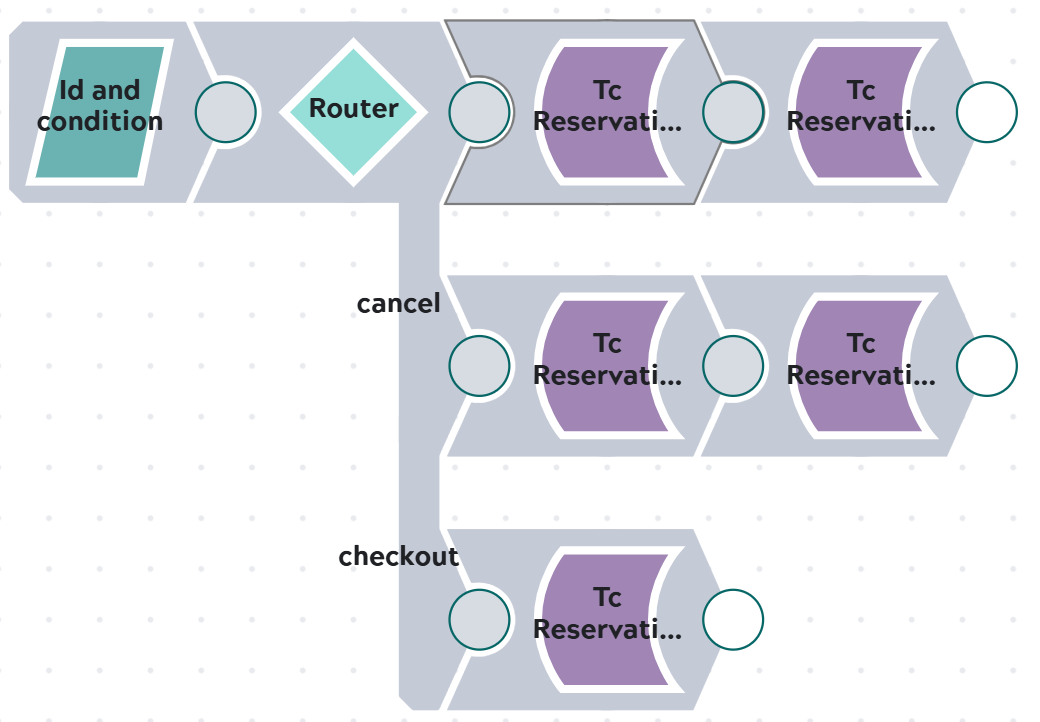

Pipeline consisting of JSON Generator Snap, Router to move message do Checkin, Cancel Checkout or Checkout Snap. After Checkin or Cancel Checkout Reservation History Snap is attached.

Steps

1: Input for the pipeline is stored in JSON Generator. The stored JSON document contains ID information and decission value for following router.

Note:

UIDs in Teamcenter are as the name says UNIQUE. The UIDs in the example only exist in our Teamcenter system as expected for our example. Same is valid for Adapter ID "_id" since its base is the UID.

Snap configuration

Snap output


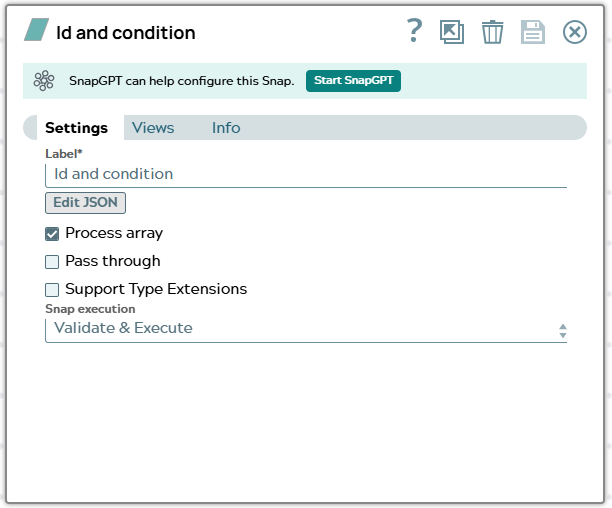
Settings of JSON Generator Snap.

[
  {
    "uid": "AWPAAt0x7hAnmD",
    "decission": "checkin",
    "expand": [
        "object_type",
        "object_name",
        "object_string",
        "item_id",
        "item_revision_id",
        "checked_out",
        "checked_out_change_id",
        "checked_out_date",
        "checked_out_user"
    ]
  }
]

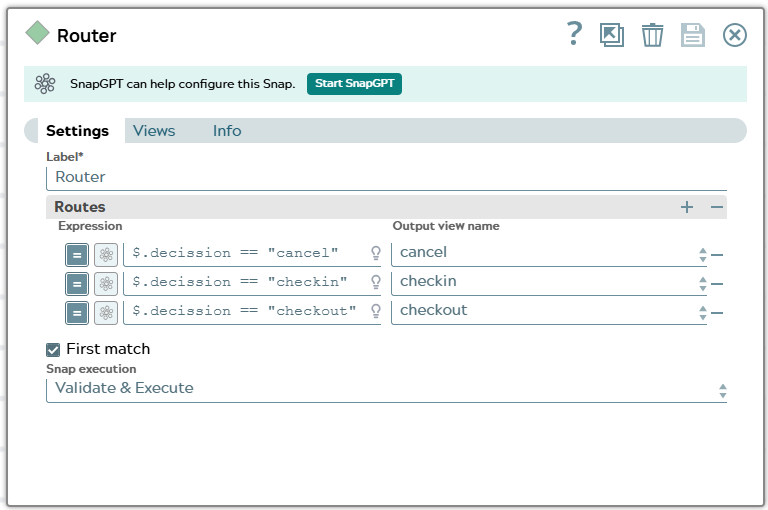
2: Configure a Router Snap to check request information for property “decission”. Expression for the three branches are

$.decission == "checkin"
$.decission == "checkout"
$.decission == "cancel"

Snap configuration

Snap output


Settings tab of Router Snap.

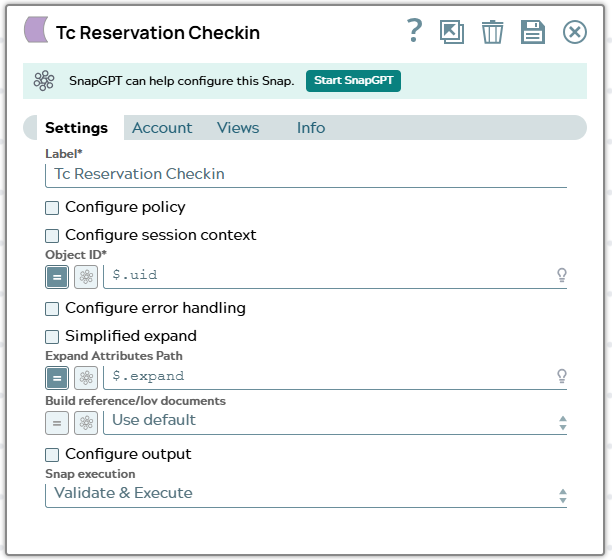
3.1: Branch “Checkin” - Configure a Tc Reservation Checkin Snap:

  • $uid to field Object ID
  • $.expand to field Expand Attributes Path

Snap configuration

Snap output


Settings of Tc Reservation Checkin Snap.

[
  {
    "_id": "TC*Part Revision*null***AWPAAt0x7hAnmD",
    "checked_out": " ",
    "checked_out_change_id": " ",
    "checked_out_date": null,
    "checked_out_user": null,
    "checked_out_user_DISPLAY": " ",
    "item_id": "053044",
    "item_revision_id": "A",
    "object_name": "Doku_checkIn_Out",
    "object_string": "053044/A;2-Doku_checkIn_Out",
    "object_type": "Part Revision",
    "object_type_DISPLAY": "Part Revision",
    "UID": "AWPAAt0x7hAnmD",
    "original": {
      "uid": "AWPAAt0x7hAnmD",
      "decission": "checkin",
      "expand": [
        "object_type",
        "object_name",
        "object_string",
        "item_id",
        "item_revision_id",
        "checked_out",
        "checked_out_change_id",
        "checked_out_date",
        "checked_out_user"
      ]
    }
  }
]

Output JSON document provides an example of the response returned after checkin of Part Revision in Teamcenter. Now attribute for checked_out* are emtpy or null again.

4.1: Branch “Checkin” - Configure a Tc Reservation History Snap:

  • $_id to field Object ID
  • $.original.expand to field Expand Attributes Path

Snap configuration

Snap output


Settings of Tc Reservation Checkin Snap.

[
  {
    "result": [
      {
        "dateTime": "2026-08-07 01:02:38",
        "user": "user111",
        "activity": "Check-Out",
        "changeId": "",
        "comment": "First checkout after creation."
      },
      {
        "dateTime": "2026-08-07 02:07:08",
        "user": "user111",
        "activity": "Check-In",
        "changeId": "",
        "comment": ""
      }
    ],
    "original": {
      "_id": "TC*Part Revision*null***AWPAAt0x7hAnmD",
      "checked_out": " ",
      "checked_out_change_id": " ",
      "checked_out_date": null,
      "checked_out_user": null,
      "checked_out_user_DISPLAY": " ",
      "item_id": "053044",
      "item_revision_id": "A",
      "object_name": "Doku_checkIn_Out",
      "object_string": "053044/A;2-Doku_checkIn_Out",
      "object_type": "Part Revision",
      "object_type_DISPLAY": "Part Revision",
      "UID": "AWPAAt0x7hAnmD",
      "original": {
        "uid": "AWPAAt0x7hAnmD",
        "decission": "checkin",
        "expand": [
          "object_type",
          "object_name",
          "object_string",
          "item_id",
          "item_revision_id",
          "checked_out",
          "checked_out_change_id",
          "checked_out_date",
          "checked_out_user"
        ]
      }
    }
  }
]

Output JSON document provides result list containing now 2 reservation information for the Part Revision in Teamcenter.

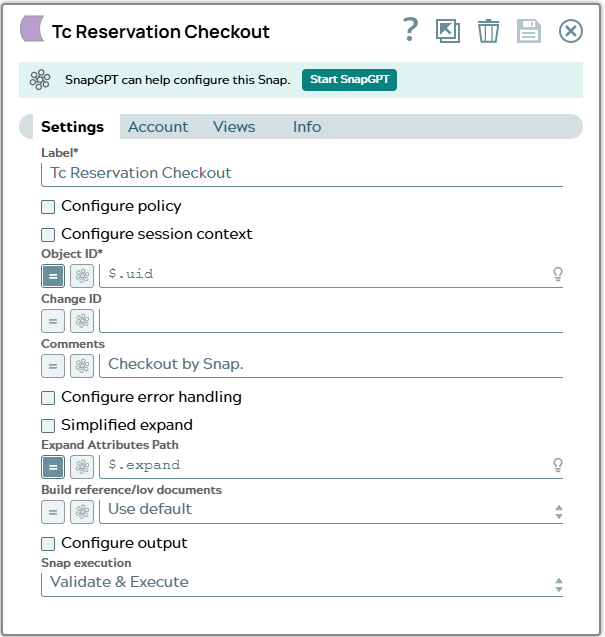
3.2: Branch “Checkout” - Configure a Tc Reservation Checkout Snap:

  • $uid to field Object ID
  • $.expand to field Expand Attributes Path

Snap configuration

Snap output


Settings of Tc Reservation Checkout Snap.

[
  {
    "_id": "TC*Part Revision*null***AWPAAt0x7hAnmD",
    "checked_out": "Y",
    "checked_out_change_id": "",
    "checked_out_date": "2026-08-07T09:17:18Z",
    "checked_out_user": "TC*User*null***A6CAAAx07hAnmD",
    "checked_out_user_DISPLAY": "user111 (user111)",
    "item_id": "053044",
    "item_revision_id": "A",
    "object_name": "Doku_checkIn_Out",
    "object_string": "053044/A;3-Doku_checkIn_Out",
    "object_type": "Part Revision",
    "object_type_DISPLAY": "Part Revision",
    "UID": "AWPAAt0x7hAnmD",
    "original": {
      "uid": "AWPAAt0x7hAnmD",
      "decission": "checkout",
      "expand": [
        "object_type",
        "object_name",
        "object_string",
        "item_id",
        "item_revision_id",
        "checked_out",
        "checked_out_change_id",
        "checked_out_date",
        "checked_out_user"
      ]
    }
  }
]

Output JSON document provides an example of the response returned after checkout of Part Revision in Teamcenter. Now attributes for checked_out* have a value set.

3.3: Branch “Cancel” - Configure a Tc Reservation Cancel Checkout Snap:

  • $uid to field Object ID
  • $.expand to field Expand Attributes Path

Snap configuration

Snap output


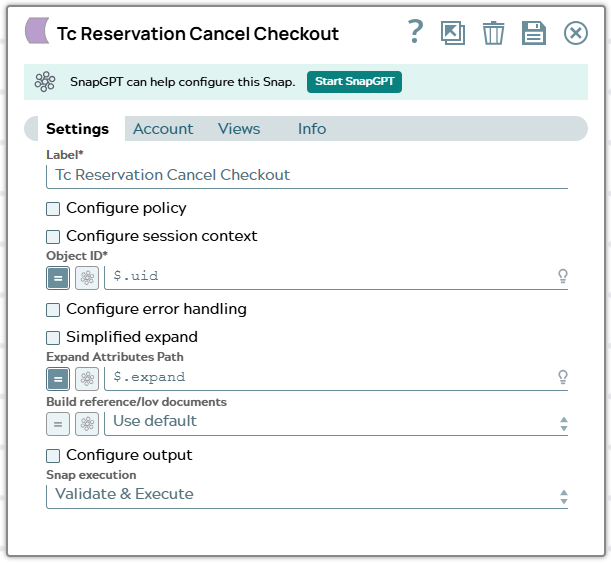
Settings of Tc Reservation Cancel Checkout Snap.

[
  {
    "_id": "TC*Part Revision*null***AWPAAt0x7hAnmD",
    "checked_out": " ",
    "checked_out_change_id": " ",
    "checked_out_date": null,
    "checked_out_user": null,
    "checked_out_user_DISPLAY": " ",
    "item_id": "053044",
    "item_revision_id": "A",
    "object_name": "Doku_checkIn_Out",
    "object_string": "053044/A;2-Doku_checkIn_Out",
    "object_type": "Part Revision",
    "object_type_DISPLAY": "Part Revision",
    "UID": "AWPAAt0x7hAnmD",
    "original": {
      "uid": "AWPAAt0x7hAnmD",
      "decission": "cancel",
      "expand": [
        "object_type",
        "object_name",
        "object_string",
        "item_id",
        "item_revision_id",
        "checked_out",
        "checked_out_change_id",
        "checked_out_date",
        "checked_out_user"
      ]
    }
  }
]

Output JSON document provides an example of the response returned after cancel checkout of Part Revision in Teamcenter. Now attribute for checked_out* are emtpy or null again.

4.3: Branch “Cancel” - Configure a Tc Reservation History Snap:

  • $_id to field Object ID
  • $.original.expand to field Expand Attributes Path

Snap configuration

Snap output


Settings of Tc Reservation Checkin Snap.

[
  {
    "result": [
      {
        "dateTime": "2026-08-07 01:02:38",
        "user": "user111",
        "activity": "Check-Out",
        "changeId": "",
        "comment": "First checkout after creation."
      },
      {
        "dateTime": "2026-08-07 02:07:08",
        "user": "user111",
        "activity": "Check-In",
        "changeId": "",
        "comment": ""
      },
      {
        "dateTime": "2026-08-07 02:17:18",
        "user": "user111",
        "activity": "Check-Out",
        "changeId": "",
        "comment": "Checkout by Snap."
      },
      {
        "dateTime": "2026-08-07 02:21:31",
        "user": "user111",
        "activity": "Cancel Check-Out",
        "changeId": "",
        "comment": ""
      }
    ],
    "original": {
      "_id": "TC*Part Revision*null***AWPAAt0x7hAnmD",
      "checked_out": " ",
      "checked_out_change_id": " ",
      "checked_out_date": null,
      "checked_out_user": null,
      "checked_out_user_DISPLAY": " ",
      "item_id": "053044",
      "item_revision_id": "A",
      "object_name": "Doku_checkIn_Out",
      "object_string": "053044/A;2-Doku_checkIn_Out",
      "object_type": "Part Revision",
      "object_type_DISPLAY": "Part Revision",
      "UID": "AWPAAt0x7hAnmD",
      "original": {
        "uid": "AWPAAt0x7hAnmD",
        "decission": "cancel",
        "expand": [
          "object_type",
          "object_name",
          "object_string",
          "item_id",
          "item_revision_id",
          "checked_out",
          "checked_out_change_id",
          "checked_out_date",
          "checked_out_user"
        ]
      }
    }
  }
]

Output JSON document provides result list containing now 4 reservation information for the Part Revision in Teamcenter.