


Google OAuth2 Account
Overview
You can configure your accounts in SnapLogic using the Designer or Manager. Use this account type to connect Google Directory Snaps with datasources that use Google OAuth2 accounts.
Prerequisites
None.
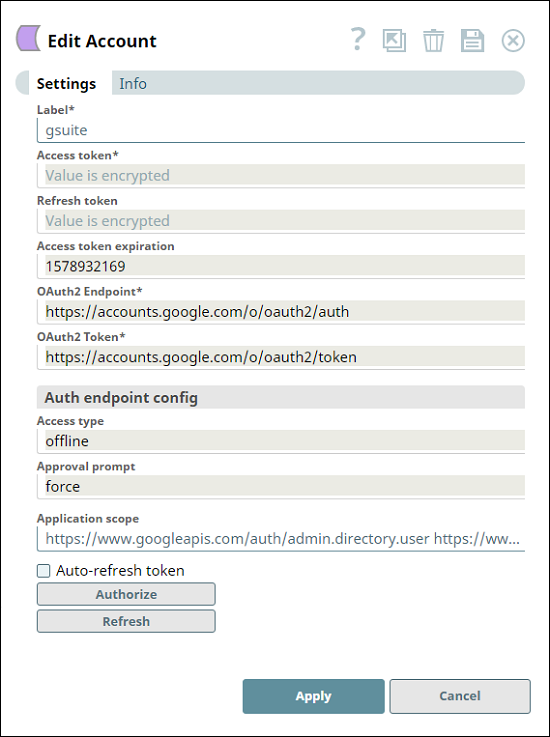
Account settings
Prerequisites
None.
Limitations and known issues
None.
Account settings
| Field/Field set | Description |
|---|---|
Label String* |
The name for the account. Preferably, update the account name if your project
includes more than one account of the same type. Default value: N/A Example:
|
Access token String* |
An object that describes the security context of SnapLogic. The token includes
the identity and privileges of the user account. The access token is retrieved when setting up the account for the endpoint. The OAuth2 flow is executed at the endpoint and the resulting access token is stored in this property. Access tokens have limited lifetimes; you must get a new access token after it expires. Note: If the access token is refreshable, an optional refresh token can be stored.
You get a new access token after the expiry of the existing access token if a
refresh token was not defined, or if both the access and the refresh token
expire.
Default value: N/A |
Refresh token String |
The refresh token for the application. The refresh token is retrieved when
setting up the account for the endpoint. There, the OAuth2 flow is executed and the
resulting refresh token can be stored in this property. If the refresh token is
stored, the access token is automatically refreshed before it expires. Default value: N/A |
Access token expiration Integer |
The time (in seconds) until which the access token must be valid. Default value: N/A Example:
|
OAuth2 Endpoint String* |
URL of the endpoint's authorization. Default value:
Example:
|
OAuth2 Token String* |
URL of the endpoint's access token. Default value:
Example:
|
Auth endpoint config String |
Provides custom properties for the OAuth2 auth endpoint. Default value: N/A |
Access type String |
The access type for the token. If offline, it will be persisted in the account.
Default value:
Example:
|
Approval prompt String |
The approval type for the token. Default value:
Example:
|
Application scope String |
The Snap-defined scope for the execution of the application. For example, the
Snap can define that the application must allow only reading of data. Default value:
Example:
|
Auto-refresh token Checkbox |
Decides whether the token must be automatically refreshed by using the refresh
token property.
Default value: Deselected |
Authorize Button |
Starts the OAuth authorization flow. The account is saved before it is authorized. |
Refresh Button |
Refreshes the access token. Available after the account has been saved. |