


Generic Hive Database Account
Overview
You can use this account type to connect Hive Snaps with data sources that use Generic Hive Database account.
Prerequisites
- A Hive account
Limitations
-
The Hive Snap Pack does not validate with Apache Hive JDBC v1.2.1 jars or earlier because of a defect in Hive. HDP 2.6.3 and HDP 2.6.1 run on Apache Hive JDBC v1.2.1 jars.
-
To validate Snaps that must work with HDP 2.6.3 and HDP 2.6.1, use JDBC v2.0.0 jars.
Known issues
- "Method not supported" error while validating Apache Hive JDBC v1.2.1 or earlier
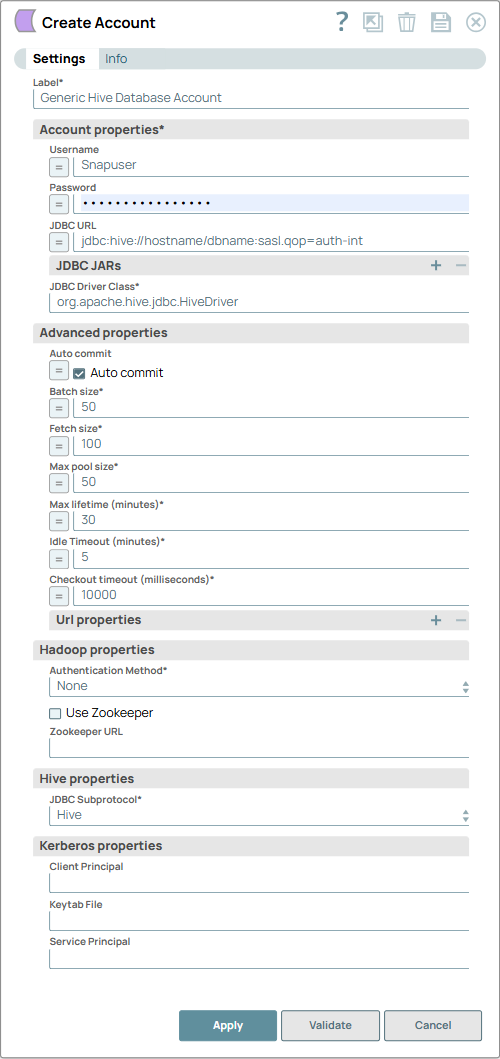
Account settings
- Expression icon (
 ): Allows using
JavaScript syntax to access SnapLogic Expressions to set field values dynamically (if
enabled). If disabled, you can provide a static value. Learn more.
): Allows using
JavaScript syntax to access SnapLogic Expressions to set field values dynamically (if
enabled). If disabled, you can provide a static value. Learn more. - SnapGPT (
 ): Generates SnapLogic Expressions
based on natural language using SnapGPT. Learn
more.
): Generates SnapLogic Expressions
based on natural language using SnapGPT. Learn
more. - Suggestion icon (
 ): Populates a
list of values dynamically based on your Snap configuration. You can select only one
attribute at a time using the icon. Type into the field if it supports a comma-separated
list of values.
): Populates a
list of values dynamically based on your Snap configuration. You can select only one
attribute at a time using the icon. Type into the field if it supports a comma-separated
list of values. - Upload
 : Uploads files. Learn more.
| Field/Field set | Type | Description |
|---|---|---|
| Label*
|
String |
Specify a unique label for the account. Default value: N/A Example: Generic Hive Database Account |
| Account properties | ||
| Username | String/Expression | Specify the username that is allowed to connect to the database. Username will
be used as the default username when retrieving connections. The username must be
valid in order to set up the data source. Default value: N/A Example: Snapuser |
| Password | String/Expression | Specify the password used to connect to the data source. Password will be used
as the default when retrieving connections. The password must be valid in order to
set up the data source. Default value: N/A Example: [email protected] |
| JDBC URL | String/Expression | Specify the URL of the JDBC database. Default value: N/A Example: jdbc:hive://hostname/dbname:sasl.qop=auth-int |
| JDBC JARs | Use this fieldset to specify the JDBC JAR files to
be loaded. A different driver binary for a driver must have a different name, the
same name can not be reused for a different driver. If this property is left blank,
a default JDBC driver will be loaded. Enter the following JDBC jars to configure the Generic Hive Database account for the concerned cluster. For HDP
For CDH
For CDP/CDW
Note:
|
|
| JDBC Driver Class | String | Required. Specify the JDBC Driver class name. For HDP Clusters: Enter the following value: org.apache.hive.jdbc.HiveDriver For CDH/CDP Clusters:Enter the following value: com.cloudera.hive.jdbc4.HS2Driver Default value: org.apache.hive.jdbc.HiveDriver Example: jdbc:hive://hostname/dbname:sasl.qop=auth-int |
| Advanced properties | ||
| Auto commit | Checkbox/Expression | Select this checkbox to commit a batch immediately after the batch executes.
So, only the current executing batch will be rolled back if the Snap fails. If you
deselect, then a transaction is started for the Snap run and committed upon run
success. The transaction is rolled back if the Snap fails. Note: For a DB Execute
Snap, assume that a stream of documents enter the input view of the Snap and the
SQL statement property has JSON paths in the WHERE clause. If the number of
documents are large, the Snap executes in more than one batches rather than
executing one per each document. Each batch would contain a certain number of
WHERE clause values. If Auto commit is turned on, a failure would only roll
back the records in the current batch. If Auto commit is turned off, the
entire operation would be rolled back. For a single execute statement (with no
input view), the setting has no practical effect. Default status: Selected |
| Batch size | Integer/Expression | Required. Specify the number of statements to
execute at a time. Using a large batch size could use up the JDBC placeholder limit
of 2100. Default value: 50 Example: 10 |
| Fetch size | Integer/Expression | Required. Specify the number of rows to
fetch at a time when executing a query. Large values could cause the server to run
out of memory. Default value: 100 Example: 100 |
| Max pool size | Integer/Expression | Required. Specify the maximum number of
idle connections a pool will maintain at a time. Default value: 50 Example: 10 |
| Max lifetime (minutes) | Integer/Expression | Required. Specify the minutes a
connection can exist in the pool before it is destroyed. Default value: 30 Example: 25 |
| Idle Timeout (minutes) | Integer/Expression | Required. Specify the number of minutes
for a connection to remain idle before a test query is run. This helps keep database
connections from timing out. Default value: 5 Example: 4 |
| Checkout timeout (milliseconds) | Integer/Expression | Required. Specify the number of
milliseconds to wait for a connection to be available in the pool. Zero waits
forever. After set time, then an exception will be thrown and the pipeline will
fail. Default value: 10000 Example: 10000 |
| Url properties | Use this fieldset to specify properties to use in JDBC Url. These properties will need to be configured when setting up SSL connection. See Advanced Configurations: Configuring Hive with SSL section below for details. | |
| Url property name | String/Expression | Specify a name for the URL property to be used by the account. Default value: N/A Example: maxAllowedPacket |
| Url property value | String/Expression | Specify a value for the URL property name. Default value: N/A Example: 1000 |
| Hadoop properties | ||
| Authentication method | Dropdown list | Required. Select the Authentication method to use when
connecting to the Hadoop service.
Default value: None. Example: Kerberos |
| Use Zookeeper | Checkbox | Select this checkbox if you want the Snap to use Zookeeper to locate the Hadoop
service instead of a specific hostname. If the checkbox is selected, use Zookeeper
to resolve the location of the database instead of using the hostname field
in the standard block. Note:
When using Zookeeper in combination with a Hive account, add the Zookeeper JAR package file on the Groundplex associated with that Hive account. The version of Zookeeper on the Groundplex should be the same as the version your Hive account uses. For HDP users, in addition to the Default status: Deselected |
| Zookeeper URL | String | Specify the URL of the Zookeeper service. Zookeeper URL formats are different
for CDH and HDP.
Note: This is NOT the URL for the Hadoop service being sought. Default value: N/A Example: hostname1:port,hostname2:port/;serviceDiscoveryMode=zooKeeper;zooKeeperNamespace=hiveserver2 |
| Hive properties | ||
| JDBC Subprotocol | Dropdown list | Required. Specify the JDBC Subprotocol to be used. This
is required when the Authentication method is Kerberos. Available
options are:
Default value: Hive Example: Impala |
| Kerberos properties | Use this fieldset to configure information required for the Kerberos authentication. These properties must be configured if you select Kerberos in the Authentication method property. | |
| Client Principal | String | Specify the principal used to authenticate to Kerberos KDC (Kerberos Key
Distribution Center - Network service used by the clients and servers for
authentication). Default value: N/A Example: [email protected] |
| Keytab File | String | Specify the Keytab file (file used to store encryption keys) used to
authenticate to Kerberos KDC. Default value: N/A Example: etc/krb5.keytab |
| Service Principal | String | Specify the principal used by an instance of a service. For example,
Default value: N/A Example: hive/host@REALM or impala/host@REALM |