This example demonstrates how we can upload multiple files using
the REST Post Snap.
-
Add and configure the REST Post Snap
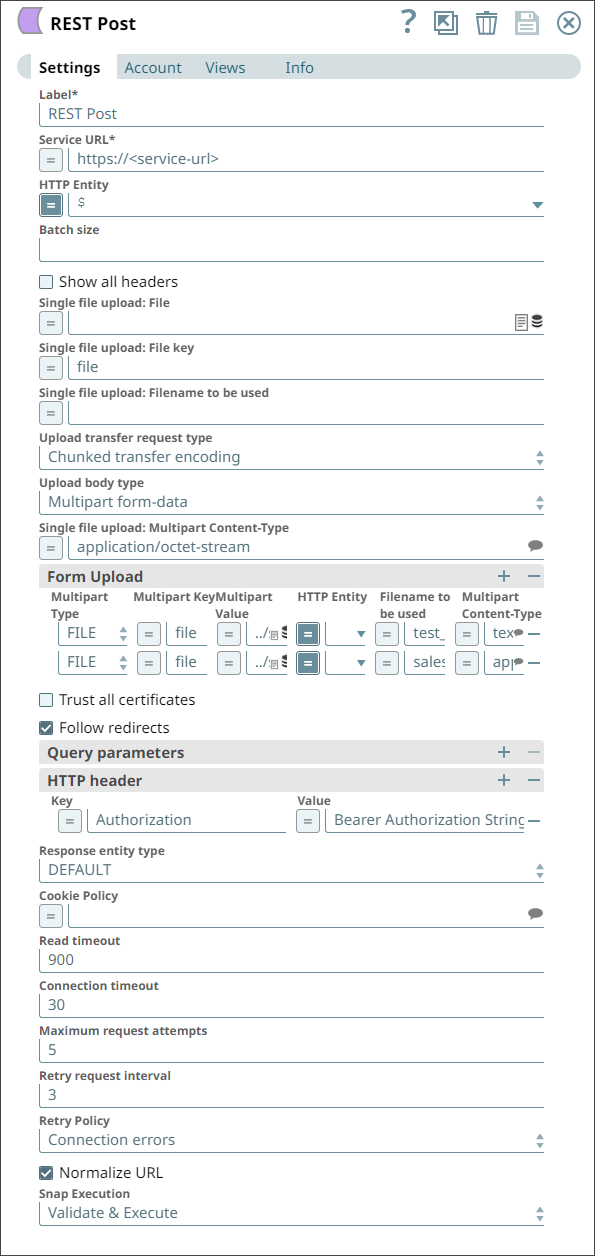
Add a REST Post Snap to your pipeline with settings configured as shown
below:
-
Specify the required fields
To upload multiple files using the REST Post Snap, you need to specify at least the following settings:
- Service URL: This is the service endpoint URL of the REST API associated with your account.
- Upload File(s):
- Upload File Key: Enter
file here to specify that you want to upload a file. For uploading messages, you could use the key seed.
- Upload file: Enter here the location and name of the file you want to upload. In this example, we have uploaded two files:
test_data.csv and Dynamics_365 For Sales Read.json.
- Filename to be used: Enter here the new name of the file. This is the name that will be given to the new file created in the destination directory. In this example, we have named our new files
test_data.csv and sales_read.json, respectively.
- Multipart Content-Type: Enter here the type of the data you want to create. In our example, the first file is
text/csv, and the second file is application/json.
-
Add authorization details in the HTTP Header fieldset
Click the + button in the HTTP Header fieldset. This adds a row of fields that you can use to add authorization information required for your request.
You can also provide Basic Auth account details instead of using these fields. In this example, we have used HTTP headers.
- Key: Enter
Authorization here. This tells the Snap that the string in the Value field is to be used for authorizing the transaction.
- Value: Enter the authorization string provided for your account.
-
Execute the Pipeline during preview
Select the Execute during preview check box to instruct the Snap to run the Pipeline during preview.
For a successful execution, the following success message appears:

After the successful execution of the Pipeline, the files are uploaded to the specified REST API endpoint.


