


Script
Overview
You can use the Script Snap to execute Javascript, Python, or Ruby scripts using the JVM ScriptEngine mechanism. Accounts are not required to work with this Snap.
You cannot create external process (like the popen function) on
Cloudplex through the
Script
Snap or a Custom Snap.
While external process creation on Groundplex is possible. You can request [email protected] to disable this if required.
- This is a Write-type Snap.
 Works in Ultra Tasks if you pass the original document to the 'write()' method for the output view.
// Read the next document, wrap it in a map and write out the wrapper
var doc = this.input.next();
var wrapper = {
    "original" : doc
}
this.output.write(doc, wrapper);-
The first argument is the input document—doc.
-
The second argument is the data for the output document—wrapper.
Both the arguments are required so that the lineage of the output document can be tied to the input document. This is important for an Ultra pipeline responding to web requests. The initial request becomes an input document to the first Snap in the SnapLogic pipeline, eventually resulting in an output document from the last Snap in the pipeline. The pipeline must maintain the lineage of each document so that each response can be correlated to the request that generated it.
Fixed issues
- In the May 2026 release (444patches34971), the Script Snap now correctly parses integers for JavaScript.
Limitations and known issues
HashMap or LinkedHashMap, per the
following:importClass(java.util.LinkedHashMap);
...
var inDoc = this.input.next();
var outDoc = new LinkedHashMap();
outDoc.put("original", inDoc);
this.output.write(inDoc, outDoc);Breaking change
The following breaking changes apply to the pipelines using the Script Snap (or the deprecated Execute Script Snap) with the Python engine.
- An open bug in 2.7 introduced a backward-incompatible change in the SnapLogic platform wherein the Jython engine automatically converts BigInteger values to primitive long values. This impacts all your scripts that perform numeric manipulation of integer values from documents (SnapLogic uses the BigInteger type to represent integers in documents). Your pipelines and Snaps with the Script (or the deprecated Execute Script) that use numeric manipulation scripts with integer or BigInteger data type may fail during execution. We recommend you prospectively replace integer or BigInteger values with long values.
Example:
sum = a.intValue() + b.intValue()Here, a and
b are of BigInteger type that now fail as Jython 2.7.2
automatically and transparently calls longValue() on any
BigInteger value it encounters. So a and b would
need to use the long and not BigInteger type.
sum = a + b by
removing occurrences of .intValue() or .longValue() from
your Python scripts. -
Before the 4.22 release (August 2020), when using the Script Snap with the Scripting language option selected as Python, requesting a key that did not exist in a dictionary (for example,
my_dict['missing_key']) would returnNone. Starting from the 4.22 release, the same request returns aKeyErrorexception. If you need to continue returningNone, use the .get(key) method instead (for example,my_dict.get['missing_key']). -
- zlib.compress(): The zlib library compresses the JSON files retrieved from the SnapLogic APIs and backs-up Pipelines and accounts to a database. The following Python code, when trying to compress displays anascii … ordinal not in range(128)error.Original code:
in_doc["json"] = zlib.compress(in_doc["json"])Fix: in_doc["json"]= zlib.compress(in_doc["json"].encode("utf-8")) -
{dictionary}.values().toArray()[i]:Before the 4.22 release (August 2020), to subscript a{dictionary}.values()method, you had to append thetoArray()method tovalues();else, you would see the
error. After the 4.22 release,Failure: ‘java.util.LinkedHashMap$LinkedValues’ object is unsubscriptabletoArray()returns Failure: ‘list’ object has no attribute ‘toArray’. However, the requirement fortoArray()is no longer necessary for the subscript.Original code:
sLine = data.values().toArray()[0]Fix: sLine =
data.values()[0]
Snap views
| Type | Description | Examples of upstream and downstream Snaps |
|---|---|---|
| Input | This Snap has at most one document input view. | |
| Output | This Snap has at most one document output view. | |
| Learn more about Error handling. | ||
Snap settings
- Expression icon (
 ): Allows using
pipeline parameters to set field values dynamically (if enabled). SnapLogic Expressions
are not supported. If disabled, you can provide a static value.
): Allows using
pipeline parameters to set field values dynamically (if enabled). SnapLogic Expressions
are not supported. If disabled, you can provide a static value. - SnapGPT (
 ): Generates SnapLogic Expressions
based on natural language using SnapGPT. Learn
more.
): Generates SnapLogic Expressions
based on natural language using SnapGPT. Learn
more. - Suggestion icon (
 ): Populates a
list of values dynamically based on your Snap configuration. You can select only one
attribute at a time using the icon. Type into the field if it supports a comma-separated
list of values.
): Populates a
list of values dynamically based on your Snap configuration. You can select only one
attribute at a time using the icon. Type into the field if it supports a comma-separated
list of values. - Upload
 : Uploads files. Learn more.
| Field/Field set | Type | Description |
|---|---|---|
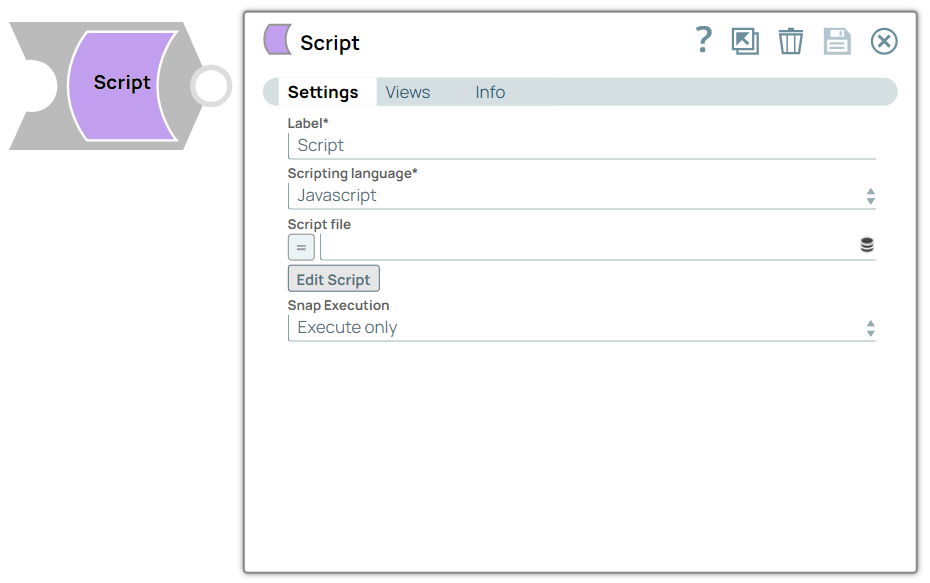
| Label*
|
String | Specify a unique name for the Snap. Modify this to be more appropriate, especially if more than one of the same Snaps is in the pipeline. Default value: Script Example: Script |
| Scripting Language | Dropdown list | Required. Choose a language for the script. The
available options are:
Default value: Javascript Example: Ruby |
| Script file | String/Expression | Specify or select a script file that implements the ScriptHook interface. This
field can be used if the script file is present in the SLDB. Click on the Upload
 icon to upload the required
script file from the SLDB. icon to upload the required
script file from the SLDB.Note: This field accepts pipeline parameters as well as
upstream parameters provided the script file is present in the SLDB. Default value: None. Example: transform.py |
| Edit Script | Button | Click the Edit Script button to edit a script within the Snap instead of
through an external file. From this page, you can export the script to a file in a
project, import a script, or generate a template for the selected Scripting
Language. Note:
Default value: A skeleton for the chosen scripting language. You can click the Generate Template link to regenerate the skeleton. |
| Snap execution
|
Dropdown list |
Choose one of the three modes in
which the Snap executes. Available options are:
Default value: Execute only Example: Validate & Execute |
ScriptHook Interface
package com.snaplogic.scripting.language;

import java.util.Iterator;

/**
 * ScriptHook is the interface that should be implemented as a callback mechanism for
 * ExecuteScript snap to call into the script.
*/

public interface ScriptHook {

    /**
     * Scripts should implement this method to provide application logic.
     */
    void execute();

    /**
     * Scripts should implement this method to cleanup any resources allocated in execute().
     */
    void cleanup();

    /**
     * Input is interface that is used by the script to read input from the snap's input view.
     */
    interface Input extends Iterator<Object> {
    }

    /**
     * Output is interface that is used by the script to send output data to the snap output view.
     */
    interface Output {

        /**
         * Write the data to the snap output.
         *
         * @param data
         */
        void write(Object data);

        /**
         * Write the data that was generated for the given incoming data to the snap output.
         * This method carries the lineage data forward.
         *
         * @param incomingData
         * @param data
         */
        void write(Object incomingData, Object data);
    }

    /**
     * Error is interface that is used by the script to send error data to snap error view.
     */
    interface Error extends Output {
    }
}
Importing Third-Party Libraries
mongo-java-driver-3.12.7.jar, in the directory
/opt/snaplogic/ext_jar/. For your Python scripts to be able to use this
library, create a file named .jython in the home directory of the user
running the JCC process. The .jython file should specify a value for the
python.path, as
follows:python.path=/opt/snaplogic/ext_jar/mongo-java-driver-3.12.7.jarYou can find the user’s home directory (user running the jcc) in the jcc filename
“jcc_output.log" when you search with user.home. If
you have multiple jar files, you can add all the paths in the same
.jython file separated by colon, as shown below:
python.path=jar1_path:jar2_path:jar3_path
cleanup method to ensure that the mongoClient object is
appropriately closed.from com.snaplogic.scripting.language import ScriptHook
from com.mongodb.client import MongoClients
class TransformScript(ScriptHook):
def __init__(self, input, output, error, log):
self.input = input
self.output = output
self.error = error
self.log = log
def execute(self):
try:
self.mongoClient = MongoClients.create("mongodb://localhost:27017/?readPreference=primary&ssl=false")
for d in self.mongoClient.listDatabases():
self.output.write(d)
except Exception as e:
errDoc = {
'error' : str(e.args)
}
self.error.write(errDoc)
def cleanup(self):
self.mongoClient.close()
hook = TransformScript(input, output, error, log)-
The paths listed in
python.pathcan be.jarfiles (Java libraries), directories containing Python libraries (compatible with Python 2.7), or.zipfiles packaging those Python libraries. Learn more about using the .jython file: Jython Registry. -
The
python.pathvariable is Jython's version of CPython’sPYTHONPATHvariable. Refer to the official Python documentation for more about thePYTHONPATH. -
If you are using multiple Groundplex nodes, you must add the package/JAR files in each node.
-
You can import third party libraries only on Groundplex nodes.
Additional Information
The document data can be converted to and from the JSON data interchange language. By convention, the root of every document is conceptually a JSON object—a collection of name-value pairs, where each name is a string, and each value is an object, an array, a string, a number, a boolean, or a null. Every modern programming language has a corresponding type for this concept:
| Script | Type |
|---|---|
| Java | Map |
| Python | Dictionary |
| Ruby | Hash |
| JavaScript | Object |
When writing a script for the Script Snap, each input document is an object that implements the Java Map interface and can be accessed as an instance of the scripting language’s native object class, such as a Python dictionary.
To write an output document, your script must create a new object. In Python or Ruby, you can create an instance of the required language’s native object type, a Python dictionary, or a Ruby hash. The values you add to these objects must be one of the JSON-compatible types, including objects, arrays, strings, numbers, and booleans. You can use the corresponding array or list type of the language for an array. Objects written to the output view should be of Java types. Some downstream Snaps require this, for example, the Join Snap. To write a Python map to the output view in a Python script, convert the map to a Java HashMap.
General Instructions for all Scripting Languages
-
The variable input is of type
ScriptHook.Input -
The variable output is of type
ScriptHook.Output -
The variable error is of type
ScriptHook.Error -
The variable log is of type
org.slf4j.Logger
Type defined in the schema maps to the Java class per the following:
| Data Type | Java Class |
|---|---|
| NUMBER | java.math.BigDecimal |
| INTEGER | java.math.BigInteger |
| STRING | java.lang.String |
| DATETIME | org.joda.time. DateTime |
| LOCALDATETIME | org.joda.time. LocalDateTime |
| BOOLEAN | java.lang.Boolean |
| DATE | org.joda.time.LocalDate |
| TIME | org.joda.time.LocalTime |
| BINARY | java.lang.Byte |
| TABLE | java.util.List |
| ANY | java.lang.Object |
| COMPOSITE | java.util.Map |