


Hive - Execute
Overview
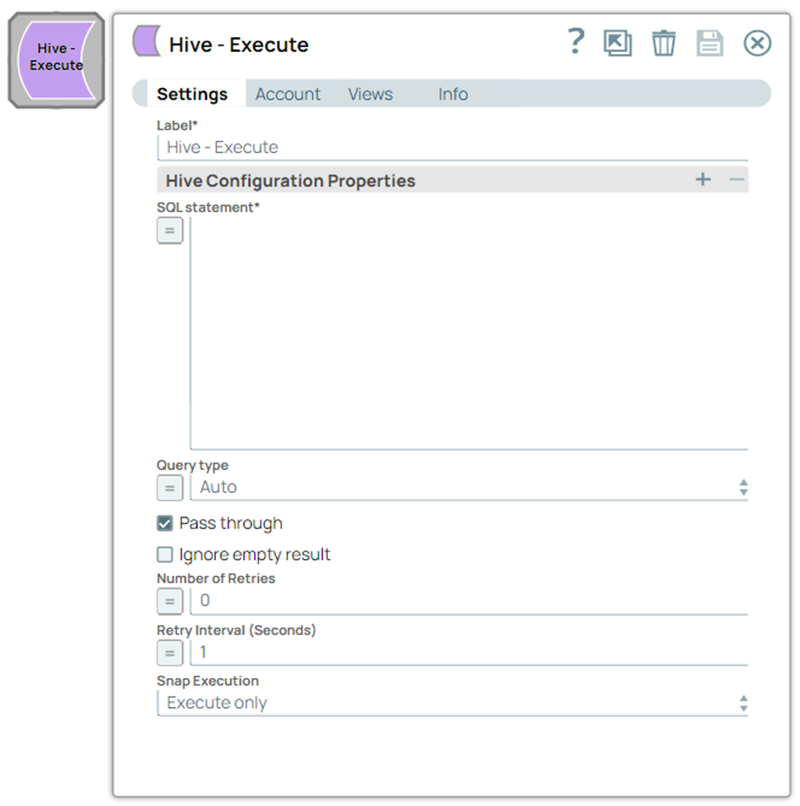
- This is a Write-type Snap.
 Works in Ultra Tasks
Limitations and known issues
The Hive Snap Pack does not validate with Apache Hive JDBC v1.2.1 JARS or earlier because of a defect in Hive. HDP 2.6.3 and HDP 2.6.1 run on Apache Hive JDBC v1.2.1 JARs.
"Method not supported" error is displayed when validating Apache Hive JDBC
v1.2.1 or earlier. To validate Snaps that must work with HDP 2.6.3 and HDP 2.6.1, use JDBC
v2.0.0 JARs.
Snap views
| Type | Description | Examples of upstream and downstream Snaps |
|---|---|---|
| Input |
If the input view is defined, then the WHERE clause can substitute incoming values for a particular expression. Valid JSON Paths that are defined in the where clause for queries/statements will be substituted with values from an incoming document. |
|
| Output |
The status message of the executed query. Documents will be written to the error view if the document is missing a value to be substituted into the query/statement. |
|
| Learn more about Error handling. | ||
Snap settings
- Expression icon (
 ): Allows using
pipeline parameters to set field values dynamically (if enabled). SnapLogic Expressions
are not supported. If disabled, you can provide a static value.
): Allows using
pipeline parameters to set field values dynamically (if enabled). SnapLogic Expressions
are not supported. If disabled, you can provide a static value. - SnapGPT (
 ): Generates SnapLogic Expressions
based on natural language using SnapGPT. Learn
more.
): Generates SnapLogic Expressions
based on natural language using SnapGPT. Learn
more. - Suggestion icon (
 ): Populates a
list of values dynamically based on your Snap configuration. You can select only one
attribute at a time using the icon. Type into the field if it supports a comma-separated
list of values.
): Populates a
list of values dynamically based on your Snap configuration. You can select only one
attribute at a time using the icon. Type into the field if it supports a comma-separated
list of values. - Upload
 : Uploads files. Learn more.
| Field/Field set | Type | Description |
|---|---|---|
| Label*
|
String | Specify a unique name for the Snap. Modify this to be more appropriate, especially if more than one of the same Snaps is in the pipeline. Default value: Hive - Execute Example: Hive - Execute |
| Hive Configuration Properties | Use this field set to configure property-value pairs to set for the SQL statement. The values are used in 'set x=y' statements executed immediately before the SQL. | |
| Property | String | Specify the name of the configuration property. Default value: N/A Example: name |
| Value | String | Specify the value of the configuration property. Default value: N/A Example: jack |
| SQL Statement | String/Expression | Required. Specify the SQL statement to execute on the
server. Document value substitution will be performed on literals starting with $
(such as $people.name will be substituted with its value in the
incoming document).The Snap does not allow to inject SQL, such as Note:
Default value: N/A Example: select * from people LIMIT 10 or select * from people where name = $people.name |
| Query type | Dropdown list/Expression | Select the type of query for your SQL statement (Read or
Write). When Auto is selected, the Snap tries to determine the query type automatically. If the execution result of the query is not as expected, you can change the query type to Read or Write. Default value: Auto Example: Read |
| Pass through | Checkbox | Select this checkbox if you want the input document to be passed through to the
output view under the key 'original'. This property applies only to the Execute
Snaps with a SELECT statement. Default status: Selected |
| Ignore empty result | Checkbox | Select if you want no document written to the output view when the SELECT
operation does not produce any result. If this property is not selected and the
Pass through property is selected, the input document will be passed
through to the output view. Default status: Deselected |
| Number of Retries | Integer/Expression | Specify the maximum number of retry attempts the Snap must make in case of
network failure. When you set the Number of retries to more than 0,
the Snap generates duplicate records when the connection is not established. To
prevent duplicate records, we recommend that you follow one of the following:
Default value: 0 Example: 5 |
| Retry Interval (seconds) | Integer/Expression | Specify the time interval in seconds between connection attempts. Default value: 1 Example: 11 |
| Snap execution
|
Dropdown list |
Choose one of the three modes in
which the Snap executes. Available options are:
Default value: Execute only Example: Validate & Execute |