


PipeLoop
Overview
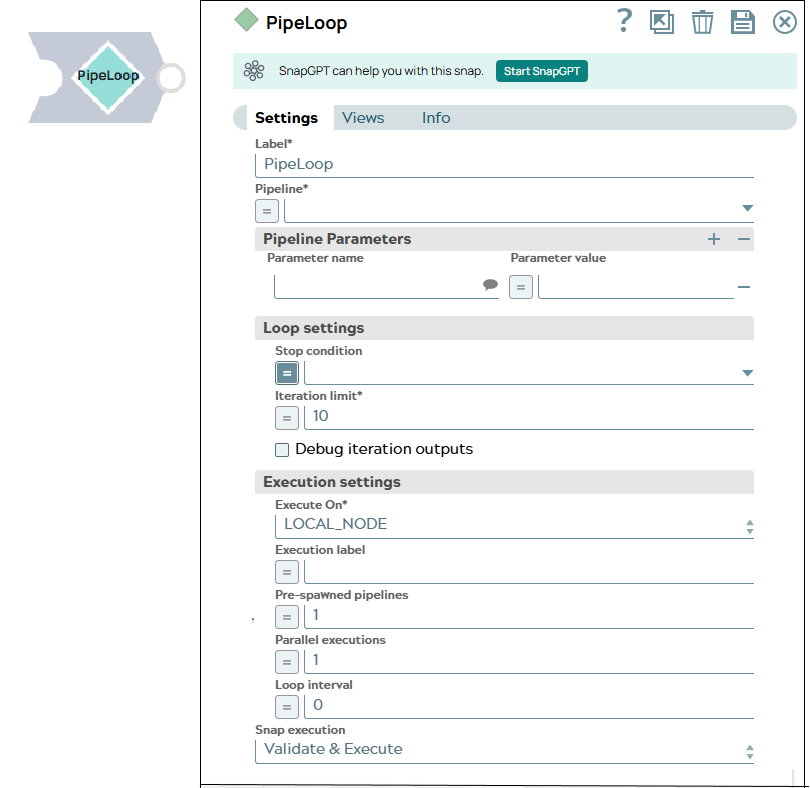
You can use this Snap to enable looping on pipeline executions based on a stop condition or iteration limit. The output document of each iteration is fed into the next iteration as the input document, and execution continues until the stop condition is met or the iteration limit is reached. Learn more.
- This is a Flow-type Snap.
 Works in Ultra Tasks
Limitations
-
Reuse is currently not supported because of the requirement to close an input view to force flush all documents out.
-
Reads only the first output document for a specific input document (the remaining documents are ignored and dropped).
-
Supports expressions on the pipeline specification, but only evaluates the input document to PipeLoop, not for each iteration.
Snap views
| Type | Description | Examples of upstream and downstream Snaps |
|---|---|---|
| Input | The document or binary data to send to the child pipeline. For a single document input, only the first output document is captured in the output document and the remaining documents are ignored. | |
| Output | If you select the Debug iterations output checkbox, an additional
_iteration_documents is added to the output document alongside
the output documents and passthrough
documents._iteration_documents contains the following fields:
|
|
| Learn more about Error handling. | ||
Snap settings
- Expression icon (
 ): Allows using
pipeline parameters to set field values dynamically (if enabled). SnapLogic Expressions
are not supported. If disabled, you can provide a static value.
): Allows using
pipeline parameters to set field values dynamically (if enabled). SnapLogic Expressions
are not supported. If disabled, you can provide a static value. - SnapGPT (
 ): Generates SnapLogic Expressions
based on natural language using SnapGPT. Learn
more.
): Generates SnapLogic Expressions
based on natural language using SnapGPT. Learn
more. - Suggestion icon (
 ): Populates a
list of values dynamically based on your Snap configuration. You can select only one
attribute at a time using the icon. Type into the field if it supports a comma-separated
list of values.
): Populates a
list of values dynamically based on your Snap configuration. You can select only one
attribute at a time using the icon. Type into the field if it supports a comma-separated
list of values. - Upload
 : Uploads files. Learn more.
| Field/Field set | Type | Description |
|---|---|---|
Label
|
String | Required. Specify a unique name for the Snap. Modify this to be more appropriate, especially if more than one of the same Snaps is in the pipeline. Default value: PipeLoop Example: SimpleLoop |
| Pipeline | Dropdown list/Expression | Required. Specify the path of the pipeline to execute. Default value: N/A Example: demo-child-pipeline |
| Pipeline Parameters | Use this field set to define child pipeline parameters to use for executing the pipeline. | |
| Parameter name | String/Suggestion | Specify the parameter's name. You can also select the Pipeline Parameters
defined for the pipeline selected in the Pipeline field. Default value: N/A Example: tools |
| Parameter value | Integer/Expression | Specify the value for the pipeline parameter, which can be an expression based
on incoming documents or a constant. If you configure the value as an expression
based on the input, then each incoming document or binary data is evaluated
against that expression when invoking the pipeline. The result of the expression
is JSON-encoded if it is not a string. The child pipeline then needs to use the
Default value: N/A Example: $tools |
| Loop settings | Define the iteration configuration. | |
| Stop condition | Dropdown list/Expression | Specify the condition to be evaluated during execution that decides whether the
execution should stop or continue. The iteration continues until the stop condition
is met or the iteration limit is reached. The Snap errors out if the Stop condition
cannot be evaluated at run time. The stop condition is evaluated on the output
document from each iteration. Default value: N/A Example:
|
| Iteration limit | Integer/Expression | Required. Specify the maximum limit for the number of
iterations to run to avoid infinite loops. Default value: 10 Example: 15 |
| Debug iteration outputs | Checkbox | Select this checkbox to include the index, output document, and stop condition
evaluation for each iteration as part of the output format. Default status: Deselected |
| Execution settings | Define the child pipeline execution configuration. | |
| Execute on | Dropdown list | Required. Select one of the following Snaplex options to
specify the target Snaplex for the child pipeline:
Default value: LOCAL_NODE Example: LOCAL_SNAPLEX |
| Execution label | String/Expression | Specify the label to display in the Dashboard for the current execution. Default value: N/A Example: demo |
| Pre-spawned pipelines | Integer/Expression | Specify a value to maintain a pool of pre-initialized child pipelines. A
pre-spawned pipeline is initialized only if the current Pool size is below the
Iteration limit. For example, if the Iteration limit is 10 and 5
pipelines are pre-spawned, the process starts with 5 pipelines. Once there are only
4 iterations left, no new pipelines will be initialized. Default value: 1 Example: 1 |
| Parallel executions | Integer/Expression | Specify the number of parallel executions the Snap must perform. Note:
Default value: 1 Example: 2 |
| Loop interval | Integer/Expression | Specify the loop interval between iterations in milliseconds.
Default value: 0 Example: 5 |
| Minimum loop duration | Integer/Expression | Specify the minimum time in seconds that each loop iteration should take,
measured from the iteration start time.
Unlike Loop interval (which adds a fixed wait in milliseconds after each iteration completes), Minimum loop duration enforces a minimum wall-clock time in seconds per iteration measured from its start. When using this field, set Loop interval to 0 to avoid timing conflicts. Accepts expressions, enabling dynamic values via pipeline parameters for per-environment configuration. CAUTION: A Lint warning is displayed when both Loop interval
and Minimum loop duration are set to non-zero values, as this may cause
inconsistent timing. Consider setting one of the values to 0.
Note: The Snap validates this field before execution and returns an error if the
value is non-numeric or negative.
Common use cases:
Default value: 0 (no minimum duration; preserves existing behavior) Example: 3 |
| Snap execution
|
Dropdown list |
Choose one of the three modes in
which the Snap executes. Available options are:
Default value: Validate and Execute Example: Execute only |