


Private Key Account
This account is available only for the PGP Decrypt Snap.
Prerequisites
Valid Private and Public keys.
Known issues
Private and public keys provided as Pipeline properties cannot be accessed as expression variables in the respective settings of the Private Key Account . However, they can still be accessed as Pipeline properties if they are passed to the pipeline by a parent pipeline's Pipeline Execute Snap.
Account Settings
- Expression icon (
 ): Allows using
JavaScript syntax to access SnapLogic Expressions to set field values dynamically (if
enabled). If disabled, you can provide a static value. Learn more.
): Allows using
JavaScript syntax to access SnapLogic Expressions to set field values dynamically (if
enabled). If disabled, you can provide a static value. Learn more. - SnapGPT (
 ): Generates SnapLogic Expressions
based on natural language using SnapGPT. Learn
more.
): Generates SnapLogic Expressions
based on natural language using SnapGPT. Learn
more. - Suggestion icon (
 ): Populates a
list of values dynamically based on your Snap configuration. You can select only one
attribute at a time using the icon. Type into the field if it supports a comma-separated
list of values.
): Populates a
list of values dynamically based on your Snap configuration. You can select only one
attribute at a time using the icon. Type into the field if it supports a comma-separated
list of values. - Upload
 : Uploads files. Learn more.
| Field/Field set | Type | Description |
|---|---|---|
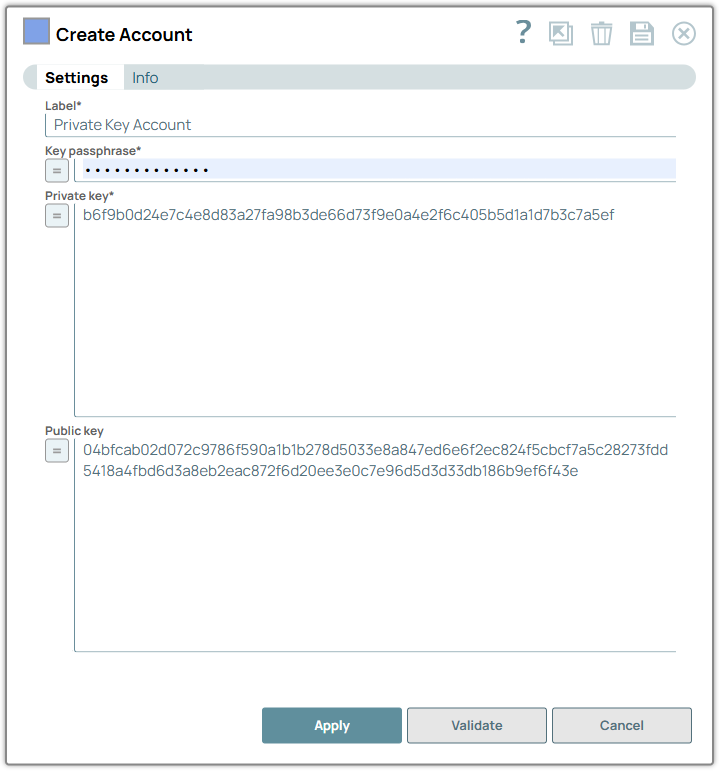
| Label*
|
String |
Specify a unique label for the account. Default value: None. Example: Private Key Account |
| Private Key | String/Expression | Required. Specify the private key for
authentication. Note: The size of the key supported may vary with the JRE
security files installed on the Snaplex. To use different security policies,
copy the files for your JRE to /opt/Snaplogic/pkgs/jre1.7.0_17/lib/security and
restart the JCC. If there are multiple nodes in your Snaplex, you will need to
make this change on all of the nodes. Default value: N/A Example: DJSEiqaLiMhQCJpY |
| Key passphrase | String/Expression | Required. Specify the passphrase used to decrypt the
private key. By default, this field is expression-enabled. Warning:
Default value: N/A Example: lQOsBFuGUtQBCAC68U7dNX7ymbl978zYnjA5qyZkTfD2PcJrF0qyoGi6LEVfUrErCYjMseU6l0B7/R9LkD3KVwAn23W4FaVnC5x1W9FN8lKQQmEARDCiEtG56(OR)_passphrase |
| Public Key | String/Expression | Specify the private key to authenticate data communication, digital
signatures, and encryption and decryption of messages and files. Default value: N/A Example: XYZdfeiok123kjkjdfd098mnjyaLIM-92[!= |
Account Encryption
| Standard Encryption | If you are using Standard Encryption, the High sensitivity settings under Enhanced Encryption are followed. |
| Enhanced Encryption | If you have the Enhanced Account Encryption feature, the following fields are
encrypted for each sensitivity level for each account.
|
Troubleshooting
| Error | Reason | Resolution |
|---|---|---|
| Failed to validate account: Key passphrase is undefined. | The account could not find a value for the Key passphrase field. | Ensure to define the value for Key passphrase in the pipeline parameters. |