


Cassandra SSL/TLS Database Account
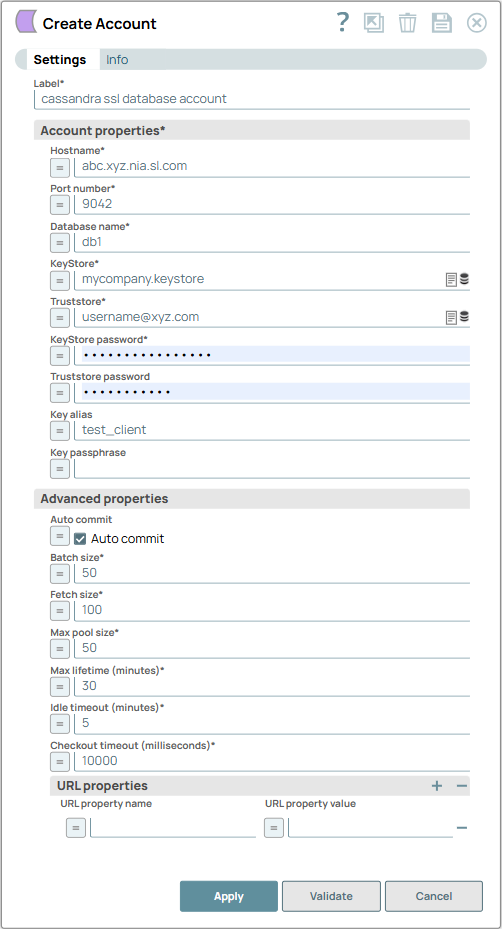
Account settings
- Expression icon (
 ): Allows using
JavaScript syntax to access SnapLogic Expressions to set field values dynamically (if
enabled). If disabled, you can provide a static value. Learn more.
): Allows using
JavaScript syntax to access SnapLogic Expressions to set field values dynamically (if
enabled). If disabled, you can provide a static value. Learn more. - SnapGPT (
 ): Generates SnapLogic Expressions
based on natural language using SnapGPT. Learn
more.
): Generates SnapLogic Expressions
based on natural language using SnapGPT. Learn
more. - Suggestion icon (
 ): Populates a
list of values dynamically based on your Snap configuration. You can select only one
attribute at a time using the icon. Type into the field if it supports a comma-separated
list of values.
): Populates a
list of values dynamically based on your Snap configuration. You can select only one
attribute at a time using the icon. Type into the field if it supports a comma-separated
list of values. - Upload
 : Uploads files. Learn more.
| Field/Field set | Type | Description |
|---|---|---|
| Label
|
String |
Required.Specify a unique label for the account. Default value: N/A Example: Cassandra SSL/TLS Database Account |
| Account properties | Required.This fieldset
allows you to enter in the information to create a connection to the
database. This fieldset comprises the following fields:
|
|
| Hostname | String/Expression | Required. The server's address to connect to. You may want to provide multiple hostnames when using a Cassandra cluster. To do so, separate each hostname with two uninterrupted hyphens; for example, host1--host2--host3. Warning:
The multiple hostnames support is not applicable for IP addresses. Default value: None. |
| Port Number | String/Expression | Required. The database server's port to connect
to. Default value: 9042 |
| Database name | String/Expression | Required. The database name to connect to. Default value: None. |
| KeyStore | String/Expression | Required.The location of the key store file. It can be located in SLDB or any other unauthenticated endpoint such as 'https://'. You can also browse for the location. |
| TrustStore | String/Expression | Required. The location of the trust store file. It can be located in SLDB or any other unauthenticated endpoint such as 'https://'. You can also browse for the location. |
| KeyStore Password | String/Expression | Required. Password for the keystore file. Also used for TrustStore when TrustStore Password is not provided. |
| TrustStore Password | String/Expression | Password for the truststore file. Also used for KeyStore when KeyStore Password is not provided. |
| Key Alias | String/Expression | Alias of the private key to be used from the key store. |
| Key Passphrase | String/Expression | Password for the private key to be used from the key store. |
| Local Datacenter | String/Expression |
Required.Required when connecting to Cassandra using the 4.x driver. Specifies the local datacenter name of the Cassandra cluster for this account. This value is used by the Cassandra driver to:
Default value: None. Example: Cassandra Database AccountImportant:
For existing accounts:
|
| Advanced properties |
Use this fieldset to define specific settings. This fieldset comprises the
following fields:
|
|
| Auto commit | Checkbox/Expression |
When selected, each of the batches is committed immediately after it is executed. If the Snap fails, only the batch being executed at that moment is rolled back. When deselected, the Snap execution output is committed only after all the batches are executed. If the Snap fails, the entire transaction is rolled back, unless the Snap finds invalid input data before it sends the insert request to the server, and routes the error documents to the Error view. Default status: Selected |
| Batch size | Integer/Expression | Required. Number of statements to execute at a
time. Warning: Select queries are not batched. Warning: Using a large batch size could use up the JDBC placeholder
limit of 2100.
Default value: 50 |
| Fetch size | Integer/Expression | Required. Number of rows to fetch at a time when
executing a query. Warning: Large values could cause the server to run
out of memory. Default value: 100 |
| Min pool size | Integer/Expression | Required. Minimum number of connections a pool will
maintain at a time. Default value: 3 |
| Max pool size | Integer/Expression | Required. Maximum number of connections a pool will
maintain at a time. Default value: 50 |
| Max life time | Integer/Expression | Required. Maximum lifetime of a connection in the pool.
Ensure that the value you enter is a few seconds shorter than any database or
infrastructure-imposed connection time limit. Warning: A value of 0
indicates an infinite lifetime, subject to the Idle Timeout value. An
in-use connection is never retired. Connections are removed only after they are
closed. Default value: 30 |
| Idle timeout (minutes) | Integer/Expression | Required.The maximum amount of time a connection is
allowed to sit idle in the pool. Warning: A value of 0 indicates that
idle connections are never removed from the pool.
Default value: 5 |
| Checkout timeout | Integer/Expression | Required.Number of milliseconds to wait for a
connection to be available when the pool is exhausted. Note: If you specify
0, the Snap waits infinitely until the connection is available. Therefore,
we recommend you not to specify 0 for Checkout Timeout. Default value: 10000 |
| URL Properties | Use this fieldset to define URL properties. | |
| URL property name | String/Expression | URL property name. Default value: None. |
| URL property value | String/Expression | URL property value. Default value: None. |
For a DB Execute Snap, assume that a stream of documents enters the input view of the Snap and the SQL statement property has JSON paths in the WHERE clause. If the number of documents are large, the Snap executes in more than one batches rather than executing one per each document. Each batch would contain a certain number of WHERE clause values. If Auto commit is turned on, a failure would only roll back the records in the current batch. If Auto commit is turned off, the entire operation would be rolled back. For a single execute statement (with no input view), the setting has no practical effect.
Troubleshooting
1. java.lang.NoSuchMethodError involving io.netty.util.concurrent.SingleThreadEventExecutor
Symptoms
When validating a Cassandra Database Account or Cassandra SSL/TLS Database Account, or when running a pipeline that uses Cassandra Snaps, you see errors similar to:
java.lang.NoSuchMethodError: 'void io.netty.util.concurrent.SingleThreadEventExecutor.<init>(
    io.netty.util.concurrent.EventExecutorGroup,
    java.util.concurrent.Executor,
    boolean,
    java.util.Queue,
    io.netty.util.concurrent.RejectedExecutionHandler
)'
Cause
This error is caused by a runtime dependency conflict between multiple Netty versions on the classpath:
The Cassandra Snap Pack previously:
- Used the Cassandra JDBC driver based on DataStax 3.x, which depends on Netty 4.0.x/4.1.x.
- Bundled Netty JARs explicitly (for example, netty-all:4.1.17.Final).
Other Snap Pack dependencies (Hadoop/Zookeeper, Azure SDK, AWS SDK, test dependencies, and the Cassandra driver itself) brought in their own different Netty versions (4.1.63.Final, 4.1.77–4.1.118.Final, and others).
At runtime, the JVM loaded a Netty class where the expected constructor signature did not exist in the actual Netty version on the classpath, resulting in NoSuchMethodError during driver initialization.
This failure happens before any SSL/TLS handshake or database I/O. It is not caused by account credentials, key stores, or network connectivity.
Resolution / What changed
The Cassandra Snap Pack now:
- Consolidates to a single Netty version required by the Cassandra driver, and
- Excludes conflicting Netty transitive dependencies brought in by other libraries.
As a result:
- The NoSuchMethodError no longer occurs.
- Cassandra Database Account and Cassandra SSL/TLS Database Account connections can be established successfully.