


Salesforce Account
Overview
You can configure your accounts in SnapLogic using the Designer or Manager. You can use the Salesforce account type to connect Salesforce Snaps with data sources that use Salesforce account.
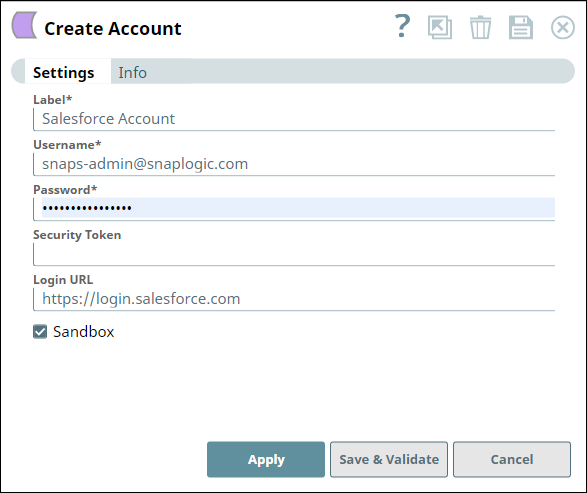
Account settings
Legend:
- Expression icon (
 ): Allows using
JavaScript syntax to access SnapLogic Expressions to set field values dynamically (if
enabled). If disabled, you can provide a static value. Learn more.
): Allows using
JavaScript syntax to access SnapLogic Expressions to set field values dynamically (if
enabled). If disabled, you can provide a static value. Learn more. - SnapGPT (
 ): Generates SnapLogic Expressions
based on natural language using SnapGPT. Learn
more.
): Generates SnapLogic Expressions
based on natural language using SnapGPT. Learn
more. - Suggestion icon (
 ): Populates a
list of values dynamically based on your Snap configuration. You can select only one
attribute at a time using the icon. Type into the field if it supports a comma-separated
list of values.
): Populates a
list of values dynamically based on your Snap configuration. You can select only one
attribute at a time using the icon. Type into the field if it supports a comma-separated
list of values. - Upload
 : Uploads files. Learn more.
| Field/Field set | Description |
|---|---|
Label*
String |
Required. Unique name for the account. Default value: N/A |
Username
String |
Required. Specify a username for the account.
Default value: N/A Example: [email protected] |
Password
String |
Required. Specify the password for the associated username.
Default value: N/A Example: ********@1 |
Security token
String |
Specify a security token. To create a security token, log into your Salesforce account and navigate to Personal Setup > My Personal Information > Reset My Security Token.
Default value: N/A Example: 1234 |
Login URL
String |
Enter your salesforce.com login URL if it is different from "https://login.salesforce.com/". Usually it is not required, but if you are using CipherCloud for Salesforce, you should enter the login URL issued by CipherCloud while you deselect the Sandbox checkbox.
Default value: https://login.salesforce.com/ Example: https://login.salesforce.com/ |
Sandbox
Checkbox |
Select this checkbox if the username is for a sandbox account. Deselect this checkbox if it is for a production account.
Default value: Deselected |
Note: Click Validate
after entering the required details to ensure that all fields have been filled accurately.
Click Apply to save the settings.