


BigQuery - Dataset Delete
Use this Snap to delete BigQuery Datasets.
Overview
You can use this Snap to delete BigQuery Datasets.
- Snap Type: Write
 Works in Ultra Tasks
Prerequisites
A valid Google BigQuery Account with the required permissions.
Limitations and Known Issues
None.
Supported Accounts
This Snap works with the following account types. For more information, see Configuring Google BigQuery Accounts.
Snap Views
| Type | Format | Number of Views | Examples of Upstream and Downstream Snaps | Description |
|---|---|---|---|---|
| Input | Document |
|
|
This Snap has at most one document input view. The Project ID and the Document ID. |
| Output | Document |
|
Any document processing Snap can be used. |
This Snap has exactly one document output view. |
| Learn more about Error handling. | ||||
Snap Settings
| Field/Field set | Description | ||
|---|---|---|---|
| Label String |
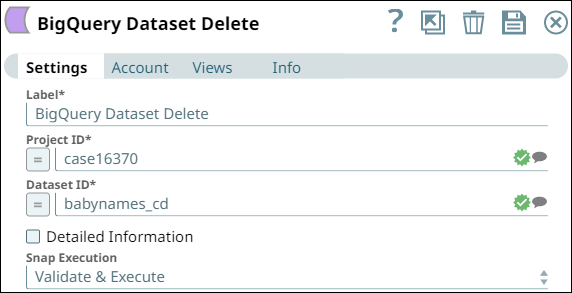
Specify a unique name for the Snap. Modify this to be more specific, especially if you have more than one Snap of the same type in your Pipeline. Default value: BigQuery Dataset Delete Example: Babynames Dataset Delete |
||
| Project ID String/Expression |
Specify the Project ID in which the dataset to be deleted resides. Default value: N/A Example: Test-project-324543 |
||
| Dataset ID String/Expression |
Specify the ID of the dataset that you want to delete. Default value: N/A Example: project-test-43433 |
||
| Detailed Information Checkbox |
Select this checkbox to enable the Snap to access additional fields for displaying them in the output. The additinal fields include: Dataset Location, Dataset Description, Dataset Creation Time, Dataset Last Modified Time, and Dataset Default Table Expiration. Default value: Deselected |
||
Snap execution
Dropdown list |
Choose one of the three modes in
which the Snap executes. Available options are:
Default value: Execute only Example: Validate & Execute |
||
Implicit retries in BigQuery Snaps
The BigQuery Snaps handle all retriable BigQuery errors (BigQuery exception, IO exception, and Runtime exception) internally.
- 429 (Too Many Requests):
- Retry attempts: Maximum of 5 retries.
- Delay Between Retries: Backoff strategy with jitter (random variation) is applied to prevent synchronized retries and reduce load.
- 401 (Unauthorized):
- Retry attempts: Maximum of 3 retries.
- Delay Between Retries: Backoff strategy is applied.
- Additional Actions: Reloads the BigQuery account on the retry event.
- IOException and 500, 502, 503, 504 (Server Errors):
- Retry attempts: Maximum of 3 retries.
- Delay Between Retries: Backoff strategy is applied.
Troubleshooting
| Error | Resolution |
|---|---|
| No Dataset found with the specified id. | Either the dataset has already been deleted or specify another dataset to delete. |