


SAP Concur Read
Overview
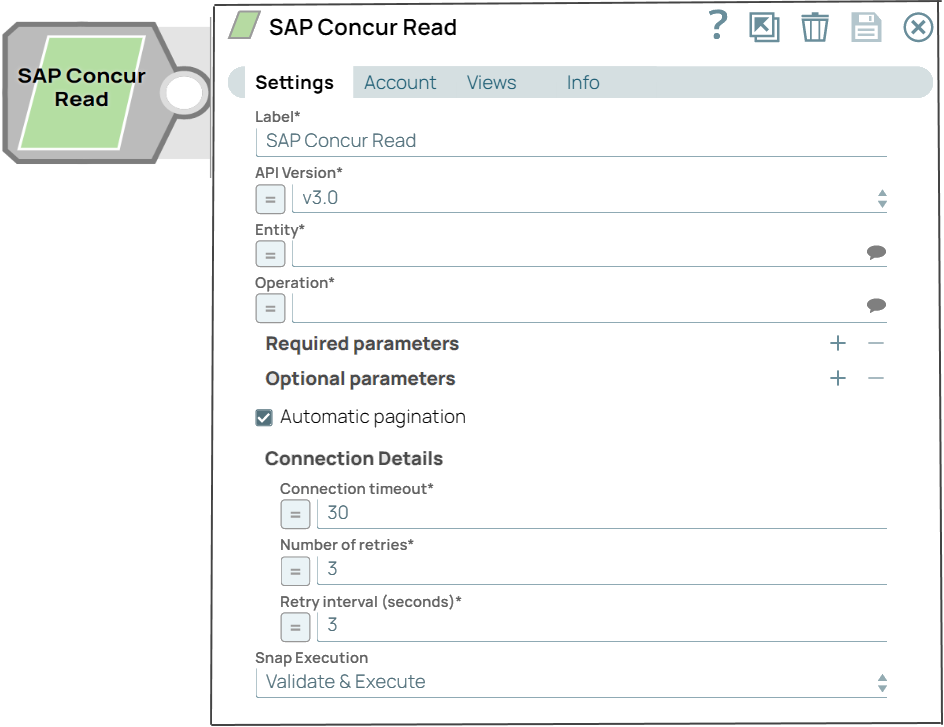
The SAP Concur Read Snap reads or fetches data resources from SAP Concur. For more information about SAP Concur APIs, refer to SAP Concur API Documentation.
- This is a Read-type Snap.
 Works in Ultra Tasks
Prerequisites
- A valid account with the required permissions.
Snap views
| Type | Description | Examples of upstream and downstream Snaps |
|---|---|---|
| Input |
This Snap has at most one document input view. A document containing data that can be used to filter entities that need to be retrieved in SAP Concur. |
|
| Output |
This Snap has exactly one document output view. A document containing the data retrieved from SAP Concur. |
|
| Learn more about Error handling. | ||
Snap settings
- Expression icon (
 ): Allows using
pipeline parameters to set field values dynamically (if enabled). SnapLogic Expressions
are not supported. If disabled, you can provide a static value.
): Allows using
pipeline parameters to set field values dynamically (if enabled). SnapLogic Expressions
are not supported. If disabled, you can provide a static value. - SnapGPT (
 ): Generates SnapLogic Expressions
based on natural language using SnapGPT. Learn
more.
): Generates SnapLogic Expressions
based on natural language using SnapGPT. Learn
more. - Suggestion icon (
 ): Populates a
list of values dynamically based on your Snap configuration. You can select only one
attribute at a time using the icon. Type into the field if it supports a comma-separated
list of values.
): Populates a
list of values dynamically based on your Snap configuration. You can select only one
attribute at a time using the icon. Type into the field if it supports a comma-separated
list of values. - Upload
 : Uploads files. Learn more.
| Field/Field set | Description |
|---|---|
Label
String |
Optional. Specify a unique name for the Snap. Modify this to be more appropriate, especially if more than one of the same Snaps is in the pipeline. Default value: SAP Concur Read Example: SAP Concur Read |
API Version
Dropdown list |
Specify the API version of SAP Concur. For more information about the API, refer to Swagger API Explorer. Available values are:
Default value: v3.0 Example: v3.1 |
Entity
String/Expression/ Suggestion |
Required. Specify an entity or data objects to read. You can specify a static value or pass the value dynamically. This field populates suggestions of entities available in the chosen version of API. Default value: N/A Example: Vendors |
Operation
String/Expression |
Required. Define the Action (SAP Concur Endpoint). Default value: N/A Example: Retrieves an existing vendor |
| Required parameters | Use this field set to specify the required fields for a selected operation. If there is any suggestion, it means these parameters are required for the selected endpoint. |
Parameter
String |
Specify the names of the required parameters. Default value: N/A Example: vendorcode |
Value
String |
Specify the values of the required parameters. The data type of this field depends on what parameter name you selected or entered, which can be String, Integer, Boolean, etc. Default value: N/A Example: 1234 |
| Optional parameters | Use this field set to specify the names and values of optional parameters defined in SAP Concur API Documentation. |
Parameter
String |
Specify the names of the optional parameters. Default value: N/A Example: createdFrom |
Value
String |
Specify the values for optional parameters. The data type of this field depends on what parameter name you selected or entered, which can be String, Integer, Boolean, etc. Default value: N/A Example: 01-01-2022 |
Output entry offset
Integer |
Specify the number of records the query must skip while fetching the results. Default value: N/A Example: 1 |
Output entry limit
Integer |
Specify the number of records the query should return. You can leave it empty to retrieve the default number of records. Default value: N/A Example: 30 |
Automatic pagination
Checkbox |
Select if you want results of all the records matching to be acquired automatically beyond the limit. By default, SAP Concur returns a limit of records depending on the entity. Default value: Deselected |
Connection Timeout
Integer |
Required. Specify the connection timeout duration in seconds. Default value: 30 Example: 40 |
Number of Retries
Integer |
Required. Specify the maximum number of reconnections if the connection is failed or timeout. Default value: 3 Example: 5 |
Retry Interval (seconds)
Integer |
Required. Specify the interval in seconds between reconnections. Default value: 3 Example: 10 |
Snap execution
Dropdown list |
Choose one of the three modes in
which the Snap executes. Available options are:
|
Troubleshooting
| Error | Cause | Resolution |
|---|---|---|
| Missing required parameters. | There is a parameter required for the selected operation and that was not provided. | Check the required parameters and add missing ones. |