


Twilio Modify
Overview
Use this Snap to modify existing Twilio data objects.
- This is a Write-type Snap.
 Works in Ultra Tasks
Prerequisites
- Valid Twilio Account SID
- Auth Token corresponding to the Account SID
Snap views
| Type | Description | Examples of upstream and downstream Snaps |
|---|---|---|
| Input |
Document Min: 1, Max: 1 A document containing details of the entity or data object to modify a Twilio entity. |
|
| Output |
Document Min: 0, Max: 1 A document containing details of the modified Twilio entity or data object. |
|
| Learn more about Error handling. | ||
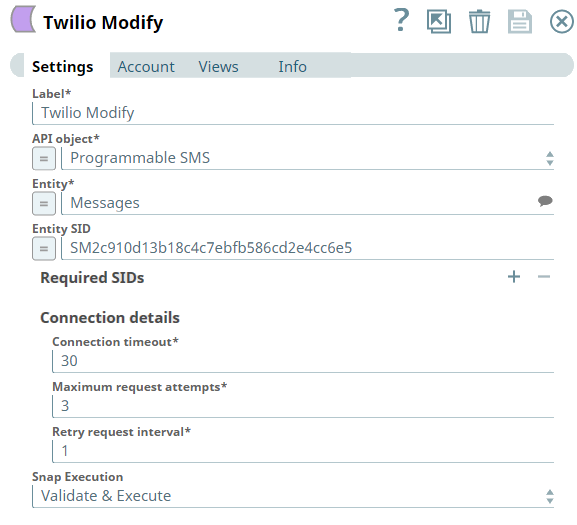
Snap settings
| Field/Field set | Description |
|---|---|
|
Label String
|
Specify a unique name for the Snap. Modify this to
be more appropriate, especially if there are more than one of the same Snap in the
pipeline.
Default value: Twilio Modify |
|
API object String/Expression
|
Required. Select the API that you want to access in Twilio instance.
Default value: Programmable SMS |
|
Entity String/Expression/ Suggestion
|
Required. Select an entity that belongs to the corresponding API object chosen above.
Default value: Messages |
|
Entity SID String/Expression
|
Required. Specify a unique ID for the entity that determines one specific resource under the given entity type. |
| Required SIDs | Use this fieldset to specify any additional SIDs required by the selected entity. Click the + icon to add a row and provide the SID name and its value for each required parameter. |
|
SID name String/Expression
|
Specify the name of the required SID parameter for the selected entity. Default value: N/A Example: AccountSid |
|
SID value String/Expression
|
Specify the value for the corresponding SID name. Default value: N/A Example: |
| Connection details | Use this fieldset to specify the connection details for the Snap. |
|
Connection timeout Integer/Expression
|
Required. Specify the connection timeout duration in seconds. Default value: 30 Example: 60 |
|
Maximum request attempts Integer/Expression
|
Required. Specify the maximum number of attempts to be made to receive a response. The request is terminated if the attempts do not result in a response. Default value: 3 Example: 5 |
|
Retry request interval Integer/Expression
|
Required. Specify the time interval in seconds between successive retry attempts. A retry occurs only when the previous attempt resulted in an exception. Default value: 1 Example: 5 |
|
Snap execution Dropdown list
|
Choose one of the three modes in
which the Snap executes. Available options are:
Default value: Execute only |
Troubleshooting
| Error | Reason | Resolution |
|---|---|---|
| You have an empty value in the Key/Value field. | Key/value parameters must not be empty. | Enter a valid value for key/value parameters. |
| One or more Required SIDs are missing. | The Required SIDs are mandatory for this Endpoint. | Check your settings under the Required SIDs table. Ensure that you have entered SID names and values for all the entries. |
| You have an empty value in the SID name/value field for the Required SID. | The SID name/value field must not be empty for Required SIDs. | Enter a valid SID name/value for the Required SID. |
Input schema
The Payload schema helps you define the input payload for the API
call through the Modify Snap. It dynamically loads and represents all the parameters that
you need for the data object modification. For a Mapper Snap or a Snap that can display the
entire input schema, always use the Payload schema to define your
input payload. Otherwise, in your input JSON object, always include
Payload text as a key in the parent of your input.