


Salesforce Bulk Delete
Overview
The Salesforce Bulk Delete Snap deletes records using Salesforce Bulk API 2.0.
The Snap submits the delete requests in batches and executes a soft delete.
- This is a Write-type Snap.
 Works in Ultra Tasks when the Batch size is set to 1.
Supported Accounts
Limitations
This Snap performs batch processing; a batch of input documents is processed for each HTTP request sent to Salesforce. Values of all the expression-enabled fields must remain constant during the Snap execution or validation. Hence, all expression fields can support Pipeline parameters only when they are expression-enabled. The input data parameters are not supported for expression fields; for example, $serviceVersion.
Snap views
| Type | Description | Examples of upstream and downstream Snaps |
|---|---|---|
| Input |
This Snap has exactly one document input view. Each document contains one Salesforce record. |
|
| Output |
This Snap has at most one document output view. Produces documents in the view. |
|
| Error |
This Snap has at most one document error view. Note: Because of the potentially large size of the error messages, the
Reason for the Salesforce error message in the error document field may be truncated. The complete error is available in the field full_error under the original object containing copies of the failed input records or in the logs. |
|
Examples
Delete Records In Bulk from Salesforce: Delete records in bulk using Bulk API 2.0.
Snap settings
| Field/Field set | Description |
|---|---|
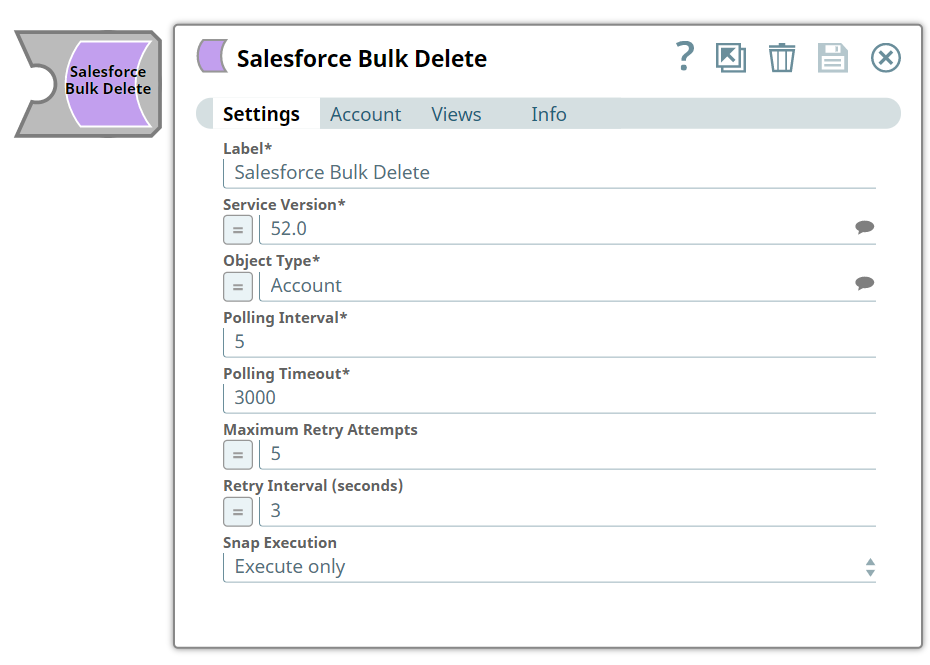
Label*
String |
Specify the name for the Snap. Update the Snap name if two or more Snaps of the same type are in your pipeline. Default value: Salesforce Bulk Delete Example: SalesforceBulk2Delete |
Service Version*
String/Expression/ Suggestion |
Specify the version number associated with the Salesforce service that you want to connect to. Alternatively, click the Suggestion icon to fetch the list of versions and select the desired version. Default value: 52.0 Example: 41.0 |
Object Type*
String |
Specify the name of the Salesforce object or select one from the suggested list. Note: This Snap does not support Net Zero Cloud Salesforce objects.
Default value: Account Example: Account |
Polling Interval*
Integer |
Define polling interval in seconds. Default value: 5 Example: 5 |
Polling Timeout*
Integer |
Define the maximum time in seconds to wait for the query to complete. Default value: 3000 Example: 300 |
Maximum Retry Attempts
Integer |
Define the maximum number of retries to attempt in case of connection failure. Note:
This Snap retries all retryable HTTP status codes, including 401, 403, and 5XX, and connection-related errors. Default value: 5 Example: 5 |
Retry Interval (seconds)
Integer |
Define the interval between retries in seconds. Default value: 3 Example: 3 |
Snap execution
Dropdown list |
Choose one of the three modes in
which the Snap executes. Available options are:
|