


IBM MQ Account
Overview
Use this account type to connect IBM MQ Snaps with data sources that use an IBM MQ account.
Prerequisites
- Valid username (optional)
- Valid hostname, port, and queue manager name
Account settings
- Expression icon (
 ): Allows using
JavaScript syntax to access SnapLogic Expressions to set field values dynamically (if
enabled). If disabled, you can provide a static value. Learn more.
): Allows using
JavaScript syntax to access SnapLogic Expressions to set field values dynamically (if
enabled). If disabled, you can provide a static value. Learn more. - SnapGPT (
 ): Generates SnapLogic Expressions
based on natural language using SnapGPT. Learn
more.
): Generates SnapLogic Expressions
based on natural language using SnapGPT. Learn
more. - Suggestion icon (
 ): Populates a
list of values dynamically based on your Snap configuration. You can select only one
attribute at a time using the icon. Type into the field if it supports a comma-separated
list of values.
): Populates a
list of values dynamically based on your Snap configuration. You can select only one
attribute at a time using the icon. Type into the field if it supports a comma-separated
list of values. - Upload
 : Uploads files. Learn more.
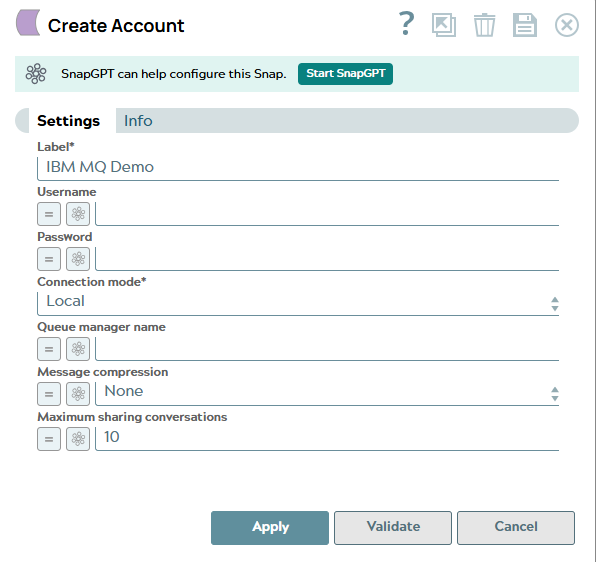
| Field/Field set | Type | Description |
|---|---|---|
| Label String |
Required. Specify a unique label for the account. Default value: N/A Example: IBM MQ Account |
|
| Username String/Expression |
Specify a username necessary to create the connection to the provider (optional). Default value: N/A Example: [email protected] |
|
| Password String/Expression |
Specify the password associated with the IBM MQ username. Default value: N/A Example: Encrypted |
|
| Connection mode Dropdown list |
Specify the connection mode type for binding. The available options are:
Default value: Remote Example: Remote |
|
| Hostname String/Expression |
Specify the host name of the IBM MQ Queue Manager to which you need to connect. Default value: jmsibmmqssl2.snaplogic.nia.com Example: jmsibmmqssl2.snaplogic.nia.com |
|
| Port number Integer/Expression |
Specify the port number of the IBM MQ Queue Manager to which you must connect. Default value: N/A Example: 1414 |
|
| Queue manager name String/Expression |
Specify the name of the IBM MQ Queue Manager to which you must connect. Default value: N/A Example: snaplogic |
|
| Channel String/Expression |
Specify the channel name of the IBM MQ Queue Manager to which you must connect. Default value: N/A Example: integration |
|
| Message compression String/Expression |
Specify the compression option to use for the message compression. Options:
Default value: None Example: ZLIB Fast |
|
| SSL Options | ||
| SSL enabled Checkbox |
Select this checkbox to connect to the IBM MQ Queue Manager via SSL. This is visible only when the connection mode is Remote. Default value: Deselected |
|
| FIPS Checkbox |
Select this checkbox to enable FIPS mode in SSL configuration. Default value: Deselected |
|
| SSL cipher suite String/Expression |
Specify the SSL cipher suite to use for connection to the IBM MQ Queue Manager. Default value: N/A Example: TLS_RSA_WITH_AES_128_CBC_SHA256 |
|
| Truststore String/Expression |
Specify the path to the SSL trust store file containing the trusted CA certificates for the connection to the IBM MQ Queue Manager. The file can be located in SLDB, on the host machine that hosts the JCC, or at any other remote location. For a local file, click the Upload icon, then select the appropriate file using the file browser. Default value: N/A Example: client.jks |
|
| Truststore password String/Expression |
Specify the password for the SSL trust store file containing the trusted CA certificates for the connection to the IBM MQ Queue Manager. Default value: N/A Example: Encrypted |
|
| Keystore String/Expression |
Specify the location of the keystore file. The file can be located in SLDB, on the host machine that hosts the JCC, or at any other remote location. For a local file, click the Upload icon to select the appropriate file using the file browser. You can also upload the file using any protocol such as https, ftp, sldb, and sftp. Default value: N/A Example: x590_certificate.jks |
|
| Keystore password String/Expression |
Specify the password for the SSL key store file containing the client certificate for the connection to the IBM MQ Queue Manager. This field is required if the SSH Auth Mode is KeyFile. Default value: N/A Example: Xy9!aP3r$7LmQ2zT |
|
| Maximum sharing conversations Integer/Expression |
The maximum number of conversations that can be shared over a single TCP/IP socket. Default value: 10 Example: 10 |
|