


Reltio Unmerge
Overview
The Reltio Unmerge Snap is used to un-merge merged Reltio Objects (only Entities) on the mentioned Tenant.
Based on the Snap's configuration, it is also possible to unmerge composite Entities. The Snap transforms merged Reltio Objects into separate un-merged entities.
- This is a Write-type Snap.
 Works in Ultra Tasks
Prerequisites
- Reltio account with a valid Tenant ID so that Tenant URL can be formed/API for Account Settings.
- The Reltio account must have write access to create objects in Tenant.
Limitations
- You cannot roll back the productized Reltio Snap Pack in 4.20 to a prior version.
Snap views
| Type | Description | Examples of upstream and downstream Snaps |
|---|---|---|
| Input |
This Snap has exactly one document input view. Input view is optional and is required only to pass the Origin Entity Id/Spawn Entity Id from upstream Snaps or as a value in their corresponding properties. |
|
| Output |
This Snap has exactly one document output view. Response for the Snap contains every field of each unmerged Entity. |
|
| Learn more about Error handling. | ||
Snap settings
| Field/Field set | Description |
|---|---|
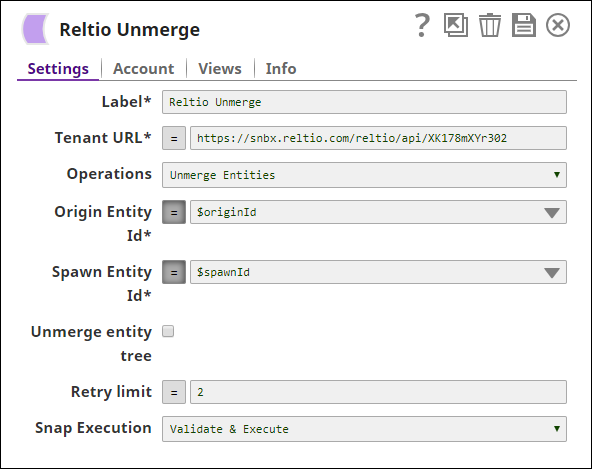
Label*
String |
Specify a unique name for the Snap. Modify this to be more appropriate, especially if more than one of the same Snaps is in the pipeline. Default value: Reltio Unmerge |
Tenant URL*
String/Expression |
Specifies the Reltio host with Tenant ID. The format to use is https://<reltio_host>/reltio/api/<tenant_id>.
Note: This value can be provided dynamically as a pipeline parameter or directly in the Snap, but not as an upstream parameter.
Default value: https://test.reltio.com/reltiotest/api/XKiqdracb178fmuXYr3U7ZrG6/ Example: https://sndbx.reltio.com/reltio/api/XK178mXYr3UZrG6/ |
Operations
Dropdown list |
Specifies the type of unmerge operation. Possible allowed values are:
Default value: Unmerge Entities |
Origin Entity Id*
String/Expression |
Specifies the composite Entity ID, which is the parent Entity ID (similar to Winner Id in Reltio Merge Snap) formed during the merge operation.
Note: This value can be passed either as an upstream parameter or directly in the Snap, but not as a pipeline parameter.
Default value: N/A |
Spawn Entity Id*
String/Expression |
Specifies the Entity ID, which is the child of the merged Entity (similar to Loser Id in Reltio Merge Snap) formed during the merge operation.
Note: This value can be passed either as an upstream parameter or directly in the Snap, but not as a pipeline parameter.
Default value: N/A |
Unmerge entity tree
Checkbox |
Select this checkbox for a composite Entity, an Entity that is the result of several merge operations. If enabled, every component (contributor) can be unmerged to be a standalone entity again. If not selected, only the initial state of spawn without any merges would be unmerged.
Default value: Deselected |
Retry limit
Integer/Expression |
Specifies the maximum number of attempts to get the response.
Note: You can provide this value dynamically as a pipeline parameter or directly in the Snap, but not as an upstream value.
Default value: 5 Example: 3 |
Snap execution
Dropdown list |
Choose one of the three modes in
which the Snap executes. Available options are:
Default value: Execute only Example: Validate & Execute |