


Bulk Lead Upsert
Overview
You can use the Bulk Lead Upsert Snap to upsert a large number of leads into the Lead database.
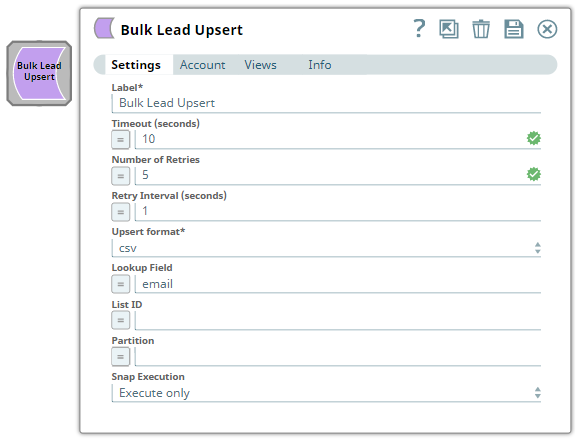
- This is a Write-type Snap.
 Works in Ultra Tasks
Prerequisites
- A valid Marketo OAuth2 Account.
- Valid permissions for bulk lead operations. Refer to the Marketo Bulk Import API documentation.
Limitations
- API Limits:
- Daily Quota: The subscriptions are allocated 50,000 API calls per day (which resets daily at 12:00AM CST).
- API Rate Limit: All Marketo APIs are rate-limited. The API access per instance is limited to 100 calls per 20 seconds.
- Concurrency Limit: You can make a maximum of 10 concurrent API calls.
- Marketo supports a variety of objects for extraction, such as
Bulk Custom Object Import,Bulk Lead Import, andBulk Program Member Import; however, this Snap supports onlyLead upsertobjects. See Bulk Lead Import API for more information. - This Snap accepts values for the Timeout (seconds), Number of Retries, and Retry Interval (seconds) fields from Pipeline parameters only. These fields do not support values from upstream Snaps when you enable the expression icon.
Known issues
- Bulk Lead Upsert Snap fails with error 1006 for SSV file format as input.
- Marketo Snaps do not support some special characters (for example, (
𝖖𝖗𝖘𝖬𝖭𝖮𝗕𝗖𝘧𝘨𝘩𝛀𝛁𝛂𝛃𝛄𝛅𝛆𝛇,𝖗𝖘𝖬𝛌𝛗𝛘𝛙𝛴)).
Snap views
| Type | Description | Examples of upstream and downstream Snaps |
|---|---|---|
| Input | This Snap has at most two binary input views. Requires the Upsert format and additional detail, if required, to insert or update a large number of records into the Lead database. | |
| Output | This Snap has at most one document output view. Insertion of large leads into the Lead database. | |
| Learn more about Error handling. | ||
Snap settings
| Field/Field set | Description |
|---|---|
Label*
String |
Specify a unique name for the Snap. Supports expressions.
Default value: Bulk Lead Upsert |
Timeout (seconds)
Integer/Expression |
Specify the time in seconds to wait for the bulk lead upsert to complete before it times out. A value of zero disables the timeout. Default value: 0 |
Number of Retries
Integer/Expression |
Specify the number of attempts the Snap must make in case of connection failure or timeout. Default value: 0 |
Retry Interval (seconds)
Integer/Expression |
Specify the minimum number of seconds the Snap must wait before each retry attempt. Default value: 1 |
Upsert Format*
Dropdown list |
Select the file format for the bulk lead upsert:
Default value: CSV |
Lookup Field
String/Expression |
Specify the field used to deduplicate lead records during upsert. If not specified, the email field is used by default. Note: You can use
Id only for update-only operations.Default value: email |
List ID
Integer/Expression |
Specify the ID of the static list to add the upserted leads to. Leave blank to upsert without adding to a list. Default value: N/A |
Partition
String/Expression |
Specify the name of the lead partition to upsert records into. Required for workspaces and partitions-enabled instances. Default value: N/A |
Snap execution
Dropdown list |
Choose one of the three modes in
which the Snap executes. Available options are:
Default value: Validate and Execute |