


Neo4j Write
Overview
The Neo4j Write Snap creates or merges nodes of a given label in your Neo4j database, processing the incoming documents in batches.
Each incoming document becomes one node, with the document's fields written as node properties. Use the Operation field to choose between creating a new node for every document and merging on a set of key properties so that existing nodes are updated instead of duplicated.
- This is a Write-type Snap.
Supported Accounts
Snap views
| Type | Description | Examples of upstream and downstream Snaps |
|---|---|---|
| Input |
This Snap has one document input view. Each incoming document is written as one node, with the document's fields mapped to node properties. |
|
| Output |
This Snap has at most one document output view. Each output document reports the result of the write for the corresponding input document. |
|
| Learn more about Error handling. | ||
Snap settings
| Field/Field set | Description |
|---|---|
Label* String |
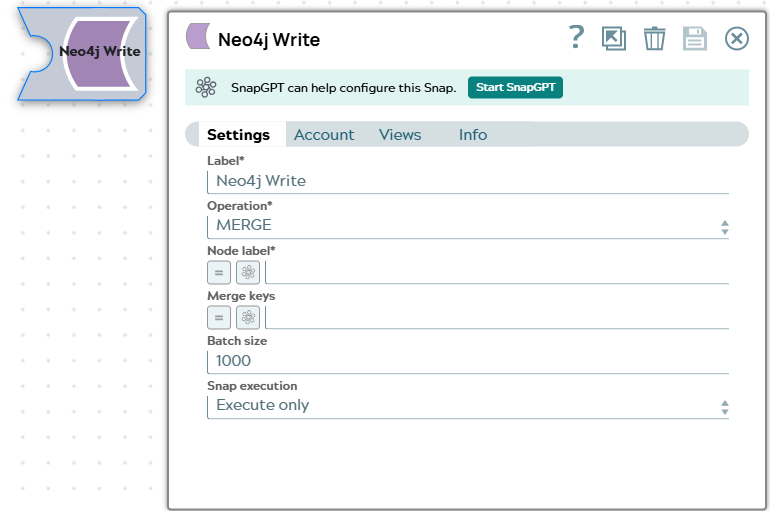
Specify a unique name for the Snap. Modify this to be more appropriate, especially if more than one of the same Snaps is in the pipeline. Default value: Neo4j Write |
Operation*
Dropdown list |
Select the Cypher operation used to write each node.
Default value: MERGE Example: CREATE |
Node label*
String/Expression |
Enter the label to assign to the nodes that the Snap writes. Default value: None Example: |
Merge keys
String/Expression |
Enter a comma-separated list of node properties that together identify an existing node. The Snap matches on these properties and updates the matched node rather than creating a duplicate. This field is ignored when Operation is CREATE. Default value: None Example: |
Batch size
Integer/Expression |
Enter the number of documents the Snap writes to Neo4j in a single transaction. A larger batch size improves throughput but holds a longer transaction on the server. Default value: 1000 Example: |
|
Snap execution Dropdown list
|
Choose one of the three modes in
which the Snap executes. Available options are:
Default value: Execute only |
Troubleshooting
| Error | Reason | Resolution |
|---|---|---|
| Node label is required | The Node label field is empty. | Provide a non-empty node label in the Node label field. |
| Merge keys are required when the operation is MERGE | Operation is set to MERGE but the Merge keys field is empty. Without merge keys, MERGE matches every existing node of the label and silently collapses or overwrites data. | Provide one or more comma-separated property names in the Merge keys field that together uniquely identify a node, or switch Operation to CREATE. |