


Eloqua OAuth2 Account
Overview
Use this account type to connect Eloqua Snaps with datasources that use Eloqua OAuth2 accounts.
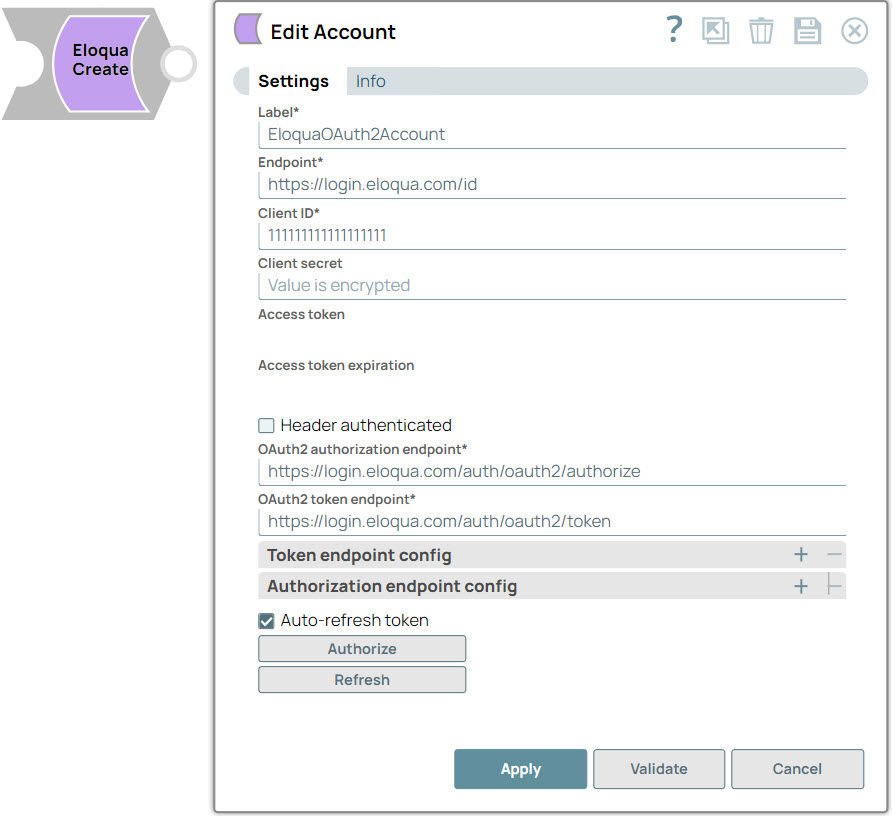
Account settings
- Expression icon (
 ): Allows using
JavaScript syntax to access SnapLogic Expressions to set field values dynamically (if
enabled). If disabled, you can provide a static value. Learn more.
): Allows using
JavaScript syntax to access SnapLogic Expressions to set field values dynamically (if
enabled). If disabled, you can provide a static value. Learn more. - SnapGPT (
 ): Generates SnapLogic Expressions
based on natural language using SnapGPT. Learn
more.
): Generates SnapLogic Expressions
based on natural language using SnapGPT. Learn
more. - Suggestion icon (
 ): Populates a
list of values dynamically based on your Snap configuration. You can select only one
attribute at a time using the icon. Type into the field if it supports a comma-separated
list of values.
): Populates a
list of values dynamically based on your Snap configuration. You can select only one
attribute at a time using the icon. Type into the field if it supports a comma-separated
list of values. - Upload
 : Uploads files. Learn more.
| Field Name/Field Type | Description | |
|---|---|---|
| Label
|
Required. The name for the account. Preferably, update the account name if your project includes more than one account of the same type. Default value: Eloqua OAuth2 Account |
|
| Endpoint
|
Required. URI for fetching base REST API.Eloqua supports multiple data centers, and the https://login.eloqua.com/id endpoint lets you interface with Eloqua regardless of the location of the Eloqua install. For information on endpoint URIs, see Determining Base URLs. Default value: https://login.eloqua.com/id |
|
| Client ID
|
Required. The identification for the client that you obtain from the API console.For more information, see Validating a Call Signature. Default value: None |
|
| Client secret
|
A secret key known only to SnapLogic and the authorization server. It protects your resources by granting tokens to only authorized users. Default value: None |
|
| Access token
|
Read-only. An object that describes the security context of SnapLogic. The token includes the identity and privileges of the user account. This property is automatically populated after the account is authorized.The access token is retrieved when setting up the account for the endpoint. The OAuth2 flow is executed at the endpoint and the resulting access token is stored in this property.Access tokens have limited lifetimes; you must get a new access token after it expires.If the access token is refreshable, an optional refresh token can be stored. You get a new access token after the expiry of the existing access token if a refresh token was not defined, or if both the access and the refresh token expire. Default value: None |
|
| Refresh token
|
Read-only. Credentials that are used to acquire new access tokens. This property is automatically populated after the account is authorized. Refresh tokens can also expire but have a much longer lifetime.The refresh token is retrieved when setting up the account for the endpoint. The OAuth2 flow is executed at the endpoint and the resulting refresh token is stored in this property. If the refresh token is stored, the access token can be refreshed automatically before it expires. Default value: None |
|
| Access token expiration
|
Read-only. Number of seconds that the access token must be valid. This property is automatically populated after the account is authorized. Default value: None |
|
| Header authenticated
|
Enable if the endpoint uses bearer header authentication. Default value: None |
|
| OAuth2 authorization endpoint
|
Required. URL of the endpoint's authorization. Default value: None |
|
| OAuth2 token endpoint
|
Required. URL of the endpoint's access token. Default value: None |
|
| Token endpoint config |
Provides custom properties for the OAuth2 token endpoint. |
|
| Token endpoint parameter |
An optional OAuth2 token endpoint parameter. Default value: None |
|
| Token endpoint parameter value
|
An optional OAuth2 token endpoint parameter value. Default value: None |
|
| Auth endpoint config |
Provides custom properties for the OAuth2 auth endpoint. |
|
| Authentication parameter
|
An optional OAuth2 authentication parameter. Default value: None |
|
| Authentication parameter value
|
An optional OAuth2 authentication parameter value. Default value: None |
|
| Auto-refresh token
|
When selected, the refresh token refreshes the access token automatically.When not selected, the access token expires after its lifetime.When the access token expires, the user is forced to sign in again. Default value: Deselected |
|
Limitations
None.