


Implement Slowly Changing Dimension Type 2
Overview
This example demonstrates how to use the Redshift SCD2 Snap to track historical changes in dimension tables using SCD Type 2 methodology. The Snap enables historization of changing data while preserving both current and historical records.
Prerequisites
- Amazon Redshift cluster with appropriate access
- Valid Redshift account configured in SnapLogic
- Understanding of Slowly Changing Dimension concepts
- Target table with appropriate SCD2 columns (start_date, end_date, active flag)
SCD Type 2 Concepts
Slowly Changing Dimension Type 2 (SCD2) is a technique for tracking historical changes in dimension data. When a record's data changes:
- The existing record is marked as historical (active = false) and end-dated
- A new record is inserted with the updated data (active = true) and a new start date
- Both records share the same natural key but have different surrogate keys
This allows queries to access either current data or historical snapshots based on date ranges.
Pipeline Overview
The pipeline consists of two Snaps working together:
- Redshift SCD2 Snap: Compares incoming data against the target table, identifying new and changed records
- Redshift Bulk Upsert Snap: Performs the actual database operations to historize old records and insert new ones
Snap Configuration
Redshift SCD2 Snap - Settings:
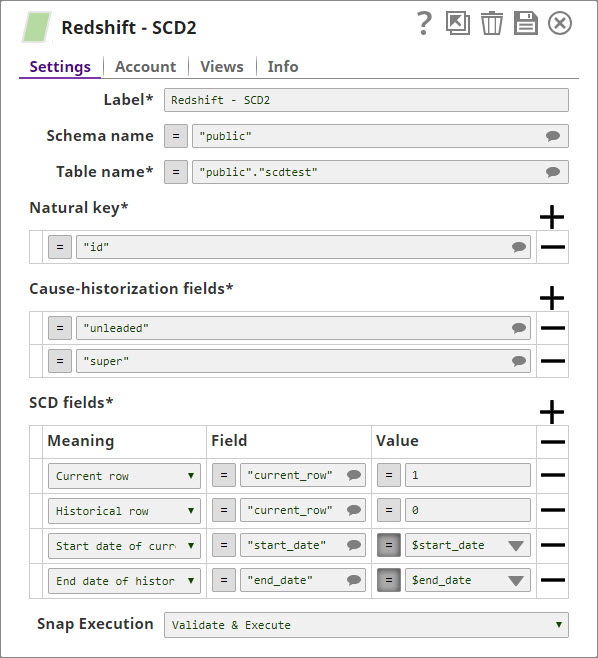
- Schema name: Target schema (e.g., public)
- Table name: Target dimension table
- Natural key: Columns that uniquely identify a business entity (e.g., station_id, zipcode)
- Cause-historization fields: Columns whose changes trigger historization (e.g., premium, regular)
- SCD Fields: Configure dimension tracking columns:
- Current row field: active (value: true for current, false for historical)
- Start date field: start_date (value: Date.now())
- End date field: end_date (value: Date.now() when historized, null for current)
- Ignore unchanged rows: Optional - skip generating output for records with no changes
Redshift Bulk Upsert Snap - Settings:
- Table name: Same as SCD2 Snap target table
- Key columns: Must include at least one natural key field from SCD2 configuration
How It Works
When the pipeline executes:
- The SCD2 Snap receives incoming data and performs a lookup in the target table using the natural key
- For each input record:
- If no match found: Generates one output document for insertion as a new current record
- If match found and cause-historization fields changed: Generates two output documents:
- One to update the existing record (mark as historical, set end_date)
- One to insert the new record (mark as current, set start_date)
- If match found and no changes: Either skips or generates pass-through based on configuration
- The Bulk Upsert Snap executes the updates and inserts generated by the SCD2 Snap
Example Data Flow
Initial Load:
Input: { "station_id": "U01", "zipcode": "94402", "premium": 4.13, "regular": 3.83 }
Output: One record marked as current (active=true, start_date=now, end_date=null)
After Price Update:
Input: { "station_id": "U01", "zipcode": "94402", "premium": 4.25, "regular": 3.98 }
Output: Two records:
  1. Update existing: active=false, end_date=now
  2. Insert new: active=true, start_date=now, end_date=null, premium=4.25, regular=3.98
Use Cases
This pattern is useful for:
- Tracking price changes over time
- Maintaining customer address history
- Recording product attribute changes
- Preserving organizational hierarchy changes
- Any scenario requiring historical data snapshots
Best Practices
- Choose natural keys that truly identify unique business entities
- Select cause-historization fields carefully - only those whose changes matter
- Ensure the target table has appropriate indexes on natural key columns
- Use the Ignore unchanged rows option to reduce unnecessary processing
- Test with small datasets to verify historization logic before full deployment
- Consider data volume and retention policies when implementing SCD2