


Oracle - Table List
Overview
The Oracle - Table List Snap outputs a list of tables in a database.
The Snap connects to the database, reads its metadata, and outputs a document for each table found in the database. The table names are output in a topological order so that tables with the fewest dependencies are output first. In other words, if table A has a foreign key reference to table B, then table B will be output before A. The ordering is intended to ease the process of replicating a group of tables from one database to another.
The Oracle JDBC Driver is upgraded from OJDBC6 JAR (v11.2.0.4) to OJDBC10 JAR (v19.20.0.0) in the latest distribution in October 2023 and deployed to the stable distribution in the November 2023 release (after the Snaplex upgrade). The latest JDBC driver upgrade is backward-compatible. Learn more: Oracle JDBC driver and JOOQ upgrades.
You can consume this driver upgrade with the 434patches23000 Snap Pack
version.
This JDBC driver upgrade has resulted in specific behavior changes that include errors, status codes, and success and failure messages. Learn more about the behavior changes to ensure your migration to the upgraded driver is seamless.
- This is a Write-type Snap.
 Works in Ultra Tasks
Prerequisites
None.
Snap views
| Type | Description | Examples of upstream and downstream Snaps |
|---|---|---|
| Input |
This Snap has at most one document input view. |
|
| Output |
This Snap has at most one document output view. Expected output: Documents with the following fields:
|
|
| Learn more about Error handling. | ||
Replicating a Subset of Tables
The output of the Table List Snap can be directly used to replicate an entire database. However, if you are only interested in a subset of tables, you can use a Filter Snap to select the table names you are interested in as well as the tables that they reference. For example, given the following diamond-shaped table graph where A depends on B and C and they both depend on D:
    A
   / \
  B   C
   \ /
    D
The Table List will output the following documents:
name=D; dependents=[A, B, C, D]
name=C; dependents=[A, C]
name=B; dependents=[A, B]
name=A; dependents=[A]
So, if you wanted to copy just table 'A' and its dependencies, you can add a Filter Snap with the following expression:
$.dependents.indexOf('A') != -1The filter will then remove any extra tables that happen to be in the schema.
Snap settings
- Expression icon (
 ): Allows using
pipeline parameters to set field values dynamically (if enabled). SnapLogic Expressions
are not supported. If disabled, you can provide a static value.
): Allows using
pipeline parameters to set field values dynamically (if enabled). SnapLogic Expressions
are not supported. If disabled, you can provide a static value. - SnapGPT (
 ): Generates SnapLogic Expressions
based on natural language using SnapGPT. Learn
more.
): Generates SnapLogic Expressions
based on natural language using SnapGPT. Learn
more. - Suggestion icon (
 ): Populates a
list of values dynamically based on your Snap configuration. You can select only one
attribute at a time using the icon. Type into the field if it supports a comma-separated
list of values.
): Populates a
list of values dynamically based on your Snap configuration. You can select only one
attribute at a time using the icon. Type into the field if it supports a comma-separated
list of values. - Upload
 : Uploads files. Learn more.
| Field/Field set | Description |
|---|---|
Label String |
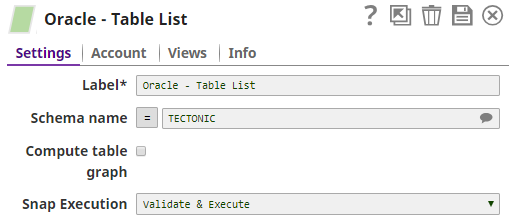
Required. Specify a unique name for the Snap. Modify this to be more appropriate, especially if more than one of the same Snaps is in the pipeline. Default value: Oracle - Table List |
Schema Name
String/Expression/ Suggestion |
Specify the database schema name. The suggestions in the Schema field are populated only when at least a single table exists in the schema. If no tables exist to use that schema, only SYS, SYSTEM, and XDB are populated. Default value: None Example: SYS |
Compute table graph
Checkbox |
Computes the dependents among tables and returns each table with a list of tables it has foreign key references to. The ordering of outputted tables is from least dependent to most-dependent. Note that as turning on this option will significantly slow down the Snap, it should be left as off unless you need it. Default value: Not selected |
|
Snap execution Dropdown list
|
Choose one of the three modes in
which the Snap executes. Available options are:
Default value: Validate & execute Example: Execute only |