


ServiceNow Delete
Overview
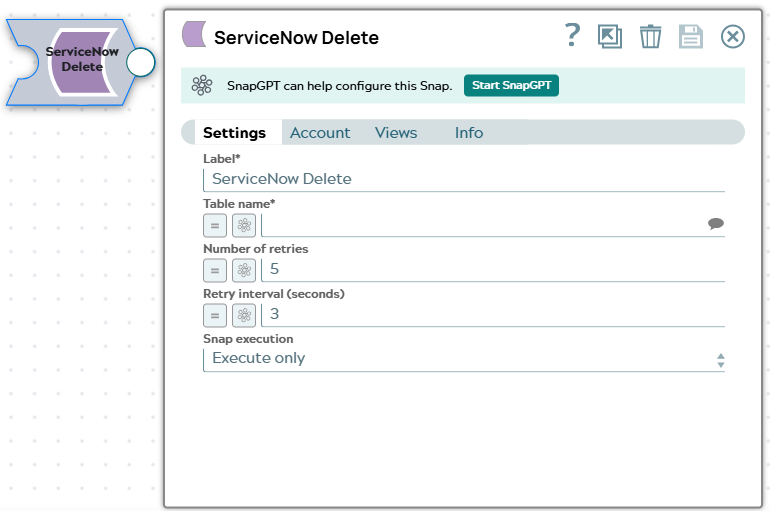
The ServiceNow Delete Snap connects to a particular ServiceNow instance, deletes the records by the IDs (fetched from incoming documents) from a given table, and returns the response as a document stream.
- This is a Write-type Snap.
 Works in Ultra Tasks
Snap views
| Type | Description | Examples of upstream and downstream Snaps |
|---|---|---|
| Input |
This Snap has exactly one input view. A Table Name and record ID. |
|
| Output |
This Snap has exactly one output view. Deletes a record. |
|
| Learn more about Error handling. | ||
Supported Accounts
Snap settings
- Expression icon (
 ): Allows using
pipeline parameters to set field values dynamically (if enabled). SnapLogic Expressions
are not supported. If disabled, you can provide a static value.
): Allows using
pipeline parameters to set field values dynamically (if enabled). SnapLogic Expressions
are not supported. If disabled, you can provide a static value. - SnapGPT (
 ): Generates SnapLogic Expressions
based on natural language using SnapGPT. Learn
more.
): Generates SnapLogic Expressions
based on natural language using SnapGPT. Learn
more. - Suggestion icon (
 ): Populates a
list of values dynamically based on your Snap configuration. You can select only one
attribute at a time using the icon. Type into the field if it supports a comma-separated
list of values.
): Populates a
list of values dynamically based on your Snap configuration. You can select only one
attribute at a time using the icon. Type into the field if it supports a comma-separated
list of values. - Upload
 : Uploads files. Learn more.
| Field/Field set | Description |
|---|---|
| Label
|
Specify a unique name for the Snap. Modify this to be more appropriate, especially if more than one of the same Snaps is in the pipeline. Default value: ServiceNow Delete |
| Table name
|
Required. The name of the table in the instance. The table name is suggestible but requires an account setting for the suggestions to appear. Note: Only accounts that have the 'Personalize dictionary' role can see the field labels associated with each table in the ServiceNow data dictionary. Therefore, accounts used with Snaps in this Snap Pack must have the 'Personalize dictionary' permission if you want to view the Table name suggestions.
Default value: N/A Example: incident |
| Number of retries
|
Specifies the maximum number of retry attempts when the Snap fails to write. Minimum value: 0 Default value: 0 Example: 3 |
| Retry interval (seconds)
|
Specifies the minimum number of seconds the Snap must wait before each retry attempt. Minimum value: 1 Default value: 1 Example: 3 |
| Snap execution
| Choose one of the three modes in
which the Snap executes. Available options are:
|