


ServiceNow OAuth2 Account
Overview
You can configure your accounts in SnapLogic using the Designer or Manager. You can use this account type to connect ServiceNow Snaps with data sources that use the ServiceNow OAuth2 account.
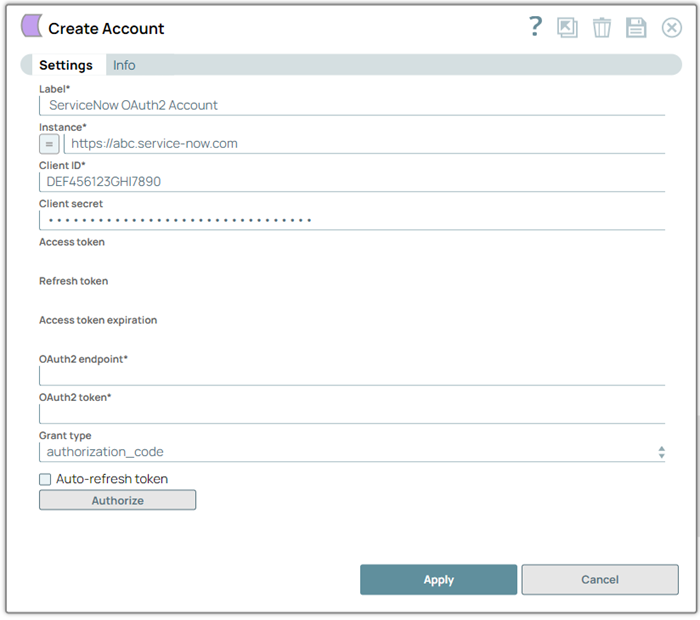
Prerequisites
- Create an app in ServiceNow portal for your ServiceNow instance.
Account settings
- Expression icon (
 ): Allows using
JavaScript syntax to access SnapLogic Expressions to set field values dynamically (if
enabled). If disabled, you can provide a static value. Learn more.
): Allows using
JavaScript syntax to access SnapLogic Expressions to set field values dynamically (if
enabled). If disabled, you can provide a static value. Learn more. - SnapGPT (
 ): Generates SnapLogic Expressions
based on natural language using SnapGPT. Learn
more.
): Generates SnapLogic Expressions
based on natural language using SnapGPT. Learn
more. - Suggestion icon (
 ): Populates a
list of values dynamically based on your Snap configuration. You can select only one
attribute at a time using the icon. Type into the field if it supports a comma-separated
list of values.
): Populates a
list of values dynamically based on your Snap configuration. You can select only one
attribute at a time using the icon. Type into the field if it supports a comma-separated
list of values. - Upload
 : Uploads files. Learn more.
| Field/Field set | Description |
|---|---|
| Label
|
Required. Specify a unique label for the account.
Default value: N/A Example: ServiceNow OAuth2 Account |
| Instance
|
Required. Specify the instance to access ServiceNow endpoint. If your ServiceNow URL is https://abc.service-now.com, then the instance name is abc.
Default value: N/A Example: https://abc.service-now.com |
| Client ID
|
Required. Provide the client ID to use for authorization. Learn more: Application configuration in ServiceNow portal to use in ServiceNow OAuth2 Account.
Default value: N/A Example: 45b546f46b004d10d275c2b553bc7g44 |
| Client Secret
|
Provide the client secret for authorization of OAuth2 account.
Default value: N/A Example: zcvfc098adfdb343s |
| Access Token
|
Required. Auto-generated upon account authorization. The access token for the application that is generated when setting up the account for the endpoint.
Note: Access tokens have limited lifetimes; you must get a new access token after it expires.
Default value: N/A Example: npo98yh |
| Refresh token
|
Auto-generated upon account authorization. The refresh token for the application that is generated when setting up the account for the endpoint.
Note: To access the API beyond the lifetime of a single access token, your application can obtain a refresh token. The application stores the refresh token for future use and automatically refreshes the access token before it expires.
Default value: N/A Example: N/A |
| Access Token Expiration
|
The time (in seconds) until which the access token must be valid. It represents the number of refresh tokens per user account per client.
Note: If there is no date of expiration, -1 is the default value. In such cases, the access token is refreshed on a regular interval, for instance, every hour.
Default value: N/A Example: 10 |
| OAuth2 Endpoint
|
Required. Specify the OAuth2 endpoint in the following format to authorize the application.
Default value: N/A Example: https://myinstance.service-now.com/oauth_auth.do |
| OAuth2 Token
|
Required. Specify the value for OAuth2 token in the following format to get the access token.
Default value: N/A Example: https://myinstance.service-now.com/oauth_token.do |
| Grant Type
|
Choose an authentication grant type for your ServiceNow instance. Available options are:
Default value: authorization_code Example: password |
| Username
|
Specify the username to connect to ServiceNow.
Dependency: Appears when you select password as Grant Type. Default value: N/A Example: admin |
| Password
|
Specify the password to connect to ServiceNow.
Dependency: Appears when you select password as Grant Type. Default value: N/A Example: p@$$w019 |
| Auto-refresh Token
|
Select this checkbox to enable auto-refresh of the access token before it expires. Otherwise, it might expire and will not be automatically refreshed.
Learn more about how the SnapLogic Platform handles token refresh failures. Default value: Deselected |