


Workday REST
Overview
The Workday REST Snap connects to Workday REST APIs using the OpenAPI specification specified for the service.
This Snap identifies the REST APIs using the OpenAPI specification and connects to endpoints under the selected service.
This Snap supports Workday Prism Public API v3. However, to use the Workday Prism, you must add the Workday Prism Analytics (v3) as the Scope in the Workday portal when registering the API client.
This Snap also supports:
- Standard REST operations (GET, POST, PUT, and PATCH) and a few enhancements from the traditional APIs, including better object models and better performance with faster API query responses.
- Authentication mechanisms such as OAuth2.0.
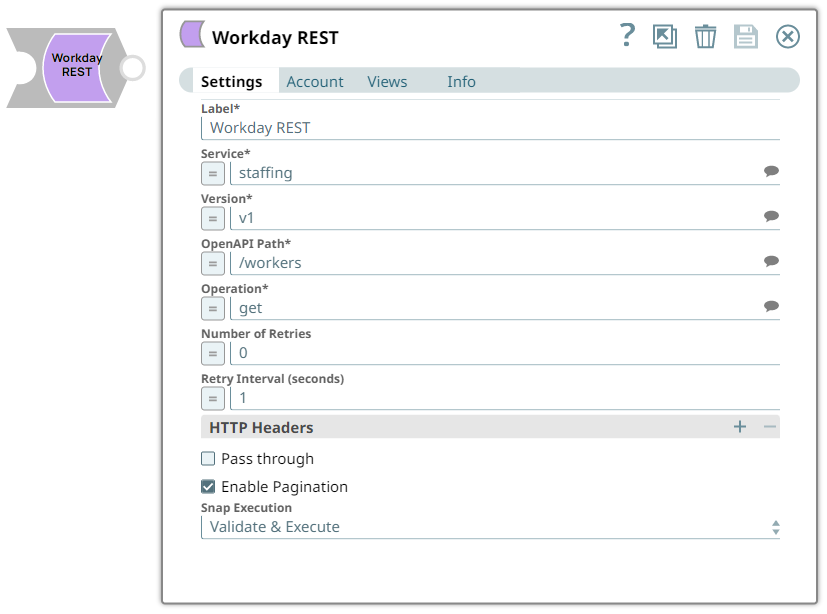
- This is a Write-type Snap.
 Works in Ultra Tasks
Prerequisites
- A valid account with the required permissions.
- Data to query and Workday access to the specified objects. Contact your organization's Workday Security Administrator for appropriate access.
Limitations
- This Snap does not support specific Unicode, Special, and UTF-8 byte characters because of the API limitation. This Snap produces an unexpected preview in the output when you pass input data with special or Unicode characters.
Snap views
| Type | Description | Examples of upstream and downstream Snaps |
|---|---|---|
| Input |
This Snap has at most one document input view. A document that conforms to the input view schema of the Snap. The input view schema is provided to an upstream Mapper Snap based on the selected service object. |
|
| Output |
This Snap has exactly one document output view. A document that represents the record structure of the retrieved Workday service object. Each record is represented as one document on the output view. |
|
| Learn more about Error handling. | ||
Snap settings
- Expression icon (
 ): Allows using
pipeline parameters to set field values dynamically (if enabled). SnapLogic Expressions
are not supported. If disabled, you can provide a static value.
): Allows using
pipeline parameters to set field values dynamically (if enabled). SnapLogic Expressions
are not supported. If disabled, you can provide a static value. - SnapGPT (
 ): Generates SnapLogic Expressions
based on natural language using SnapGPT. Learn
more.
): Generates SnapLogic Expressions
based on natural language using SnapGPT. Learn
more. - Suggestion icon (
 ): Populates a
list of values dynamically based on your Snap configuration. You can select only one
attribute at a time using the icon. Type into the field if it supports a comma-separated
list of values.
): Populates a
list of values dynamically based on your Snap configuration. You can select only one
attribute at a time using the icon. Type into the field if it supports a comma-separated
list of values. - Upload
 : Uploads files. Learn more.
| Field/Field set | Description |
|---|---|
Label
String |
Specify a unique name for the Snap. Modify this to be more appropriate, especially if more than one of the same Snaps is in the pipeline. Default value: Workday REST Example: Onboarding newhires |
Service
String/Expression/ Suggestion |
Required. Specify or select the Workday Service to connect to Workday.
Default value: N/A Example: Compensation |
Version
String/Expression/ Suggestion |
Required. Select the version corresponding to the service.
Default value: N/A Example: v2 |
OpenAPI Path
String/Expression/ Suggestion |
Required. Enter the path for the REST endpoint. Based on the service and version, the Snap downloads the open API specification and populates the list.
Default value: N/A Example: /workers |
Operation
String/Expression/ Suggestion |
Required. Specify the operation to perform on the selected OpenAPI path or select from the suggestions list. The available options are:
Default value: N/A Example: get |
Number of Retries
Integer/Expression |
Specify the number of attempts the Snap must make to perform the selected operation in case of connection failure or timeout.
The Snap retries the request if the value is greater than zero or retries only if it encounters 401 or 500 error. Default value: 0 Example: 3 |
Retry Interval (seconds)
Integer/Expression |
Specify the retry interval in seconds between retry attempts.
Default value: 1 Example: 2 |
HTTP Headers
Fieldset |
Use this field set to add additional headers to the HTTP request defined in the Workday OpenAPI specification. |
Header
String/Expression |
Specify a name for the HTTP header.
Default value: N/A Example: content-type |
Values
String/Expression |
Specify a value to assign to the HTTP header.
Default value: N/A Example: application/json |
Pass through
Checkbox |
Select this checkbox to enable the Snap to pass the input data to the downstream Snap and display in the output document.
Default value: Deselected |
Enable Pagination
Checkbox |
Select this checkbox to enable the Snap to return the response in multiple pages when the input document contains the limit and offset query parameters.
When you deselect this checkbox, the Snap limits the number of output documents to 100, with only one page of records. Default value: Selected |
Snap execution
Dropdown list |
Choose one of the three modes in
which the Snap executes. Available options are:
|
Troubleshooting
| Error | Cause | Resolution |
|---|---|---|
| 403 Error: Unauthorized user. | The permissions are insufficient. | Ensure that you assign the required permissions and retry. |