


Spreadsheet OAuth2 Account
Overview
You can use this account type to connect Google Sheets Snaps with data sources that use Spreadsheet OAuth2 account.
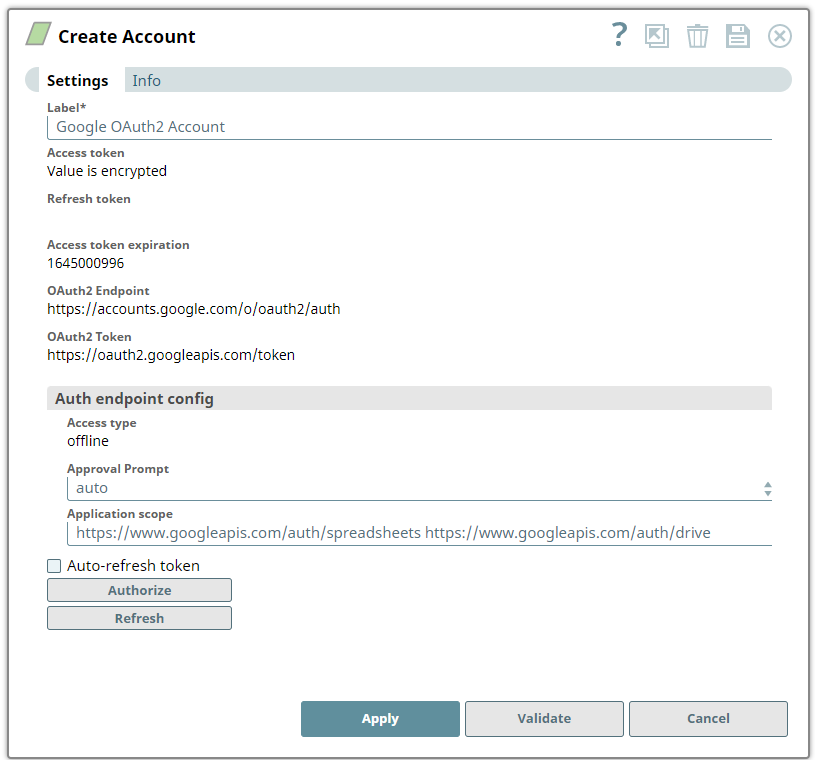
Account settings
Legend:
- Expression icon (
 ): Allows using
JavaScript syntax to access SnapLogic Expressions to set field values dynamically (if
enabled). If disabled, you can provide a static value. Learn more.
): Allows using
JavaScript syntax to access SnapLogic Expressions to set field values dynamically (if
enabled). If disabled, you can provide a static value. Learn more. - SnapGPT (
 ): Generates SnapLogic Expressions
based on natural language using SnapGPT. Learn
more.
): Generates SnapLogic Expressions
based on natural language using SnapGPT. Learn
more. - Suggestion icon (
 ): Populates a
list of values dynamically based on your Snap configuration. You can select only one
attribute at a time using the icon. Type into the field if it supports a comma-separated
list of values.
): Populates a
list of values dynamically based on your Snap configuration. You can select only one
attribute at a time using the icon. Type into the field if it supports a comma-separated
list of values. - Upload
 : Uploads files. Learn more.
| Field/Field set | Description |
|---|---|
Label*
String |
Specify a unique label for the account. |
Access token
String |
Required. Auto-generated upon account authorization. The access token for the application. You can retrieve the access token when setting up the account for the endpoint. The access token is refreshable, in which case you can store an optional refresh token. You must get a new access token if the access token has expired and no refresh token was defined or both the access and the refresh token have expired.
Default value: N/A Example: |
Refresh token
String |
Auto-generated upon account authorization. If you create a new OAuth2 Account and authorize it, you might see that you did not get a refresh token (or even a consent dialog, because Google knows your Google Account has already authorized our Snap's Google OAuth app and only provides refresh tokens by default on the first authorization per Google Account, not per SnapLogic OAuth2 Account).
Note: To force-receive a new refresh token, change Approval Prompt to force, click the Authorize button, give consent to offline access in the browser, and confirm that you now have a refresh token.
Default value: N/A Example: |
Access token expiration
String |
Auto-generated upon account authorization. The unix time until which the access token is valid. Learn more about Unix time.
Default value: N/A Example: |
OAuth2 Endpoint
String |
This is a read-only field. The authorization endpoint that authorizes the application.
Default value: |
OAuth2 Token
String |
This is a read-only field. The token endpoint to get the access token.
Default value: |
| Auth endpoint config | Custom properties for the OAuth2 endpoint. |
Access type
String |
Read-only field that indicates whether the Snap needs to access a Google API when the user is not available. The field value offline results in a refresh token being obtained the first time authorization has been received.
Default value: |
Approval Prompt
Dropdown list |
Indicates whether the user should be re-prompted for offline consent to receive a new refresh token. Available options are:
Default value: Example: |
Application scope
String |
The scope for the application's execution. For example, the Snap could define that only reading data by the application should be allowed. Learn more about OAuth2 Scopes for Google APIs.
Default value: |
Auto-refresh token
Checkbox |
Select the checkbox to receive refresh tokens automatically.
Default value: Deselected |
Note: Click Validate
after entering the required details to ensure that all fields have been filled accurately.
Click Apply to save the settings.
Troubleshooting
| Type | Description | Examples of upstream and downstream Snaps |
|---|---|---|
| Error instantiating Google Spreadsheet or docs service. | Invalid credentials. | Check if the credentials and the token are valid. |