


Neo4j Read
Overview
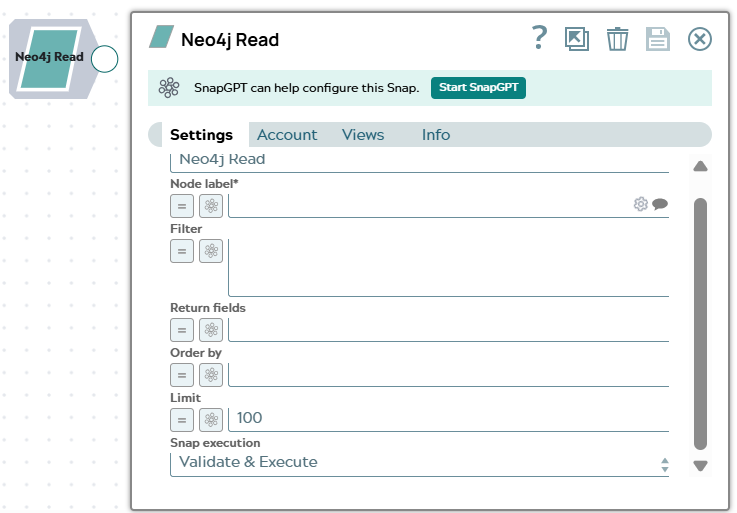
The Neo4j Read Snap retrieves nodes of a given label from your Neo4j database, with optional filter, return field, sort, and limit criteria.
Each matching node is emitted as a separate document on the output view. The Snap builds
the Cypher MATCH clause from the Node label and
Filter fields, so you do not need to write Cypher. To run an
arbitrary Cypher query instead, use the Neo4j Execute
Snap.
- This is a Read-type Snap.
Supported Accounts
Snap views
| Type | Description | Examples of upstream and downstream Snaps |
|---|---|---|
| Input |
This Snap has at most one document input view. When connected, field values from the incoming document can be referenced
in expression-enabled fields using the |
|
| Output |
This Snap has one document output view. Each matching node is emitted as a separate document containing the node's properties. |
|
| Learn more about Error handling. | ||
Snap settings
| Field/Field set | Description |
|---|---|
Label* String |
Specify a unique name for the Snap. Modify this to be more appropriate, especially if more than one of the same Snaps is in the pipeline. Default value: Neo4j Read |
Node label*
String/Expression/ Suggestion |
Enter or select the label of the nodes to retrieve. Click the suggestion icon to list the node labels defined in the target database. Default value: None Example: |
Filter
String/Expression |
Enter the Cypher predicate used to filter the matching nodes. Reference node
properties with the Default value: None Example: |
Return fields
String/Expression |
Enter a comma-separated list of node properties to include in each output document. Leave the field empty to return all properties of the matching nodes. Default value: None Example: |
Order by
String/Expression |
Enter the node properties to sort the results by, optionally followed by
Default value: None Example: |
Limit
Integer/Expression |
Enter the maximum number of nodes to emit per execution. Enter
Default value: 100 Example: |
|
Snap execution Dropdown list
|
Choose one of the three modes in
which the Snap executes. Available options are:
Default value: Validate & Execute |
Troubleshooting
| Error | Reason | Resolution |
|---|---|---|
| Node label is required | The Node label field is empty. | Provide a non-empty node label in the Node label field. |
| Neo4j operation failed | The Filter expression contains a syntax error or references a property that does not exist in the target database. | Verify the Cypher predicate in the Filter field.
Ensure all property names are prefixed with n. and the expression
is valid Cypher syntax. |