


Salesforce Lookup
Overview
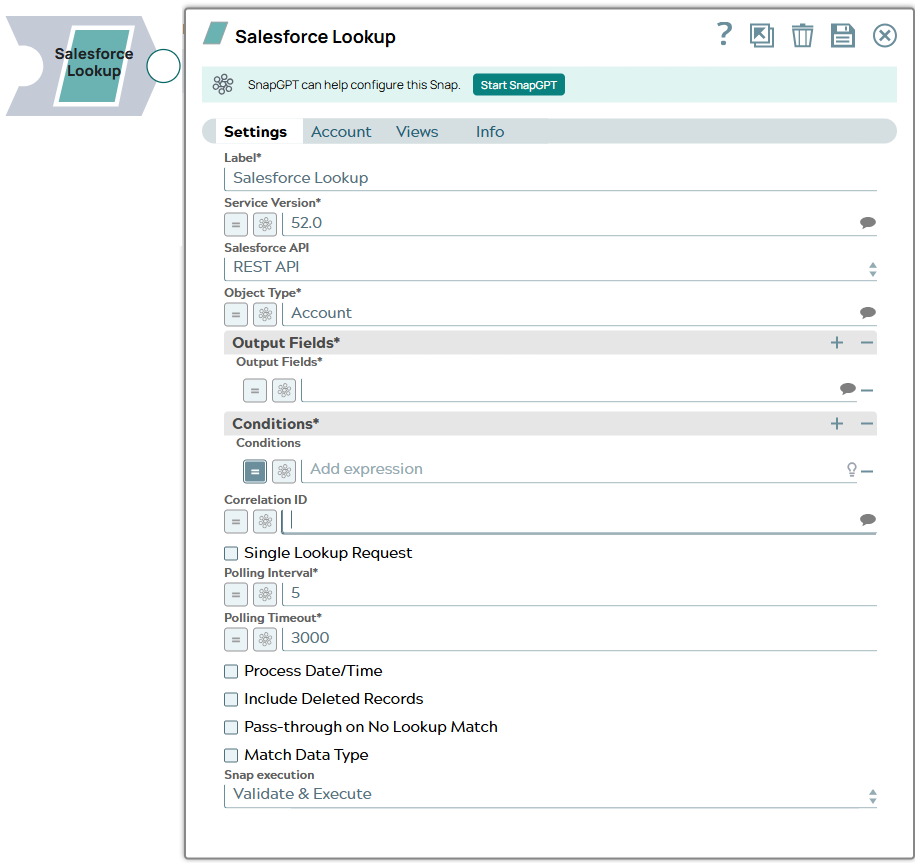
The Salesforce Lookup Snap provides the ability to format WHERE clause from input document stream for a SOQL (Salesforce Object Query Language) query.
See Introduction to SOQL and SOSL for more information.
- This is a Read-type Snap.
 Works in Ultra Tasks when the Batch size is set to 1.
Supported Accounts
Prerequisites
- A valid account with the required permissions.
Snap views
| Type | Description | Examples of upstream and downstream Snaps |
|---|---|---|
| Input |
This Snap has exactly one input view and receives documents in the view. Expressions in the Object type, Output fields, Conditions and Correlation ID properties can be evaluated with values from the input view during the execution. |
|
| Output |
This Snap has exactly one output view and writes documents to the view. |
|
| Learn more about Error handling. | ||
Examples
- Looking up Records: Look up object records from an input document stream.
- Looking-up Records with REST API Using the Correlation ID: Look up records through REST API using correlation IDs.
- Looking-up Records with a Single Lookup Request: Look up records with a single lookup request.
- Looking-up Records Using Correlation ID: Look up records using a correlation ID.
Snap settings
| Field/Field set | Description |
|---|---|
Label
String |
Specify a unique name for the Snap. Modify this to be more appropriate, especially if more than one of the same Snaps is in the pipeline. Default value: Salesforce Lookup Example: Salesforce Lookup |
Service Version*
String/Expression |
Specify the version number associated with the Salesforce service that you want to connect to. Alternatively, click the Suggestion icon to fetch the list of versions and select the desired version. Default value: 52.0 Example: 41.0 |
Salesforce API*
Dropdown list |
This property sets the Salesforce API mode to Bulk API or REST API during the pipeline execution. Default value: REST API Example: Bulk API |
Object Type*
String/Expression/ Suggestion |
Specify the name of the Salesforce object or select one from the suggested list. Note: This Snap does not support Net Zero Cloud Salesforce objects.
Default value: Account Example: Account |
| Output Fields | Use this field set to define the field names for the Salesforce Object Query Language (SOQL) SELECT statement. Specify each output field as a separate row. Click the add icon to add a new row. |
Output Fields*
String/Expression/ Suggestion |
Specify a list of field names for the SOQL SELECT statement. Alternatively, click the Suggestion icon to fetch the list of field names associated with the object type and select a field. The value for this field can also be an expression that will be evaluated against the values configured in Pipeline parameters only. Default value: N/A Example: Id, Name, ShippingAddress |
| Conditions | Use this field set to define conditions. Specify each condition as a separate row. Click the add icon to add a new row. |
Conditions*
String/Expression |
Specify the condition for the WHERE clause. Note: The values in this field forms an AND clause in the SOQL WHERE statement. Each entry in the Conditions row can be an expression to be evaluated with the values from the input view. The Snap receives a stream of document data, where each document is formatted into an AND clause and all AND clauses are ORed together to form an entire WHERE statement. If the size of SOQL statement exceeds 10,000 characters, the Snap sends the SOQL query request, retrieves the resulting records which are sent to the output view, and restarts forming a new WHERE statement.
Example: The above example is an expression which can be evaluated to Note: Using quotes in the WHERE clause
Default value: N/A Example: "Name = '" + $Name + "'" |
Correlation ID
String/Expression/ Suggestion |
Specify an ID field name which the Snap uses to correlate input document to the output record when you want to pass through input data to the output view. Alternatively, click the Suggestion icon to fetch a list of IDs and select an ID. Note:
Default value: N/A Example: Id |
Single Lookup Request
Checkbox |
Select this checkbox to enable the Snap to send one lookup request for each input document. In Ultra mode, ensure that you select this checkbox to process one document at a time. Default value: Deselected |
Polling Interval*
Integer/Expression |
Specify the polling interval in seconds for the Bulk API query execution. At each polling interval, the Snap checks the status of the Bulk API query batch processing. Maximum value: 60 This field can be an expression evaluated against the values configured in Pipeline parameters only. Default value: 5 Example: 5 |
Polling Timeout*
Integer/Expression |
Specify the polling timeout in seconds for the Bulk API read batch execution. If the timeout occurs while waiting for the read batch execution to complete, the Snap throws a SnapExecutionException. Note: This field can be an expression evaluated against the values configured in Pipeline parameters only.
Default value: 3000 Example: 300 |
Process Date/Time
Checkbox |
All date/time fields from Salesforce.com are retrieved as string type. If this property is unchecked, the Snap sends these fields without any conversion. If checked, the Snap converts date/time fields to corresponding date/time types by accessing the metadata of the given SObject. Salesforce datetime is converted to Joda DateTime, Salesforce date to Joda LocalDate and Salesforce time to Joda LocalTime. Default value: Deselected |
Include Deleted Records
Checkbox |
Select this checkbox to include deleted records in the query result. This feature is supported in REST API version 29.0 or later and Bulk API version 39.0 or later. Default value: Deselected |
Pass-through on No Lookup Match
Checkbox |
Select this checkbox to allow the input document to pass through to the output view when there is no lookup matching an input document. Else, the input document is written to the error view as an error condition. Default value: Deselected |
Match Data Type
Checkbox |
Select this checkbox to match the data types of the Bulk API results with the data types in the REST API. This property applies if the content type is not JSON in Bulk API. In Bulk API, Salesforce.com returns all values as strings if Bulk content type is XML or Batch size is for PK Chunking. If this property is checked, the Snap attempts to convert strings values to the corresponding data types if the original data type is one of boolean, integer, double, currency, and percent. This property is ignored in REST API or with JSON Bulk content type. In Bulk API (not with JSON Bulk content type), Salesforce.com does not return any value for null. Therefore, if the value is null, the key-value entry is not present in the output document, which is different from the REST API result. Default value: Deselected |
Number Of Retries
String/Expression |
Specify the maximum number of retry attempts in case of connection
failures.
Note:
This Snap retries all retryable HTTP status codes, including 401, 403, and 5XX, and connection-related errors. Minimum value: 0 Default value: 1 Example: 3 |
Retry Interval (seconds)
String/Expression |
Specify the minimum number of seconds for which the Snap must wait before attempting recovery from a network failure. Minimum value: 0 Default value: 1 Example: 3 |
Snap execution
Dropdown list |
Choose one of the three modes in
which the Snap executes. Available options are:
|